Live Chat Widget Ultimate Guide: Benefits, Tools & Best Practices

Improve your website sales and support with Veemo Chat’s advanced live chat widget. Highly customizable and scalable to match your brand needs.

No credit card required. Easy setup

live chat widget

Trusted By Leading Brands

Enhance your Website Engagement with Veemo’s Live Chat Widget

Turn online visitors into leads, provide real time assistance and superior messaging experience with the best RoI channel.

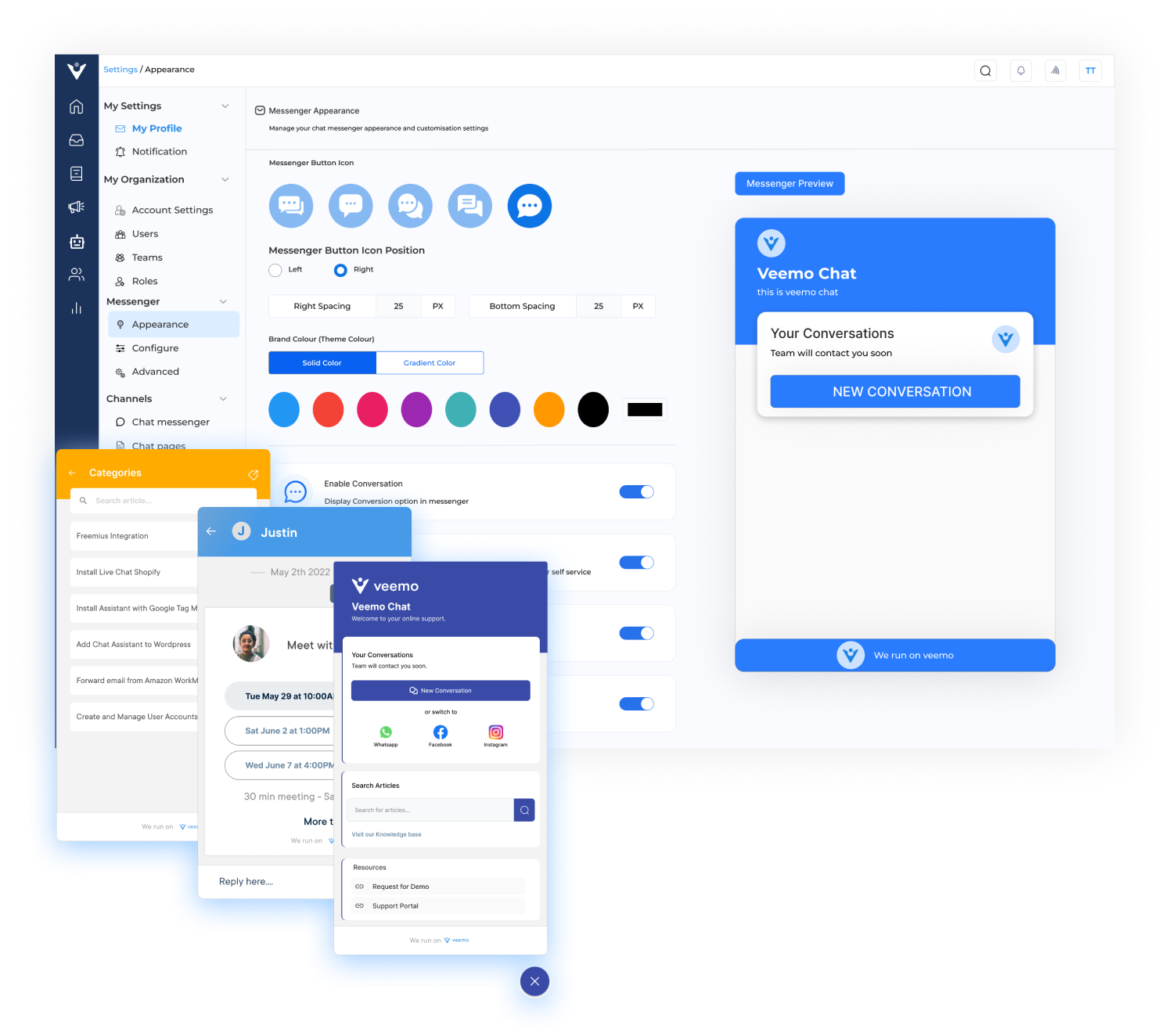
live chat widget Dashboard1

Real-Time Support

Offer immediate assistance to your website visitors with a live chat widget. Customers can ask questions, resolve issues, and get the help they need instantly.

Valuable Visitor Insights

Allow you to collect valuable visitor insights. You can analyze customer interactions, including the most frequently asked questions, pain points and preferences.

Customer Satisfaction & Retention

Providing exceptional customer service through a live chat widget leads to higher customer satisfaction and improved customer retention. Provides the convenience of receiving immediate support.

Sales & Conversion Rates

Potential customers can ask product-related questions and receive personalized recommendations. Instant engagement can significantly impact a customer’s buying decision.

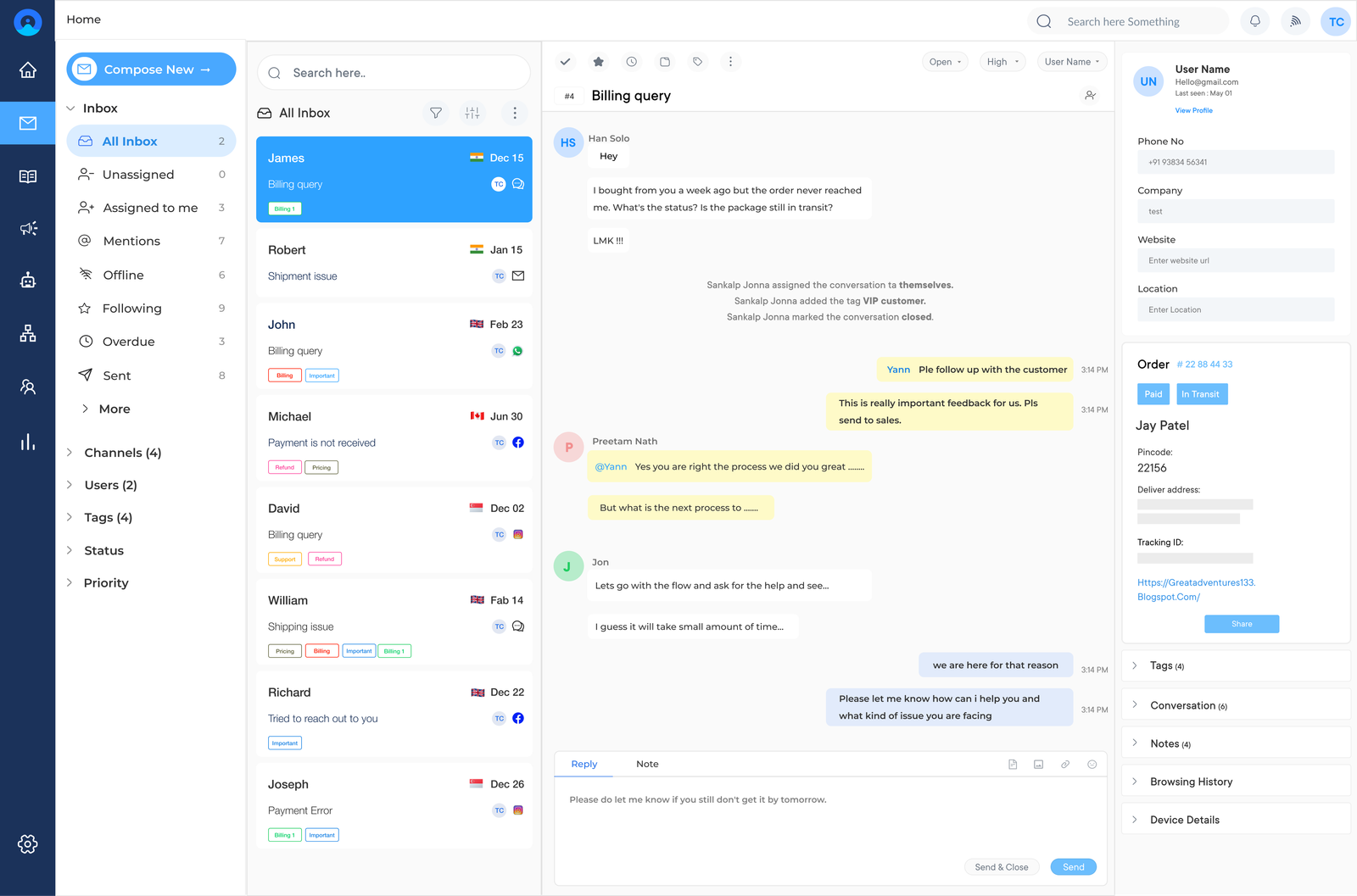
live chat widget dashboard 2

Customer expectations have evolved and have become more demanding with the rise of online shopping. Live chat widgets have become a critical channel for businesses to improve customer satisfaction, increase conversions, and boost overall website engagement.

We will explore the features, benefits, tools, and best practices for implementing these on your website. Whether you are new to live chat or looking to refine your current strategy, it’s a definitive guide that will provide you with the essential knowledge to make the chat widget as a powerful customer communication tool.

What is a Live Chat Widget?

Live chat widget is an application that allows businesses to provide instant online customer support and engagement through real-time chat conversations on their website or mobile app.
Once integrated into a website or app, a small chat box appears on the screen, usually at the bottom corner. When a visitor initiates a conversation by clicking on the chat box, it opens a chat window where they can type their message. The chat can then be answered by a live agent or an automated chatbot, providing immediate assistance to the user.

Key objectives:

  • Enhanced customer support: The primary objective of a live chat widget is to offer instant support to website visitors where they can quickly ask questions and resolve issues.
  • Lead generation and conversion: A live chat widget helps capture leads and guide potential customers through the sales funnel by engaging with users in real time.
  • Increased website engagement: Encourages visitors to stay longer on a website, increasing their engagement levels. It provides a personalized experience, builds trust, that eventually drives traffic and repeat visits.
  • Real-time feedback and insights: Businesses gather instant feedback from customers, identifying pain points and customer preferences to deliver superior customer experience.

How to Add a Live Chat Widget on a Website?

Adding a live chat widget to your website can greatly benefit your business by improving customer satisfaction and increasing conversions. Follow these simple steps to implement it:

Step 1: Sign Up and Create an Account
Once you’ve chosen a live chat software, visit their website and sign up for an account. It usually involves providing some basic information about your business and creating login credentials.

Step 2: Customize your Live Chat Widget
After creating your account, customize the chat widget through the software. You can tailor the appearance of the chat widget to match your website’s branding. You can also change colors, fonts, and other design elements to ensure a seamless integration.

Step 3: Insert the Code Snippet on your Website
Embed the code snippet into your website’s HTML code by accessing the backend of your website. Locate the appropriate section where you want the chat widget to appear, and paste the embed code there.

Step 4: Test and Launch
Once you’ve added the embed code, it’s time to test the live chat widget on your website. Open your website in a browser and verify that the chat widget is visible while functioning properly. Test its functionality by sending a chat message, ensuring that you receive a response.

Step 5: Train your Team and Provide Support
Now that your live chat widget is up and running, it’s essential to train your team on how to use the software effectively. Assign team members to handle incoming chats and provide comprehensive training on how to provide excellent customer support through this channel.

Key Features of a Best Live Chat Widget

Live chat widget provides instant customer support, improves engagement, and boosts conversions. But what makes it truly effective? Let’s explore the advanced features that set a chat widget apart from the rest.

Features of a Live Chat Widget

1. Customization

A good live chat widget should allow for customization. Businesses should be able to tailor the widget’s appearance to match their branding, choose different colors, fonts, and even add their own logo. The live chat customization ensures that the widget seamlessly blends with the website’s design while enhancing the overall user experience.

2. Omnichannel Inbox

An effective chat widget enables businesses to manage all customer messages and conversations from different channels in one unified platform. These advanced features streamline customer support processes, ensuring that no messages slip through the cracks, regardless of the channel used.

3. Chat Campaigns

Businesses get to proactively engage with customers, thanks to chat campaigns. A chat widget provides the ability to create and deploy targeted chat campaigns based on specific criteria, such as the visitor’s location, browsing behavior, or previous interactions. This chat feature helps increase customer engagement and conversion rates.

4. Chat Surveys

A chat widget usually includes chat surveys to gather valuable feedback from customers. These surveys can be presented at the end of a conversation or as a pop-up during the chat. Collecting feedback through surveys allows businesses to continuously improve their customer service and identify areas for growth.

5. Multichannel Support

Customers expect support across various channels. A live chat tool should be able to integrate with multiple communication channels such as email, social media, SMS, and more. The multichannel support ensures that businesses provide consistent service regardless of the channel chosen by the customer.

6. Canned Responses and Knowledge Base Integration

A live chat widget should integrate with a knowledge base to automate customer support with articles your customers often need help with. It lets agents quickly access and share relevant information with the customers. The widget also helps in troubleshooting steps and pre-written responses, reducing response times while ensuring accurate support.

7. Chat Routing & Workflows

An effective live chat widget should have advanced routing and workflow capabilities. It should automatically assign chats to the most suitable agents based on predefined rules, such as agent availability or skills. Workflows can be created to automate certain tasks, ensuring timely responses to customer queries.

8. Visitor Monitoring & Analytics

A chat widget should provide visitor monitoring and analytics to help businesses understand their customers better. The businesses receive real-time monitoring of visitor behavior, providing insights into their journey and preferences. Analytics help businesses make data-driven decisions to improve customer experience and optimize sales strategies.

What are the Benefits of Live Chat Widget for Websites?

Improve customer support and boost sales on your website through customizable chat widgets! They are an essential tool in digital marketing, providing numerous benefits to businesses. Here are five key benefits of using a chat widget:

Benefits of Live Chat Widget for Websites

1. Provide real-time support: Offer immediate assistance to your website visitors with a live chat widget. Customers can ask questions, resolve issues, and get the help they need instantly. The real-time support improves customer satisfaction and builds trust with your audience.

2. Increased sales & conversion rates: Live chat has been proven to increase sales and conversion rates. Here, potential customers get to ask product-related questions, discuss pricing details, and receive personalized recommendations. Instant engagement can significantly impact a customer’s buying decision.

3. Gain valuable visitor insights: The live chat widget allows you to collect useful visitor insights. You can track and analyze customer interactions, including the most frequently asked questions. The data then guides your marketing strategies while optimizing your website for better user experience.

4. Higher customer satisfaction & retention: Providing exceptional customer service through live chat leads to higher customer satisfaction and improved customer retention. Customers appreciate the convenience of receiving immediate support and tend to have a positive view of companies that offer this service.

5. Lower cost to acquire and support customers: Live chat reduces costs associated with customer acquisition and support. Traditional customer support methods, such as phone calls or emails, can be time-consuming and expensive. Live chat enables your support team to handle multiple inquiries simultaneously, reducing response times along with overall support costs.

Live Chat Widget Best Practices

Live chat widgets have become an essential tool for businesses looking to provide excellent customer service and increase conversions on their websites. Here are the best practices to enhance your live chat:

Live Chat Widget Best Practices

1. Choose the Right Live Chat Software

The first step in implementing an effective live chat widget is selecting the right software. There are numerous options available, each with its own features. Look for software that offers customization options, integration with your CRM system, reporting tools, and mobile compatibility. Also, ensure that the software provides a user-friendly interface for both customers and support agents.

2. Optimize the Placement and Design

The placement and design of your live chat widget play a crucial role in attracting visitors’ attention while also encouraging engagement. Place the widget in a prominent location, such as the bottom right corner of the screen, where it is easily accessible but not intrusive. Make sure the widget’s design aligns with your brand’s aesthetics and is consistent with the overall website design.

3. Set Realistic Availability Hours

While live chat widgets are great for offering instant support, it is essential to set realistic availability hours. If your support team is not available 24/7, clearly indicate the hours when live chat is active to manage customer expectations. Consider using a chatbot during off-hours to handle basic inquiries and collect contact information for follow-up during business hours.

4. Train and Empower Support Agents

Your support agents are the face of your business during live chat interactions. Ensure that they are properly trained to handle various customer queries and are knowledgeable about your products or services. Empower them to resolve issues independently & provide them with access to relevant information that can help them assist customers effectively.

5. Implement Canned Responses

Canned responses are pre-written messages that your support agents can use to quickly respond to common questions. Implement a library of canned responses for frequently asked questions and standard procedures to save time while providing consistent information. Make sure to personalize the responses to maintain a human touch and avoid sounding robotic.

6. Monitor and Analyze Chat Transcripts

Live chat software often provides the option to record and store chat transcripts. Take advantage of this feature to monitor and analyze customer interactions. Analyzing transcripts helps in identifying areas where your support team excels and areas that need improvement. It can also help you uncover trends or recurring issues that can be addressed proactively.

7. Integrate Live Chat with Other Support Channels

Integrate your live chat widget with other support channels like email and phone to provide a seamless customer experience. The integration ensures that customers can easily switch between channels without having to repeat information. Integrate live chat with your CRM system to capture important customer data and track interactions for future reference.

8. Solicit Customer Feedback

Actively solicit customer feedback to continuously improve your live chat service. Use post-chat surveys to gather insights and suggestions from customers. Analyze the feedback received and implement necessary changes based on the findings. This not only helps you refine your live chat strategy but also signals to customers that their opinions are valued.

Best 5 Live Chat Widget Tools

Having the right live chat software is important that matches your unique needs and business goals. Here are some of the best live chat widget tools to explore further:

#1 Veemo Chat

Veemo Chat App

Veemo Chat is an omnichannel customer messaging platform that combines live chat with other communication channels like email and social media. The live chat widget enables businesses to handle multiple conversations simultaneously, providing customer data such as browsing behavior and past interactions. With features like chatbots, saved replies, and automated messages, Veemo Chat empowers businesses to deliver personalized support.

Key features:

  • Omnichannel messaging: Veemo Chat offers a unified inbox for managing conversations across multiple channels including website, mobile app, WhatsApp, Facebook Messenger and more.
  • AI-powered chatbots: Provides advanced AI capabilities to build intelligent chatbots for handling routine queries and automating workflows.
  • Meeting Scheduling: It’s meeting scheduling feature streamlines the process of booking appointments with prospects, integrating with popular calendar applications.
  • Advanced routing and assignment: Veemo Chat’s intelligent routing and skill-based assignment ensure that customer inquiries are directed to the most suitable agents.
  • Branding and customization: Allows businesses to customize the chat widget’s appearance, branding, and language to align with their brand identity.
  • In-depth analytics and reporting: Comprehensive real-time analytics tools help businesses gain insights into customer behavior, agent performance, and overall chat operations.

#2 Omni24

Omni Inbox

Omni24 is an AI-powered customer engagement platform that offers a range of features to facilitate seamless communication between businesses and their customers. The widget is highly customizable, allowing businesses to match it to their branding. It supports multiple chat agents, file sharing, and even proactive chat invitations to engage visitors who may need assistance. With chat ratings and analytics, businesses can measure chat performance efficiently.

Key features:

  • Omnichannel inbox: A centralized inbox that consolidates customer interactions from multiple channels like email, SMS, social media, and chat.
  • Self-Service tools: Knowledge base, FAQ sections, and AI-powered chatbots to provide 24/7 self-service support to customers.
  • Automation rules: Powerful automation rules to streamline workflows, automate repetitive tasks, and improve agent efficiency.
  • Analytics and reporting: Comprehensive analytics and reporting features to track key metrics, identify trends, as well as optimize customer service operations.
  • Customizable branding: Ability to customize the chat widget, email templates, and overall branding to align with the company’s brand identity.
  • Integrations: Seamless integrations with popular e-commerce platforms, CRMs, and other business tools for a unified customer experience.

#3 Tawk.to

Tawk.to is a free live chat widget that offers a wide range of features designed to simplify customer communication. The widget supports unlimited chats, customizable chat windows, and real-time visitor monitoring. It also provides a comprehensive analytics dashboard to help businesses track visitor behavior, chat performance, and customer satisfaction.

#4 Drift

Drift is known for its conversational marketing platform that leverages chatbots and live chat to engage website visitors at different stages of the customer journey. Its live chat widget not only allows businesses to provide instant support but also facilitates lead generation and qualification which meets the need for the sales team as well.

The platform’s AI-powered chatbots can qualify leads, schedule meetings, and even book appointments, saving businesses resources.

#5 LiveChat

LiveChat offers a user-friendly live chat solution that enables businesses to chat with customers across various channels, including websites, apps, and social media platforms. The widget supports features like chat transcripts, canned responses, and chat tags, making it easier for businesses to analyze customer interactions.

LiveChat offers integrations with popular customer relationship management (CRM) systems, allowing businesses to streamline their support processes. Read more: best alternatives to LiveChat for growing support teams.

Up your Website Engagement with Live Chat Widget

Live chat widget is an invaluable tool for businesses aiming to improve website engagement, offer better sales and support channels while elevating their overall CX. They enable businesses to proactively initiate conversations with website visitors, providing them with personalized assistance and guidance in real time. Businesses can also explore AI-powered chatbots to handle repetitive queries, further enhancing scalability.

Many live chat software providers offer user-friendly platforms that allow businesses to customize the chat widget’s appearance to match their brand and website design. Integration with existing customer relationship management (CRM) systems or ticketing systems is also possible, streamlining communication, ensuring seamless collaboration between different teams. Embracing live chat can truly transform the way businesses engage with their customers and create meaningful connections.

FAQs about Online Chat Widget

Once installed on a website, a live chat widget typically contains a chat box where visitors can type their messages. When a visitor initiates a chat, it is immediately routed to a customer support agent who can provide relevant assistance. The agent can respond in real-time, providing information, guiding the visitor through the website, or resolving any issues they may have.

Yes, some live chat widgets offer automated chatbot features which can handle basic queries, provide information, and even initiate conversations with website visitors. Automated chatbots can help businesses provide round-the-clock support and pre-qualify leads before routing them to human agents for further assistance.

Setting up a live chat widget is typically a straightforward process. Most live chat software providers offer user-friendly interfaces and step-by-step instructions to guide you through the setup process. It usually involves copying and pasting a code snippet provided by the chat widget provider into the HTML of your website.

Most live chat software providers allow you to customize the appearance of the chat widget to match the website’s design. You can usually adjust colors, fonts along with the position and size of the chat box. The customization ensures that the chat widget seamlessly integrates with your website’s overall aesthetic.

Live chat widgets are compatible with mobile devices. Many chat software providers offer mobile applications that allow you to manage and respond to chats on the go. Mobile compatibility ensures that you can provide excellent customer service and support, regardless of the device your customers are using.

Live chat software usually comes with features that help you manage multiple chat conversations at once. These features may include options to set chat limits, create chat queues, and assign chats to specific team members. By utilizing these tools effectively, you can handle multiple conversations simultaneously without compromising the quality of customer support.