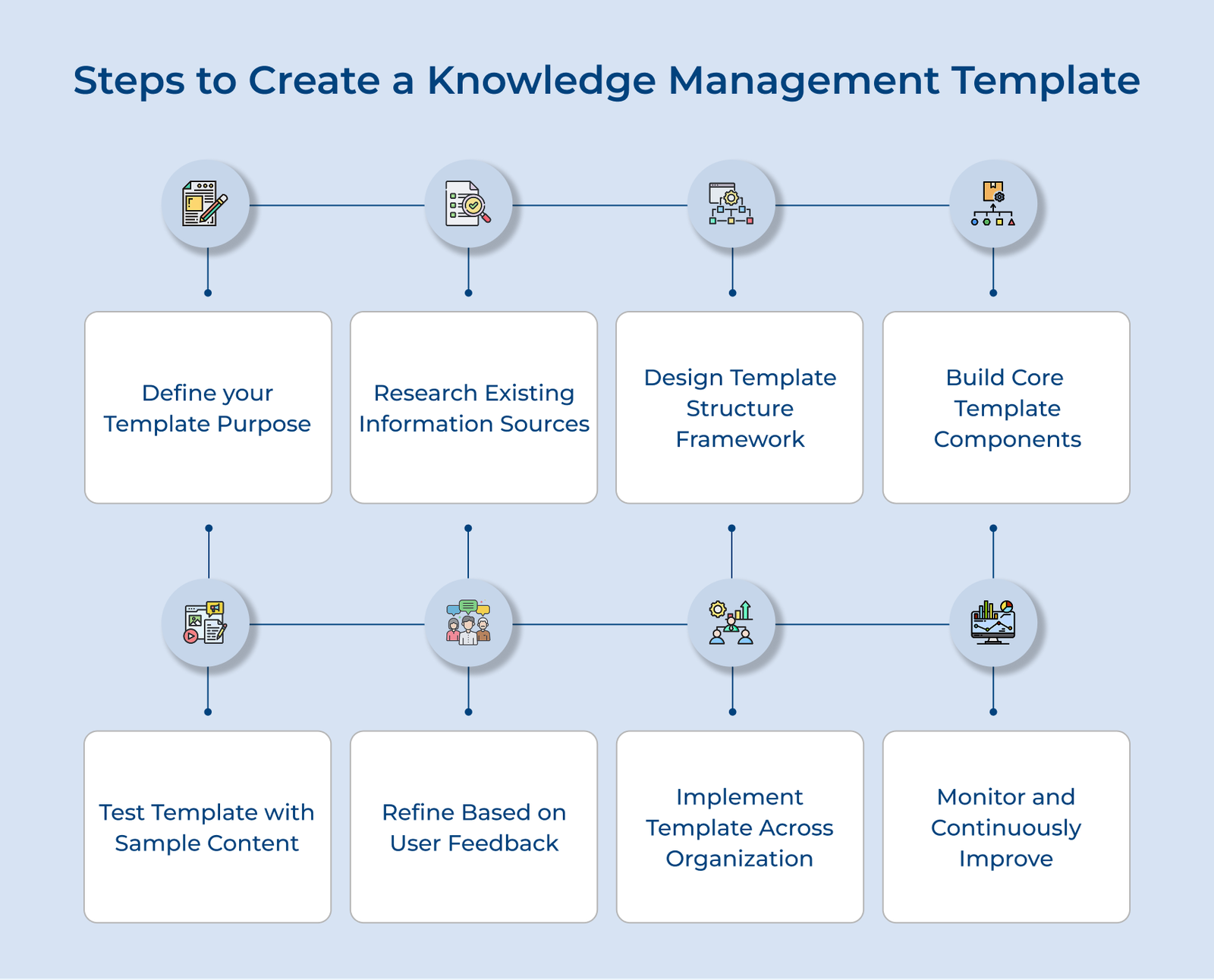
1. Define Your Template Purpose
Defining your knowledge management template’s purpose establishes the foundation for everything that follows in your knowledge management system. If it’s missing, it’s just a generic container that adds confusion instead of clarity.
Key questions:
- What problems do we waste time solving again and again?
- What type of knowledge gets lost most frequently when employees leave?
- Who will be the primary users creating and consuming this information?
- What outcomes do we want it to deliver?
- How will you measure if your template’s actually improving your processes?
The targeted questions force you to think beyond vague goals and identify concrete problems your template needs to solve. They help you avoid creating templates that look impressive but serve no real purpose in your daily operations. Understanding your target audience shapes every design decision, from language complexity to information hierarchy within your structure.
Key factors:
- Technical expertise
- Time constraints
- Specific contexts where they’ll use the knowledge
Once you’ve answered the foundational questions and identified your users, you can craft a clear purpose statement that guides your template creation. The purpose becomes your north star for making design decisions and measuring success throughout the development process.
2. Research Existing Information Sources
Good templates grow out of real needs, not assumptions. Skipping research often leads to neat-looking templates that leave out the details people actually rely on. Research involves checking documents, talking to users and noting standards. The groundwork reveals gaps between what exists and what people actually need to do their jobs effectively.
Pro tips:
- Start with casual conversations before formal interviews to uncover honest opinions about current knowledge-sharing challenges.
- Pay attention not only to the information that exists but also to the information people wish they had when it matters most.
3. Design Template Structure Framework
The structure of the template creates the organizational backbone that determines whether users can quickly find and contribute information effectively. Poor structure drives abandonment; good organization keeps templates useful and accessible.
Key approaches:
- Information hierarchy: List the type of information the template should capture, group related items and arrange them in a flow that matches how people naturally search.
- User journey: Organize the template to follow the real steps people take when solving problems or finishing tasks, so the content feels intuitive instead of forced.
- Progressive detail: Present information from broad to specific with clear pathways for users who need different levels of detail. Design sections for quick scans by experts and detailed guidance for newcomers.
An effective template might start with problem identification sections, followed by step-by-step troubleshooting guides and escalation procedures. The structure should mirror how support agents handle issues, not abstract categories.
4. Build Core Template Components
Once the structure is set, the next step is to build the parts people will actually use. If the components aren’t well designed, even the best framework will end up frustrating and inconsistent.
Key components:
- Header and metadata: Record basics like title, author, date and topic so information stays searchable.
- Content input areas: Use clear fields that prompt contributors to provide complete, consistent details.
- Navigation and links: Connect related sections so users can follow the same paths they’d take when solving real problems.
- Search and filters: Let users quickly find what they need without digging through everything manually.
- Version and updates: Track changes so people always know what’s current.
You can also use conditional logic to hide or reveal sections based on what users select. It keeps the template simple for quick tasks while still offering depth when complex situations require it.
5. Test Template With Sample Content
Testing with sample content reveals the gap between theoretical template design and practical usability when real people try to complete actual tasks. The step reveals navigation gaps, missing fields and workflow issues.
Effective testing involves recruiting representative users to work through realistic scenarios using your template with genuine organizational data rather than placeholder text. The approach surfaces authentic pain points and helps you understand how the template performs under real-world pressure and time constraints.
Actionable tips:
- Record sessions so you can spot not only what users say but also the moments they pause or struggle silently.
- Test with both experts who know the subject well and newcomers who see things with fresh eyes.
6. Refine Based on User Feedback
User feedback turns a template from a theoretical framework into a tool people actually use. Without the refinement process, templates often remain frustrating obstacles that people work around rather than valuable resources that enhance productivity.
Key questions:
- Which sections took the longest time to complete?
- What information was hard to find?
- Which parts felt confusing or unnecessary?
- What would make the template more useful in daily work?
The focused questions help you move beyond general satisfaction ratings to identify specific friction points and improvement opportunities. They reveal the difference between what you think users need and what actually helps them accomplish their goals efficiently.
Key approaches:
- Simplify content: Remove jargon, combine redundant sections and break complex instructions into digestible steps.
- Optimize fields: Add missing information points and remove fields that don’t add value.
- Enhance visuals: Use clear typography, spacing and hierarchy to guide users naturally through the template.
- Streamline workflow: Reorganize sections to match how users actually work, reducing unnecessary steps or clicks.
7. Implement Template Across Organization
A refined template only works if it’s actually used. Implementation means rolling it out across teams while providing the guidance and support needed for consistent adoption. Without it, even the best templates can go unused.
Key areas:
- Customer service and technical support
- HR and employee onboarding
- Project management and cross-team collaboration
- Sales and client relationship management
Successful implementation includes clear guidelines, hands-on training and feedback channels. The approach ensures that templates become integrated into daily operations rather than remaining unused digital artifacts.
Key takeaways:
- Start implementation with one enthusiastic team that can become internal advocates and provide success stories for broader rollout efforts.
- Create quick reference guides and video tutorials that teams can access when they need help using the template effectively.
8. Monitor and Continuously Improve
Monitoring and continuous improvement ensure your KM template remains relevant as organizational needs evolve. If businesses neglect it, even the most incredible of the templates can become outdated and unhelpful.
Key approaches:
- Usage tracking: Monitor which sections get completed and spot patterns in user behavior. Automated reports can flag declining usage or consistently skipped sections.
- Content quality reviews: Audit the information regularly for accuracy, completeness and relevance. Quarterly reviews with subject matter experts help catch gaps or outdated content.
- User feedback: Collect short, focused surveys to capture real pain points and improvement suggestions without overloading users.
Continuous improvement means using data to make targeted, high-impact updates. The iterative approach keeps templates aligned with evolving business needs while maintaining user satisfaction and adoption rates.
Best Practices for Creating a Knowledge Management Template
Check out the best practices that will empower your team to create a km template that not only captures valuable insights