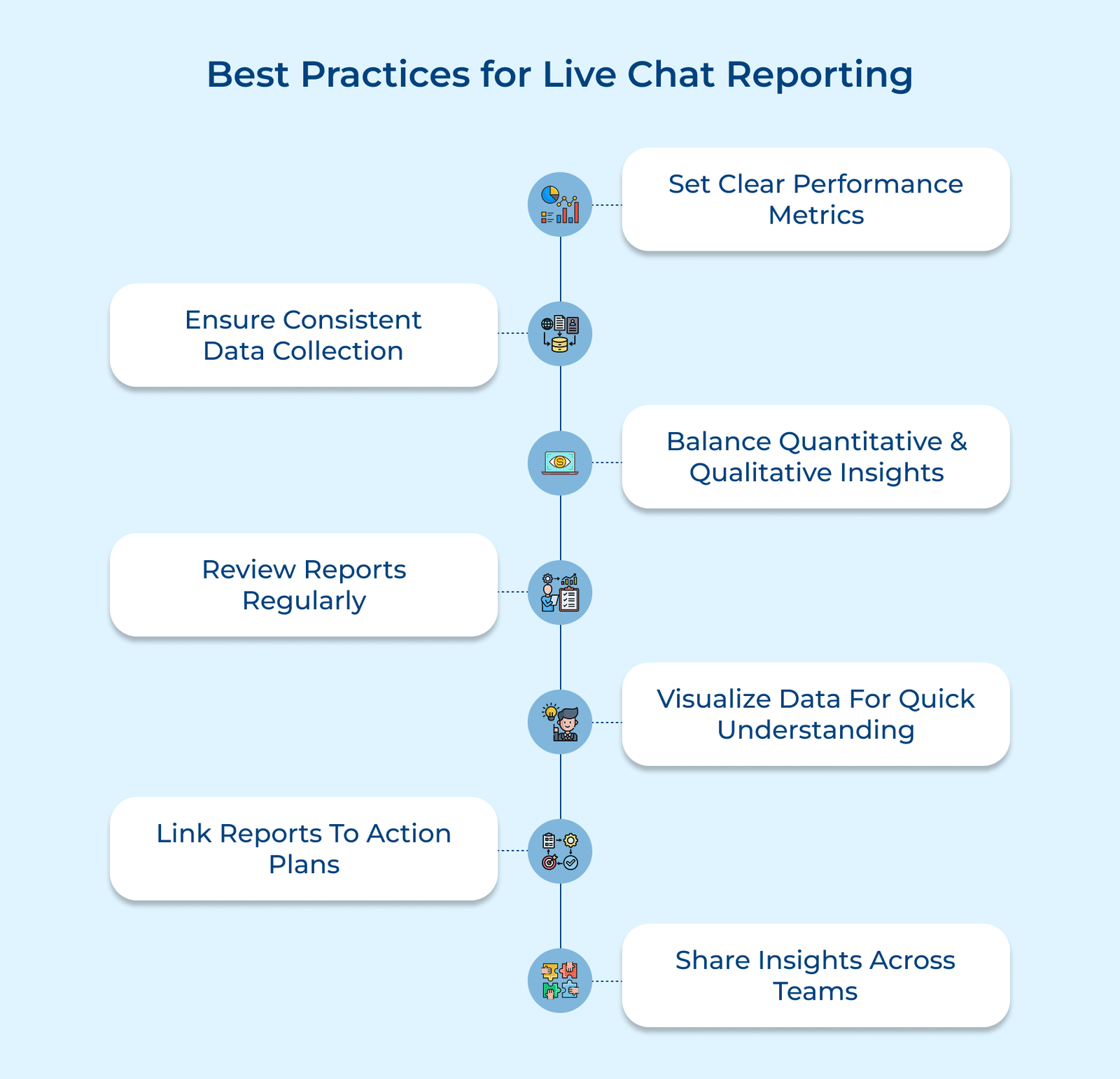
1. Set Clear Performance Measurement Standards
Without clear benchmarks, live chat reporting becomes guesswork. Defining what good performance looks like gives your team direction, sets expectations and makes reporting meaningful.
- First response time: Shows how responsive your team is and sets the tone for the conversation.
- Resolution rate: The percentage of chats that successfully resolve customer issues without requiring follow-up through other channels, indicating your team’s effectiveness at solving problems completely.
- Customer satisfaction score: Direct feedback from customers rating their chat experience, providing insight into how your service is perceived, regardless of internal operational metrics.
- Conversion rate: The percentage of chats that result in desired business outcomes like purchases or appointments, connecting customer service efforts directly to business results.
When implemented effectively, clear standards create accountability while providing agents with transparent expectations about their performance. The benchmarks should be regularly adjusted based on business needs, customer expectations and industry developments to ensure they remain relevant.
2. Implement Consistent Data Collection Methods
If different agents track data in different ways, your reports won’t be reliable. Standardizing how chat data is collected ensures every conversation is measured the same way, making it easier to spot real trends and take action with confidence.
- Automated timestamps: Let your system track when each chat starts, when the agent responds and when it ends. It avoids human error and gives you exact handling times.
- Structured chat Categories: Create a clear, limited list of topics agents must choose from (e.g., billing, cancellation, coverage) so you can see what types of issues drive chat volume.
- Required customer fields: Ask agents to collect key data every time: past purchases, open tickets or account type. It adds context to each chat and supports deeper analysis.
- Clear tagging rules: Define exactly how and when to apply tags for common issues, products or actions taken. The consistency turns chaotic chat logs into searchable insight.
- Defined chat outcomes: Make sure everyone uses the same criteria for outcomes like “resolved,” “escalated,” or “transferred.” It helps you trust your resolution metrics.
Eastbrook Insurance used a simple category list to map out the types of questions customers kept asking. Once the dust settled, almost every “general policy” query came back to three recurring coverage gaps. That insight shaped clearer FAQs and sharper agent training. Chat volume dropped by 23 percent, and more customers got their answers on the first try.
3. Balance Quantitative and Qualitative Analysis
Tracking response times and resolution rates is important, but numbers alone don’t tell the full story. You need to understand both what is happening and why it’s happening. It means pairing data with real conversations.
Combine Metrics with Reviews
Don’t just rely on dashboards. Regularly review actual chat conversations, especially from high- and low-performing agents, to spot what’s driving the outcomes. You’ll learn which phrases build trust or frustrate users and how tone impacts satisfaction.
Incorporate Customer Feedback
Match customer satisfaction ratings with chat efficiency stats. If agents are resolving issues quickly but customers still leave poor feedback, you may be missing something important, like empathy, clarity or patience.
Assess Experience and Operations
Evaluate both the procedural aspects of chat (queue management, handling times, resolution rates) and experiential elements (tone, helpfulness, personalization). The dual focus helps identify when technically “correct” interactions still leave customers feeling unsatisfied due to emotional disconnects or communication style issues.
4. Schedule Regular Review and Discussion
Reports aren’t helpful if they’re filed away and forgotten. Regular, structured review sessions turn data into action by keeping teams accountable and ensuring insights lead to real improvements.
Establish Weekly Team Debriefs
Hold short, focused meetings to go over key performance trends and individual agent metrics. The quick sessions catch small issues early, before they snowball and keep everyone aligned on priorities without overwhelming your team.
Conduct Monthly Trend Meetings
Take a step back each month to look at the bigger picture. The sessions should look beyond individual performance to identify system-wide opportunities for improvement, revealing operational bottlenecks or recurring customer pain points that require process changes.
Organize Quarterly Strategic Sessions
Every quarter, zoom out even further. Compare chat performance against larger business goals. The meetings are also a good time to ask if your current metrics still reflect what matters and to adjust them if they don’t.
5. Visualize Data for Quick Comprehension
Raw numbers can be overwhelming and often hide the real story. Visualizing chat data makes it easier to spot trends, outliers and problem areas without digging through endless spreadsheets. Good visualizations turn complex metrics into clear insights. They highlight what’s working, what’s not and where to focus next. You can spot issues in real chat time and act before they become problems.
Let’s assume that a customer service manager at Pacific Northwest Telecom notices a puzzling spike in negative feedback despite stable resolution metrics. Using heat maps of chat volume overlaid with satisfaction scores, she identifies that wait times during the 2-3 PM window were creating frustration that colored the entire interaction, even when issues were resolved.
Actionable tips:
- Start with 3-5 key metrics to display prominently, then add supporting visualizations only when they provide genuine additional context without creating visual clutter or confusion.
- Create customized views for different stakeholders—frontline supervisors need detailed agent performance visualizations, while executives benefit more from high-level trend charts connecting chat metrics to broader business outcomes.
6. Connect Reports to Action Plans
Collecting live chat data is only useful if you do something with it. Too often, reports highlight problems without leading to change. Turning reports into action plans makes your data work for you by fixing issues faster, improving agent skills and strengthening the overall customer experience.
- Link each report insight to a specific next step – be it a process fix, training need or product feedback and assign ownership so follow-through happens.
- Create a systematic approach for translating recurring chat issues into targeted training modules that address specific skill gaps revealed in reporting data, rather than generic customer service training.
- Establish a tiered response framework that automatically triggers different levels of intervention based on threshold breaches, ensuring minor issues receive appropriate attention while major problems get immediate resources.
- Implement a closed-loop feedback system where improvements are tested, measured through the same reporting metrics that identified the issue and then further refined based on results.
- Use agent-specific reports to build coaching plans based on real needs, not a standard checklist. It makes training more relevant and helps agents improve faster.
Expected outcomes from this live chat reporting best practice include reduced recurring issues, more focused resource allocation and accelerated improvement cycles. When reports directly inform actions, companies typically see faster resolution of identified problems and more sustained performance gains compared to teams that collect similar data but fail to connect it to specific improvement initiatives.
7. Share Insights Across Departments
Live chat data isn’t just for the support team, it’s a goldmine for the entire organization. Customer conversations reveal product flaws, confusing marketing messages and even hidden technical issues. When implemented effectively, cross-departmental sharing transforms live chat reporting from a performance management tool into a strategic business asset.
A SaaS team kept seeing the same question pop up in live chat: users couldn’t figure out how to reach a key feature. The support agents passed this pattern to the product team, who found the feature buried three layers deep in the menu. A small UI tweak brought it to the surface. The shift cut related chats by 67 percent and pushed up usage.
Best practices:
- Create custom report views for each department that highlight the metrics and conversation elements most relevant to their function.
- Schedule regular cross-functional review sessions where representatives from different departments can discuss chat insights together.
Examples of Live Chat Reporting
Below are the companies that have moved beyond basic metrics to develop sophisticated live chat reporting analysis frameworks that turn customer conversations into valuable business intelligence.
1. Zappos
Zappos tracks more than just speed or resolution, they focus on how agents communicate. Their reports highlight whether agents reflect Zappos’s values and create memorable interactions. The real value goes beyond the support team.
Zappos rewrote website copy to preempt the concerns by spotting repeated product questions in chat reports. The simple change reduced chat volume and let agents focus on personalized support, exactly what customers remember them for.
2. American Express
American Express links chat reporting with customer journey data. They don’t just ask “Was the chat helpful?” They measure what happens after. The full-picture view helped them shift from treating chat as a cost-saving tool to seeing it as a relationship builder. It resulted in well-handled chats that don’t just resolve issues, they strengthen customer loyalty, especially for high-value cardholders.
3. Amazon
Amazon’s scale demands efficiency. Their chat analytics don’t just review agent performance; they analyze common customer complaints across millions of interactions. When they noticed a spike in chats about unclear return policies for a certain category, they updated the return page layout. It resulted in fewer chats, faster resolutions and less friction during the buying process.
4. Apple
Apple doesn’t just track whether an issue was fixed. Their chat reporting also checks whether the support felt like Apple. It means monitoring tone, clarity and consistency with their brand voice. If agents stray into robotic or overly technical replies, the data flags it. The attention helps preserve Apple’s premium image, even when customers are frustrated with a product.
5. Delta Airlines
When flights get canceled or delayed, Delta’s chat reporting kicks into high gear. Their system flags service recovery conversations and tracks how the chats affect rebooking. It lets them identify what responses help passengers stay calm and keep booking with Delta, even during disruptions. Instead of generic apologies, they now train agents on specific, tested phrasing that defuses tension and earns trust.
Transform Interactions into Insights with Live Chat Reporting
Live chat reporting turns routine conversations into clear, actionable insight. Businesses uncover patterns in customer needs, agent performance and service efficiency that would otherwise stay buried in disconnected transcripts.
The real value shows up when the insights don’t just sit in dashboards, they lead to action. When teams share what they learn and apply it to training, product decisions or staffing strategies, chat data becomes a tool for company-wide improvement.
Key takeaways:
- Effective live chat reporting balances quantitative metrics with qualitative conversation analysis to provide context behind the numbers.
- Weekly and monthly sessions help teams catch small issues early as well as connect patterns across time.
- The most valuable reporting frameworks evolve continuously to reflect changing business priorities and customer expectations.