What is CRM Experience? Importance, Steps & Use Cases
CRM experience explains how businesses use CRM systems to improve customer relationships and streamline processes. It drives growth through better data, strategy and personalized engagement.
CRM experience explains how businesses use CRM systems to improve customer relationships and streamline processes. It drives growth through better data, strategy and personalized engagement.
Most companies invest in a CRM with good intentions, then watch it collect dust within months. Businesses see up to a 27% jump in customer retention and a 74% boost in relationship quality. Despite that, businesses that blame the platform for being clunky or overly complex, don’t realise the real problem runs deeper than the software itself.
The CRM tools that teams genuinely adopt are the ones built around existing rhythms rather than against them. The technology stops feeling like overhead and starts feeling like an advantage, which is exactly the shift that drives consistent usage and better customer outcomes. This guide walks through building a CRM experience that earns adoption rather than demanding it.
A CRM experience refers to how a business uses customer relationship management tools and strategies to interact with people throughout their buying journey. It covers each moment from first contact to ongoing support. The experience determines if the customers feel valued or just processed.
Think of it as the personality your business shows through technology. A good experience means your sales team knows a customer’s preferences before they call. It means support agents see purchase history instantly. The system works behind the scenes to make interactions feel personal rather than robotic.
Key objectives:
Below are the key reasons a strong CRM experience shapes trust across every customer interaction, helping relationships grow stronger with each touchpoint.
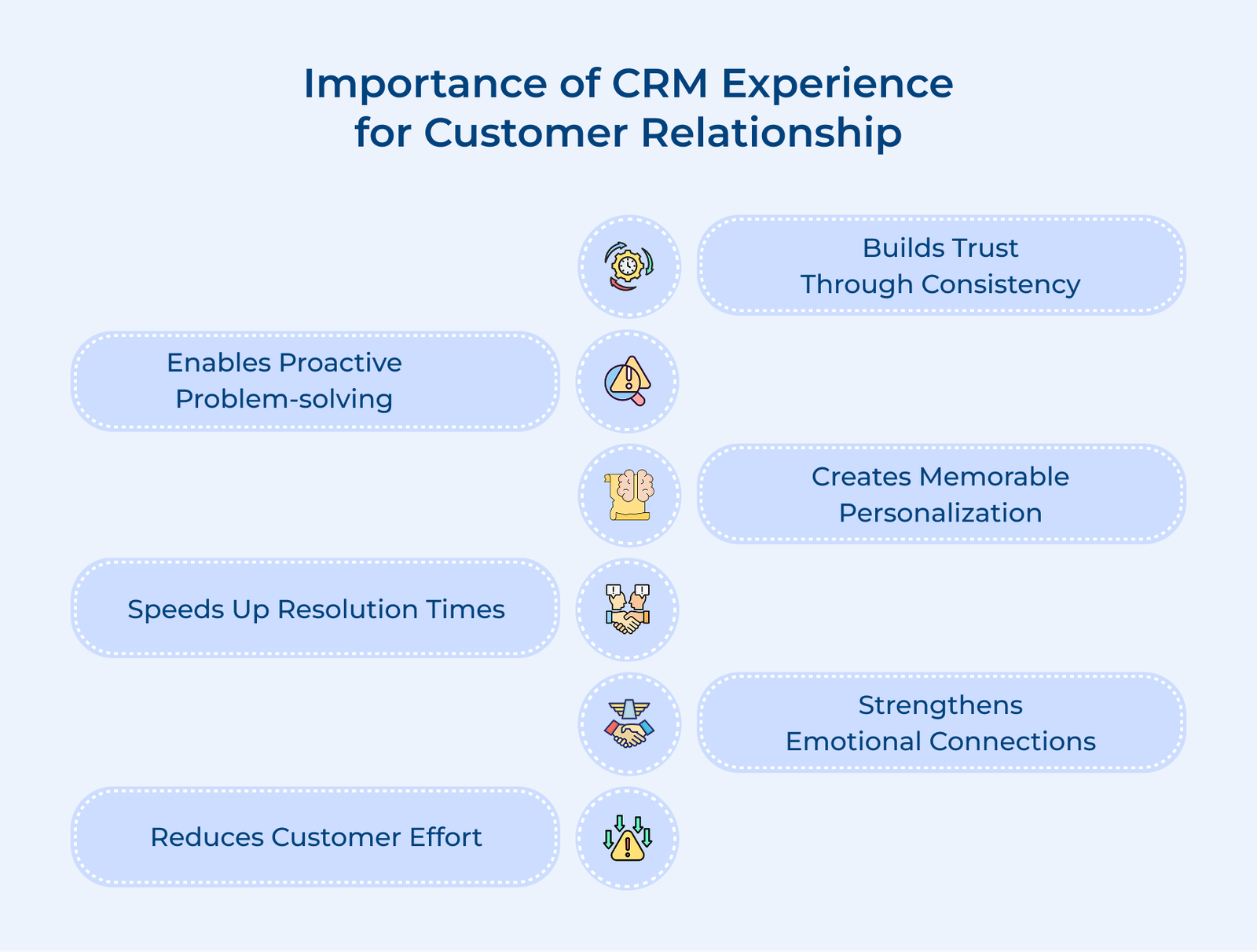
Builds Trust Through Consistency
When your CRM system tracks every interaction, customers don’t have to repeat their story to different team members. They feel heard because anyone they speak with already understands their situation. The consistency shows you value their time and actually pay attention to what they say.
Enables Proactive Problem-solving
Your CRM can flag patterns before customers even complain. Maybe someone’s usage dropped or a product issue keeps appearing in support tickets. You can reach out with solutions before frustration builds, showing customers you’re watching out for their success.
Creates Memorable Personalization
Details like preferences, milestones and past purchases stay recorded. Conversations feel thoughtful because they reference real moments, not generic scripts. Small acknowledgments make interactions feel human.
Speeds Up Resolution Times
Support teams access full histories instantly. No more digging through old emails or asking basic questions again. Faster resolutions mean less frustration and more confidence that you can actually help when problems arise.
Strengthens Emotional Connections
Customer data reveals goals, challenges and motivations. Teams can respond with empathy and relevance. The moments create loyalty that lasts beyond price or product comparisons.
Reduces Customer Effort
A well-designed customer relationship management experience solution anticipates needs and automates routine requests. Customers get shipping updates without asking and renewals happen seamlessly. When interacting with your business feels effortless, people naturally want to stick around and recommend you to others.
The following are the critical steps to effectively implement the CRM experience and transform your customer engagement model for long-term success.
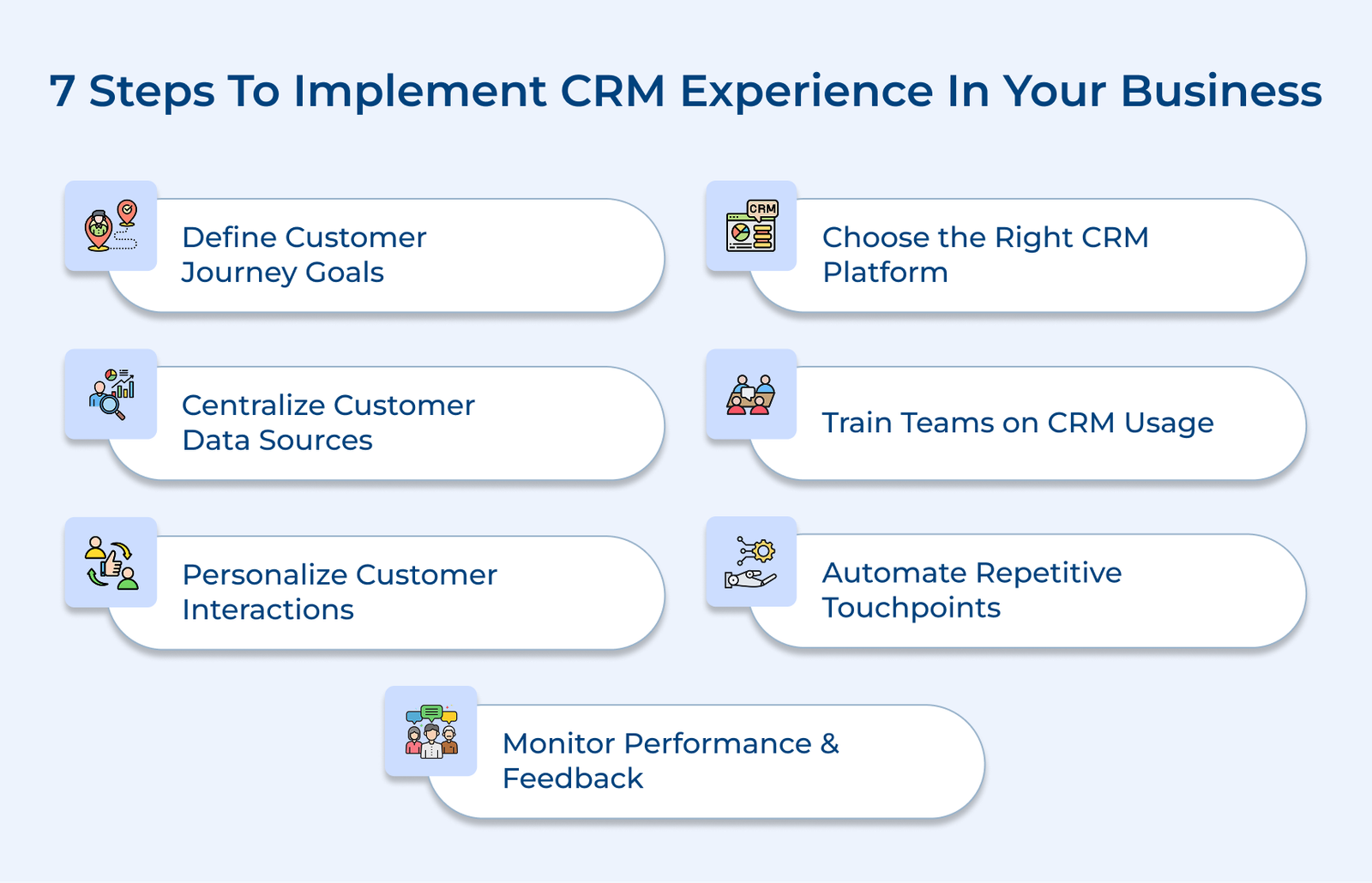
Clear direction matters before choosing any CRM system. Every interaction should move customers somewhere meaningful. Vague intentions lead to tools that sit unused and create more confusion than clarity.
Key ways:
Selecting a CRM is like picking a long-term business partner. The wrong system wastes money and frustrates teams who return to spreadsheets. Pick a platform that matches how your business actually works and you’ll have an exceptional CRM experience.
Key factors:
The right CRM system becomes the central nervous system of customer relationships. Every team member logs activities in one place so anyone can see the complete picture instantly. Here are the best CRM platforms used by most businesses:
Your customer relationship management experience solution choice determines if the customer data becomes a strategic asset or just another unused database. Take time to test systems with real team members doing actual work.
Gather every piece of customer information into your CRM. Data scattered across emails, spreadsheets and team members’ notes becomes actionable when it lives in one place.
Key ways:
Your centralized data becomes the single source of truth that eliminates guesswork. Import everything from old spreadsheets so nothing gets lost. Connect systems through integrations so new information flows automatically without manual data entry.
Pro tips:
Effective training determines if your CRM system will be a powerful tool or just another unused platform. When people understand how it simplifies their daily work, adoption increases and benefits show immediately.
Conduct Role-specific Training
Sales teams need pipeline management while support staff focus on ticket management and customer history. Generic training wastes time on unused features. Tailor sessions to show exactly how the CRM makes that specific role easier.
Create Internal Documentation and Quick References
Build a simple internal wiki with screenshots and step-by-step guides for tasks like logging calls or updating contacts. Include tips for common mistakes so team members can troubleshoot quickly without slowing down workflows.
Assign CRM Champions
Pick enthusiastic early adopters from each team who can answer quick questions without formal support tickets. The champions spread positive attitudes and help colleagues through frustrating moments. They also surface practical problems that need fixing.
Personalization uses what you know about each customer to make every interaction meaningful and timely. Generic messages get ignored, but outreach tailored to actual behavior shows customers you understand their needs.
Key interactions:
Start small rather than trying to personalize everything at once. Pick one customer segment, like your top spenders and create one automated workflow. When someone buys their third product, the CRM sends a thank-you note with a discount code. Test it, measure responses, then add more personalized touches based on what works.
Automation takes care of routine tasks, so your team can focus on interactions that require judgment and empathy. It keeps customers engaged and prevents important follow-ups from being missed.
Set Up Workflow Triggers
Create rules that send messages automatically when specific actions occur, like a prospect downloading a guide or a customer not logging in for a set period. The CRM responds instantly without manual intervention.
Automated Responses for Common Questions
Build templates for frequently asked questions, such as shipping policies or password resets. Customers get instant answers while your team focuses on more complex issues that require human attention.
Schedule Lifecycle-based Check-ins
Program your CRM to reach out at key moments, like three days after purchase or thirty days before renewal. The touchpoints happen consistently for every customer instead of relying on memory.
Monitoring ensures your CRM strengthens customer relationships instead of adding unnecessary work. Systems evolve, so regular checks keep processes effective and relevant.
Use your CRM’s reporting tools to track specific metrics you defined in step one, like response times or satisfaction scores. Review the numbers monthly to spot trends and discuss what needs adjustment based on real usage.
Pro tips:
Check out the different ways in which the CRM experience can transform your business, from improving customer interactions to boosting team efficiency.
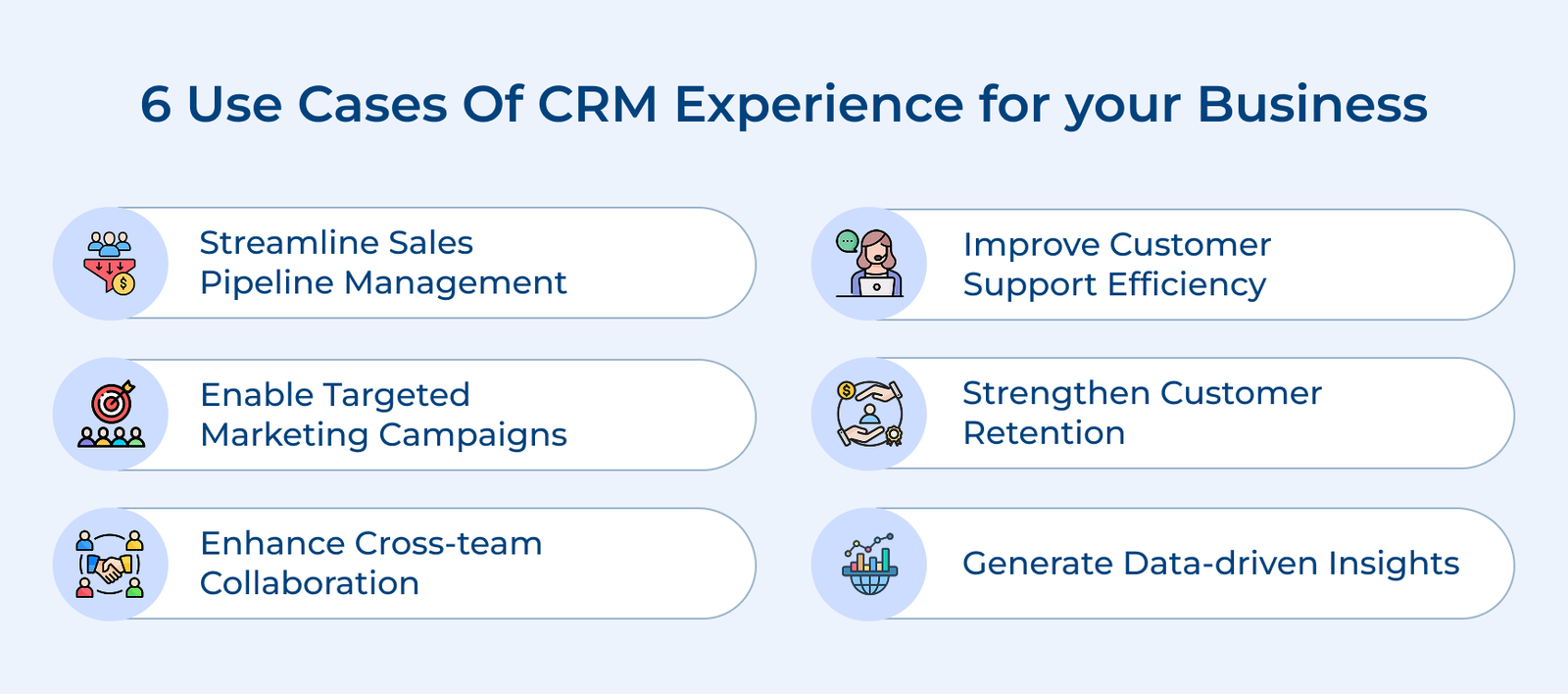
A CRM keeps your sales team focused by tracking every prospect from first contact to closed deal. Each salesperson knows exactly where opportunities stand and what actions move deals forward.
Key benefits:
Sales managers gain visibility into team performance without micromanaging. They spot patterns that lead sources to convert best or where deals typically stall. The insight helps them coach effectively instead of just asking for status updates.
Support teams access complete customer histories the moment someone reaches out, instead of asking them to repeat information. Agents see past purchases, previous tickets and sales conversations on one screen. The context turns every customer service interaction into a continuation of an ongoing relationship.
Response times drop dramatically when agents aren’t hunting through old emails to understand what happened. They can prioritize urgent issues from high-value customers while routing simple questions to automated responses. The CRM tracks resolution times so managers know which processes need improvement.
A CRM helps marketing teams segment audiences based on real behavior instead of guessing interest. You can see who bought product A but not B or who opened recent emails versus who hasn’t engaged.
Key ways:
You stop wasting budget on broad campaigns that reach the wrong people. Instead, you create personalized journeys where someone who downloaded your pricing guide gets a different follow-up than someone who watched your demo. Marketing and sales finally work from shared data.
The CRM flags at-risk customers before they cancel by watching for warning signs like decreased usage or repeated support tickets. Your team can reach out proactively with solutions instead of discovering problems only when someone asks to close their account.
Retention becomes systematic rather than reactive because you’re monitoring health scores for every customer automatically. The system identifies your happiest customers who might provide testimonials. It also reveals which features drive customer loyalty so product teams know what to improve.
A CRM breaks down silos by giving every team access to the same customer information. Sales sees marketing commitments, customer service understands sales promises and finance knows billing agreements, creating a unified experience.
Key practices:
Account managers deliver consistent customer experiences because they understand the complete customer journey. When someone from finance discusses billing, they see the sales discount that was promised. The entire organization operates as one cohesive unit.
Leadership teams make strategic decisions based on trends from thousands of customer interactions instead of relying on anecdotal feedback. The CRM reveals which products generate the most repeat business or which customer segments have the highest lifetime value.
Key ways:
You spot opportunities competitors miss because your data shows market shifts in real time. Product teams prioritize features that customers actually request most frequently. Executive dashboards surface important metrics without requiring analysts to compile reports manually for every board meeting.
A well-designed CRM makes every customer interaction feel thoughtful and relevant. Your team accesses complete context instantly, turning each conversation into a seamless continuation of an ongoing relationship.
The difference between businesses that thrive and those that struggle often comes down to how well they remember and respond to individual customer needs. Start implementing the CRM strategies today and watch your customer relationships deepen into partnerships that drive sustainable growth for years ahead.

A thoughtful CRM experience highlights warning signals before customers leave and enables timely outreach with personalized solutions. When your team remembers preferences and past interactions, customers feel valued, increasing loyalty even if competitors offer lower prices or flashier options.
A clunky or confusing CRM drives teams back to spreadsheets, wasting all potential benefits. Intuitive design encourages consistent logging of interactions, building the complete data foundation that powers reporting, automation and smarter decision-making.
When it comes to CRM experiences, different industries need to track different customer touchpoints, like patient visits for healthcare versus project milestones for agencies. Start by customizing fields, workflows and reports to match your specific business processes. Make sure you don’t force your team to adapt to generic templates that don’t fit how you actually operate.
Automation handles repetitive tasks like follow-up reminders and data entry. It means your team will devote their time to meaningful conversations instead of administrative busy work. It ensures consistent customer touchpoints happen on schedule while freeing humans to focus on complex problems that actually require judgment and empathy to solve.
Salespeople close more deals when prospect history and next-step reminders are available instantly. The CRM serves as a single command center for the pipeline, removing friction, preventing missed opportunities and ensuring prospects feel attended to at every stage.

Grow Customer Relationships and stronger team collaboration with our range of products across the Conversational Engagement Suite.
Omnichannel Customer Support & Help Desk Software
AI Enabled Business Messaging and Chatbot Software
Sales Engagement & CRM Software
Call Center Software & Virtual Phone System
Product Marketing & Experience Platform
Customer Experience & Feedback Management Software

 What is CRM Onboarding? Key Steps, Best Practices & Tools
Scroll to top
What is CRM Onboarding? Key Steps, Best Practices & Tools
Scroll to top


