Omnichannel Chat Widget: Benefits, Features, Examples & Best Practices

Bring all your customer communication in one unified platform with Veemo’s omnichannel chat widget. Talk to your customers on websites, apps, social media and messaging channels.

No credit card required. Easy setup

Omnichannel Widget Omnichannel Chat Widget

Trusted By Leading Brands

Unified Customer Experience with Omnichannel Live Chat Widget

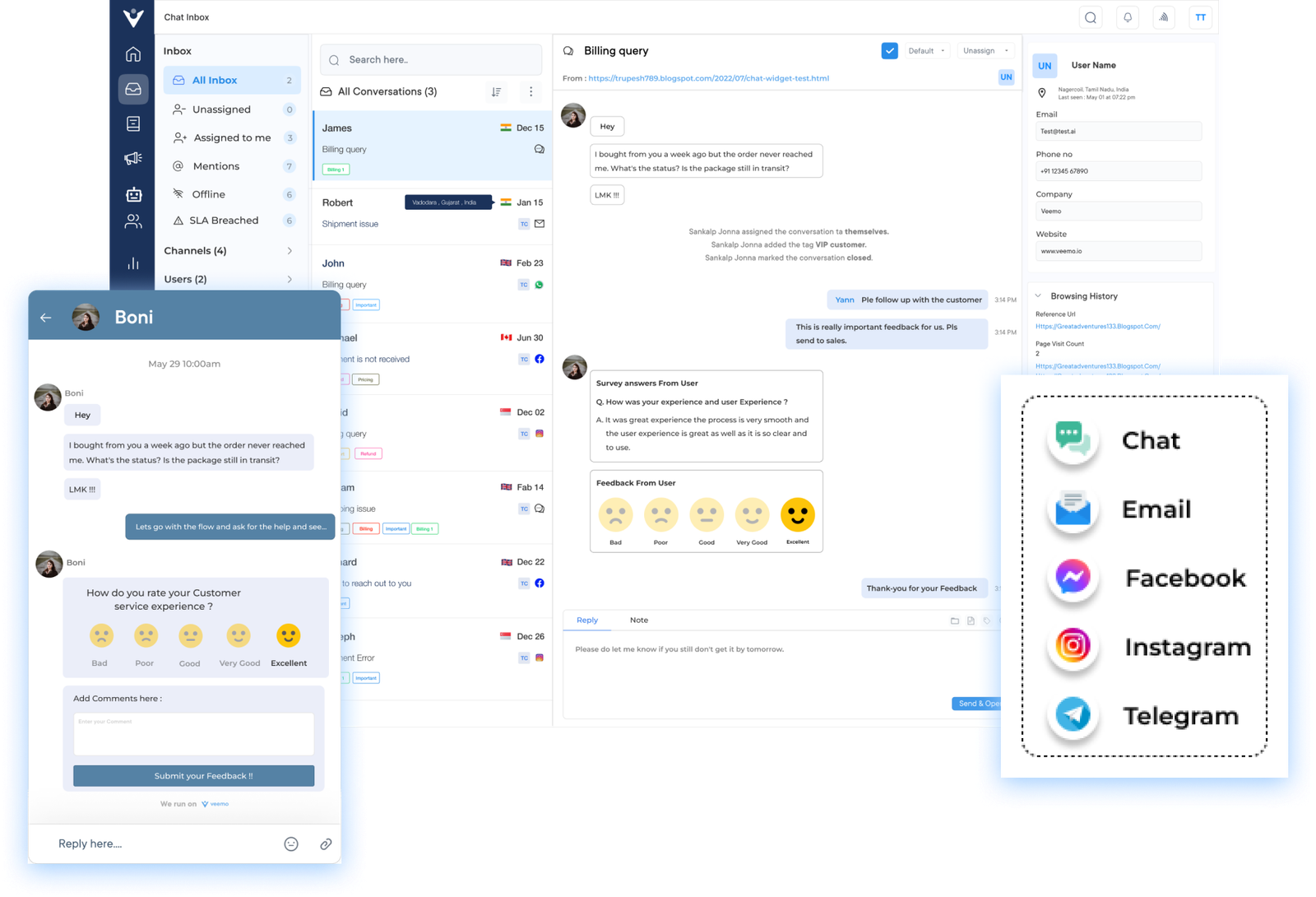
Bring all your conversations across sales, marketing and support in an omnichannel inbox with a chat widget.

Omnichannel Widget Omnichannel Chat Widget Dashboard1

Unified Customer Experience

Allows you to streamline all your customer communication channels into one platform. Ensures consistency from every chat channel and avoids any communication gaps while using multiple channels separately.

Faster Sales Cycle

The dynamic 365 customer service ensures queries are answered in real time, eliminating the need to wait for responses through other channels. Improves customer satisfaction and increases the likelihood of making a purchase.

Multi Device Accessibility

Customers can reach out for support from their preferred device, enhancing convenience. Contributes to a positive customer experience as they can engage with your business whenever they need assistance.

Consistent Brand Experience

Ensures that customers receive a consistent brand experience across all channels. Creates a cohesive brand identity, strengthening your company’s reputation. Messaging tone and style remain consistent.

Omnichannel Widget Omnichannel Chat Widget Dashboard2

Businesses are turning to omnichannel solutions to meet their customers’ expectations with the rise of online shopping. An omnichannel chat widget allows businesses to provide real-time support and enable engagement with customers on various platforms. Hence, resulting in improved customer satisfaction as well as increased conversions.

We will explore the benefits of using a custom chat widget, provide examples of successful implementation, and discuss best practices to help businesses make the most of this powerful tool. Understand how the potential of the live chat widget can significantly elevate your customer service capabilities.

What is an Omnichannel Chat Widget?

An omnichannel chat widget is a customer communication tool that allows businesses to engage with their customers in real-time across multiple communication channels. It can be on websites, mobile apps, and/or social media platforms, to provide a consistent experience.

Omnichannel Widget Omnichannel Chat Widget

The omnichannel chat widget integrates with various communication channels and consolidates all incoming customer messages into a single dashboard. It enables businesses to respond to customer inquiries promptly, track customer interactions, and maintain a unified conversation history across channels.

Key objectives:

  • Enhance customer experience: The omnichannel chat widget aims to provide a personalized experience for customers by allowing them to choose their preferred communication channel.
  • Improve customer engagement: Offering multiple communication channels reduces the average wait time for the customer that increases the chances of customer engagement.
  • Increase efficiency and productivity: Businesses can efficiently manage customer inquiries, assign them to the appropriate team members, and automate responses leading to faster issue resolution.
  • Gain valuable insights: The omnichannel for customer service collects data on interactions, allowing businesses to analyze customer behavior and pain points. It optimizes their marketing strategies and customer service approach.

Key Features of Omnichannel Chat Widget

Omnichannel widgets have revolutionized customer service by allowing businesses to communicate with their customers in real-time, regardless of the platform they are using. But what exactly are the key features of an omnichannel chat widget?

Features of Omnichannel Chat Widget

1. Unified Messaging Interface

One of the primary features of an omnichannel chat widget is its ability to integrate seamlessly across multiple platforms. Whether it’s a website, mobile app, or social media platform, the chat widget can be easily implemented.

The dynamic 365 customer service tool ensures that customers can reach out for help from any platform they prefer. It provides convenience and accessibility for customers, leading to increased customer satisfaction.

2. Seamless Switching

The omnichannel chat widget enables customers to switch channels during their interactions with businesses. It ensures that you have a persistent chat consistency where even file attachments aren’t lost.

For example, a customer can start a conversation on a website chat and continue it on a messaging app without any disruption. The feature ensures that customers can engage with businesses through their preferred channels, leading to a more convenient experience.

3. Conversational AI

Many chat widgets incorporate AI-powered chatbots, which are programmed to handle basic customer inquiries and provide instant responses. Chatbots offer round-the-clock support, ensuring customers can receive assistance even outside business hours.

When integrating chatbots into the business process, you ensure reduced response time and automate repetitive tasks. The human agents also get to handle more complex issues that cannot be answered by these bots.

4. Intelligent Routing

Efficient routing and assignment of customer inquiries are crucial for delivering prompt as well as accurate support.

The smart widget should incorporate intelligent routing capabilities that automatically assign inquiries to the most suitable agent. It can be based on predefined rules, skill sets, and availability, ensuring that customers receive the highest level of service.

5. Personalization

The dynamic 365 customer service widget can be customized to fit the brand’s unique voice and style, creating a personalized experience for customers. Personalization helps businesses establish a deeper connection with their audience and makes customers feel valued.

Businesses build a sense of trust by addressing customers by name, tailoring responses to their specific interests, and providing personalized recommendations.

6. Data collection and analysis

An effective omnichannel chat widget allows businesses to collect valuable data about customer interactions. The data can provide insights into customer preferences, pain points, and behavior patterns. In turn, businesses get to utilize to enhance marketing strategies and optimize the overall customer journey.

Analyzing this data enables businesses to make data-driven decisions and continuously improve their customer experience.

7. Seamless Agent Handoff

In situations where a customer inquiry requires the assistance of a human agent, an omnichannel chat widget facilitates a seamless agent handoff.

The feature ensures that customers don’t have to repeat their concerns or start over when transitioning from chatbots to human agents. It saves time, reduces frustration, and allows for a smooth customer experience.

8. Customization and Branding

Branding is crucial for maintaining a consistent and recognizable customer experience. The businesses should be able to customize the widgets according to their themes.

Omnichannel chat widgets should offer robust customization options, allowing businesses to tailor the user interface, chat window, and messaging templates to align with their brand identity as well as unique requirements.

Benefits of Omnichannel Widget

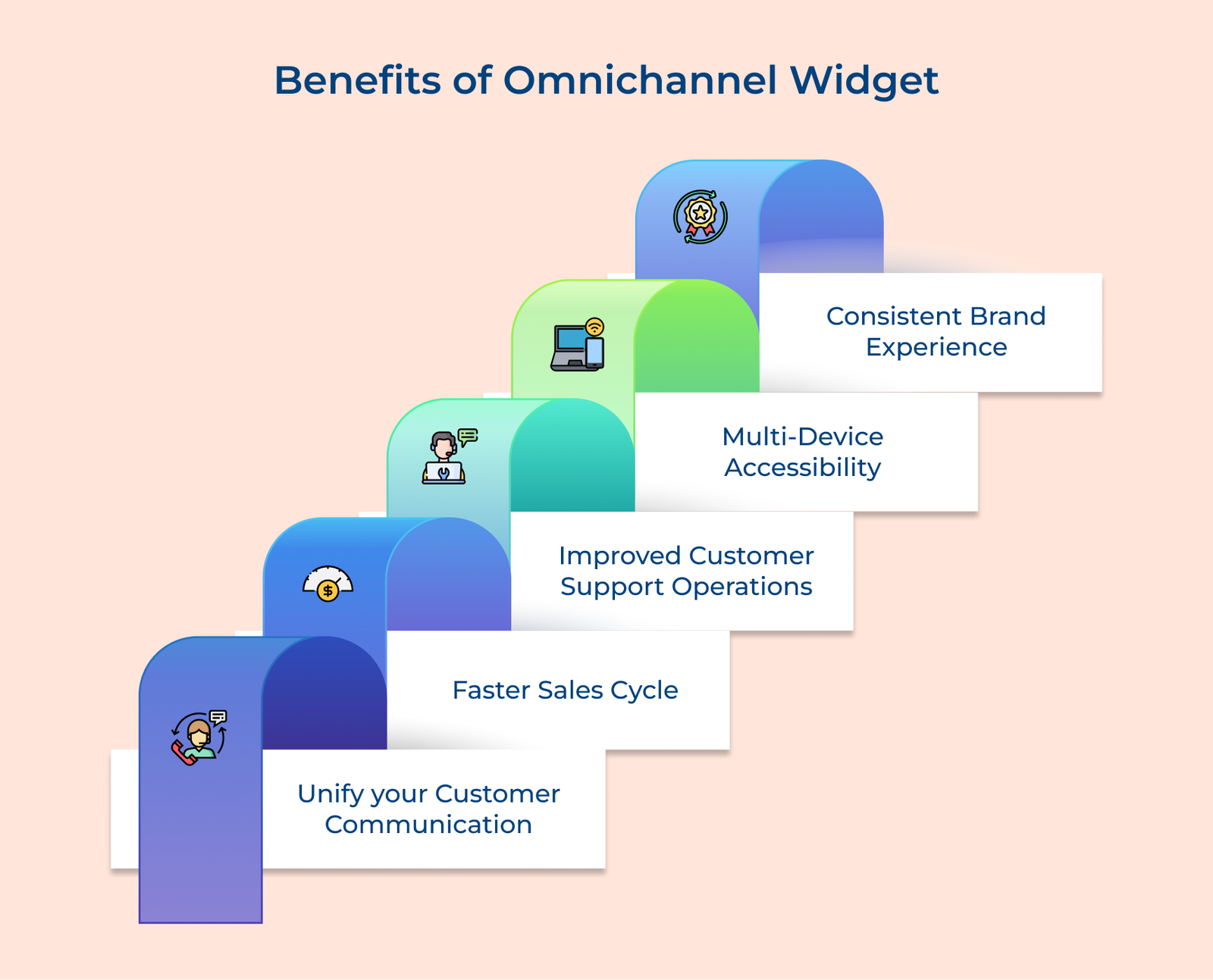
The omnichannel chat widget offers a range of benefits that can greatly enhance your customer communication and overall business operations. Here are the key benefits of the chat widget:

Benefits of Omnichannel Widget

1. Unify your customer communication: One of the major advantages of an omnichannel chat widget is that it allows you to streamline all your customer communication channels into one platform. Be it chat, email, or social media, you can have all conversations centralized, making it easier for your team to respond promptly. It ensures consistency and avoids any communication gaps or delays that may occur when using multiple channels separately.

2. Faster sales cycle: Businesses can provide immediate assistance to their potential customers, leading to faster sales conversions. Customers get real time answers to their queries, eliminating the need to wait for responses through other channels. The instant support significantly improves customer satisfaction and increases the likelihood of making a purchase.

3. Improved customer support operations: The Omnichannel Chat Widget enables businesses to provide personalized customer support. Agents can access customer information and order history, allowing them to understand the customer’s context while providing tailored solutions quickly. The faster issue resolution leads to improved customer satisfaction.

4. Multi-device accessibility: Another benefit is its compatibility with different devices including desktops, laptops and tablets. Customers can reach out for support from their preferred device, enhancing convenience. The flexibility contributes to a positive customer experience, as they can engage with your business wherever and whenever they need assistance.

5. Consistent brand experience: Omnichannel Chat Widget ensures that customers receive a consistent brand experience across all channels. Whether they interact with your business through social media, email, or chat, the messaging tone and style will remain consistent. The dynamic 365 customer service creates a cohesive brand identity, strengthening the company’s reputation.

How to Implement Effective Omnichannel Chat Widget

Online shopping and seamless customer experience are trending for quite some time now. Adding a chat widget to your marketing strategy seems like a plausible move. Let’s explore the best practices for implementing and managing an omnichannel widget.

How to Implement Effective Omnichannel Chat Widget

1. Define your Objectives and Goals

Before implementing an omnichannel chat widget, define your objectives and goals. What do you hope to achieve with the implementation of this widget? Are you looking to improve customer satisfaction, increase sales, or reduce customer service costs? By clearly defining the objectives, you can set expectations and measure the success of implementation.

2. Choose the Right Omnichannel Platform

A dive into the implementation process means that you need to start right from selecting the right platform. For large organizations, using a dedicated enterprise live chat software can offer deeper integrations, scalability, and advanced support features tailored for high-volume teams. Consider factors such as ease of use, customization options, integration capabilities, and scalability to ensure you choose a platform that aligns with your business’s specific needs.

3. Design a User-Friendly Interface

A user interface needs to be friendly for a successful chat widget implementation. Design the widget to be visually appealing, intuitive, and easy to navigate. Consider the placement and size of the widget on your website to ensure it is easily accessible without obstructing the user’s view. Include clear call-to-action buttons that allow users to initiate a chat session effortlessly.

4. Integrate Across Multiple Channels

Your chat widget should be seamlessly integrated across multiple channels to achieve true omnichannel for customer service. It means incorporating it not only on your website but also on other platforms such as social media, mobile apps, and even messaging apps. The integration allows customers to have consistent experiences across all channels, providing convenience and enhancing customer satisfaction.

5. Personalize the Chatbot Experience

Utilize personalized chatbot features to enhance customer interactions. Incorporate AI-powered chatbots that can understand basic queries, provide relevant information, and even handle simple customer requests. It is essential to strike a balance between automation and human support. Provide an option for customers to escalate the conversation to a live chat agent when necessary, ensuring a more personalized touch.

6. Implement Proactive Chat

Implementing proactive chat is a valuable strategy to enhance customer engagement. Use visitor tracking and behavior analysis tools to identify when a user might benefit from assistance. Initiate a proactive chat at strategic points during the customer journey to offer assistance, answer questions, or gently guide them towards making a purchase. Implementing this demonstrates a proactive approach to customer service, which significantly impacts user satisfaction.

7. Enable Message Continuity

Maintain message continuity across channels to provide a seamless customer experience. Customers should be able to start a conversation on one channel and continue it on another without having to repeat information or start anew. The continuity ensures that customers do not need to backtrack, saving time and reducing frustration. Implement technology that enables message synchronization across platforms to effortlessly transfer conversations between channels.

8. Monitor and Analyze Performance

Monitoring and analyzing the performance of your chat widget is crucial for continuous improvement. Track metrics such as response time, customer satisfaction ratings, chat duration, and conversion rates to evaluate your widget’s effectiveness. Use the data to identify areas of improvement while optimizing the performance of your chat widget.

Omnichannel Chat Widget Examples

Let’s take a look at some examples of how brands in different industries are utilizing omnichannel chat widgets to enhance their customer service and drive business growth.

Zocdoc
Zocdoc, an online platform that connects patients with doctors utilizes an omnichannel widget called “Book Online” to simplify the appointment booking process. The widget is embedded on healthcare provider websites, allowing patients to easily schedule appointments directly from the provider’s site. It reduces administrative tasks and improves patient satisfaction by offering a seamless booking experience.

Marriott
Marriott International, a renowned hospitality company uses an omnichannel widget called “Mobile Check-In” to streamline the check-in process for their guests. It’s available on their mobile app where the guests are allowed to check-in, select their room preferences, and even bypass the front desk, if desired. It enhances the guest experience by saving time and providing convenience.

AirBnB
B2C brands like Airbnb leverage omnichannel chat widgets to provide seamless customer support. Airbnb’s chat widget is accessible on their website, app, and even through SMS. The multichannel approach ensures that customers can reach out to them anytime, anywhere, and receive personalized assistance with their bookings.

Etsy
Etsy, an online marketplace for handmade and vintage items integrates an omnichannel chat widget called “Convo” into its platform. The dynamic 365 customer service widget allows buyers and sellers to communicate directly, discussing product details, customization options, and shipping information. By enabling this chat feature, Etsy creates a sense of community, builds trust while enhancing the overall shopping experience for its users.

Starbucks
Starbucks, a global coffeehouse chain has integrated an omnichannel widget called “Mobile Order & Pay” into their app. Here the customers get to easily order and pay for their favorite beverages ahead of time, reducing wait times while also enhancing convenience. It seamlessly connects the mobile app with in-store operations, creating an efficient customer experience.

Scale your Business Messaging with Veemo’s Omnichannel Widget

Adopting an omnichannel approach while utilizing messaging channels is no longer an option, but a necessity for brands aiming to deliver a superior customer experience and drive growth. Whether it’s through chatbots, live chat, or personalized messages, businesses can address customer queries, resolve issues, and provide personalized recommendations while building meaningful relationships.

Messaging channels not only offer accessibility for customers, but they also add value to a business’s growth. They allow brands to gather insightful data about customer behaviors, and pain points. It then can be utilized to enhance marketing strategies, tailor personalized offers, and identify new opportunities for expansion.

FAQs about Omnichannel Live Chat Widget

An Omnichannel widget works by aggregating and centralizing customer communications from different channels into a single dashboard. Through this dashboard, customer service agents can view and respond to inquiries as well as complaints in real-time. The widget also enables businesses to track customer interactions, manage customer data while providing contextual responses.

Yes, most omnichannel chat widget providers offer customization options. You can usually customize the chat widget’s appearance such as its color, size, position on the screen, and even the branding elements to match your business’s look/feel. The customization ensures that the chat widget seamlessly integrates with your website or app and provides a cohesive customer experience.

An omnichannel chat widget is a tool meant for businesses of all sizes. For small businesses with limited resources, it provides a cost-effective solution to offer round-the-clock customer support without the need for a large support team. It also allows small businesses to compete with larger competitors by providing the same level of support and convenience to their customers.

An omnichannel chat widget can collect various customer data, depending on the features and integrations you choose. Basic data includes customer contact information, chat transcripts, and key customer data such as purchase history or previous interactions. Some advanced omnichannel chat widgets can integrate with customer relationship management (CRM) systems, allowing businesses to gather more detailed insights for creating personalized experiences.

Integrating an omnichannel chat widget into your existing systems is usually straightforward. Most providers offer easy-to-use APIs or plugins that can be easily integrated into your website or app. Depending on the requirements, you can integrate the chat widget with CRM, help desk software, or other customer support tools to streamline your workflow.