13 Best Enterprise CRM Compared: The Buyer’s Guide (2025)

Compare the best enterprise CRM to find the perfect fit for your business, enhance customer relationships and streamline operations for greater success.

No credit card required. Easy setup

Enterprise CRM Sales CRM

Trusted By Leading Brands

Master Customer Management with Cutting-Edge Enterprise CRM

Streamline your operations, boost team collaboration and enhance customer satisfaction with advanced enterprise CRM tools designed to drive growth!

Enterprise CRM Sales CRM Dashboard1

Unified Customer View

Gain a comprehensive customer view with a single platform for all interactions and data points. The unified perspective revolutionizes business strategies.

Advanced Automation Capabilities

Unlock unparalleled efficiency with the power of advanced automation tools integrated into your CRM! The features take the mundane out of daily operations by automating routine tasks.

Scalable Integration Options

The CRM is designed to seamlessly connect with your existing systems and applications, ensuring that as your business grows, your technology can keep pace.

Customizable Dashboards and Reporting

Empower your team to make data-driven decisions with customizable dashboards and reporting capabilities that provide actionable insights at a glance

Enterprise CRM Sales CRM Dashboard2

Businesses face a critical challenge: managing vast amounts of customer data while trying to deliver personalized experiences at scale. Without an effective system, companies risk losing valuable insights, missing opportunities and falling behind competitors.

Enterprise CRM (Customer Relationship Management) software is a powerful tool designed to help large organizations streamline customer interactions and marketing efforts. The tool serves as a central hub for all customer-related data, enabling businesses to build stronger relationships, boost efficiency and drive growth.

What is Enterprise CRM?

Enterprise CRM (Customer Relationship Management) refers to a software solution designed to help large organizations optimize their interactions with customers and potential clients. The tool serves as a centralized platform for storing, analyzing and utilizing customer data across various departments.

CRM enterprise systems work by integrating multiple touchpoints and data sources into a unified system. The platform organizes information from sales, marketing, customer service and other departments, providing a 360-degree view of each customer. The data is then used to streamline operations, personalize communications and inform strategic decision-making.

Key objectives:

  • Enhance customer satisfaction by providing personalized experiences and efficient service.
  • Increase sales effectiveness through better lead management and opportunity tracking.
  • Improve marketing ROI by targeting campaigns based on customer insights and behavior.
  • Streamline business processes and boost operational efficiency across departments.
  • Enable data-driven decision-making through advanced analytics and reporting capabilities.

Comparison of Top Enterprise CRM Platforms

Below is a detailed comparison of leading enterprise CRM platforms, assessing features and pricing.

CRM Platform Pricing
Plan/Free Trial Sales Features
Veemo Sales $29/user/month 14-days free trial
  • Lead scoring
  • Sales forecasting 
  • Pipeline management 
  • Email tracking
  • Customizable dashboards
Zendesk Sell $19-$99/user/month 14-days free trial
  • Sales automation
  • Mobile CRM
  • Sales analytics
Creatio From $25/user/month 14-days free trial
  • Opportunity management
  • Quote management
  • AI-driven forecasting
Salesforce $25-$300/user/month 30-days free trial
  • Account & contact management
  • Opportunity tracking
  • Customizable reports
Zoho CRM Free-$52/user/month 15-days free trial
  • Workflow automation
  • Contact management
  • Appointment scheduling
EngageBay Free-$79.99/user/month Free plan available
  • Deal pipeline
  • Appointment scheduling
  • Predictive lead scoring
HubSpot CRM Free-$1200/month (5 users) Free plan available
  • Contact & deal management
  • Sales automation
  • Reporting dashboard
Salesmate $12-$40/user/month 15-days free trial
  • Pipeline management
  • Built-in phone
  • Sales forecasting
Pipedrive $14.90-$99/user/month 14-days free trial
  • Visual sales pipeline
  • AI Sales assistant
  • Lead management
Freshsales Free-$69/user/month 21-days free trial
  • AI-powered lead scoring
  • Deal management
  • Sales sequences
Keap $129-$199/month 14-days free trial
  • Pipeline automation
  • Quotes & invoices
  • Appointment scheduling
Insightly $29-$99/user/month 14-days free trial
  • Lead routing
  • Opportunity management
  • Custom sales processes
Bonsai $17-$32/month 14-days free trial
  • Client CRM
  • Project management
  • Time tracking

Key Features of Enterprise CRM Applications

Enterprise CRM applications offer a suite of advanced features designed to meet the complex needs of businesses.

Features of Enterprise CRM Applications

1. Contact Management

A CRM system relies on strong contact management at its core. Enterprise CRM software allows businesses to organize detailed information about customers, prospects and partners. The information includes basic details like names and more complex data such as interaction history, preferences or custom fields. Advanced systems offer segmentation capabilities, allowing users to group contacts based on various criteria for targeted marketing and sales efforts.

2. Multi-channel Lead Capture

Enterprise CRM systems excel at capturing leads from multiple sources, including websites, social media, email campaigns and offline events. The tools often integrate with various platforms to automatically import lead data, ensuring no potential opportunity is missed. Some systems also offer lead nurturing features to guide prospects through the sales funnel.

3. Lead Scoring

Enterprise CRMs incorporate lead-scoring mechanisms to prioritize sales efforts. The feature assigns points to leads based on various criteria such as demographic information, online behavior and engagement level. Sales teams can focus their energy on the most promising prospects by automatically ranking leads.

4. Email Automation

Enterprise CRM software typically includes powerful email automation tools that allow for personalized, timely communication at scale. Features often include email templates, scheduling, tracking, and integration with popular email clients. This automation helps maintain consistent communication with prospects and customers throughout their journey.

5. Sales Pipeline Visualization

Enterprise customer relationship management offers customizable pipeline views that display deals at various stages. The visual representation helps sales teams quickly assess the status of opportunities and forecast future revenue. Many systems allow for drag-and-drop functionality to move deals between stages easily.

6. Workflow Automation

Enterprise CRM software offers workflow automation capabilities to streamline operations and ensure consistency. Users can set up rules and triggers that automatically assign tasks, send notifications, update records, or initiate approval processes. The feature reduces manual work, minimizes errors and ensures that standard rules are followed across the organization.

7. Sales Forecasting & Planning

Accurate forecasting is essential for business planning. Enterprise CRMs leverage historical data, current pipeline information and AI-driven predictive analytics to generate sales forecasts. The tools often allow for scenario planning, helping businesses anticipate market changes and adjust strategies.

8. Reporting & Analytics

Comprehensive reporting and analytics features are a hallmark of enterprise CRM systems. The tools offer a wide range of pre-built reports that provide insights into sales performance, customer behavior and business health. Advanced systems may incorporate AI and machine learning to uncover hidden trends.

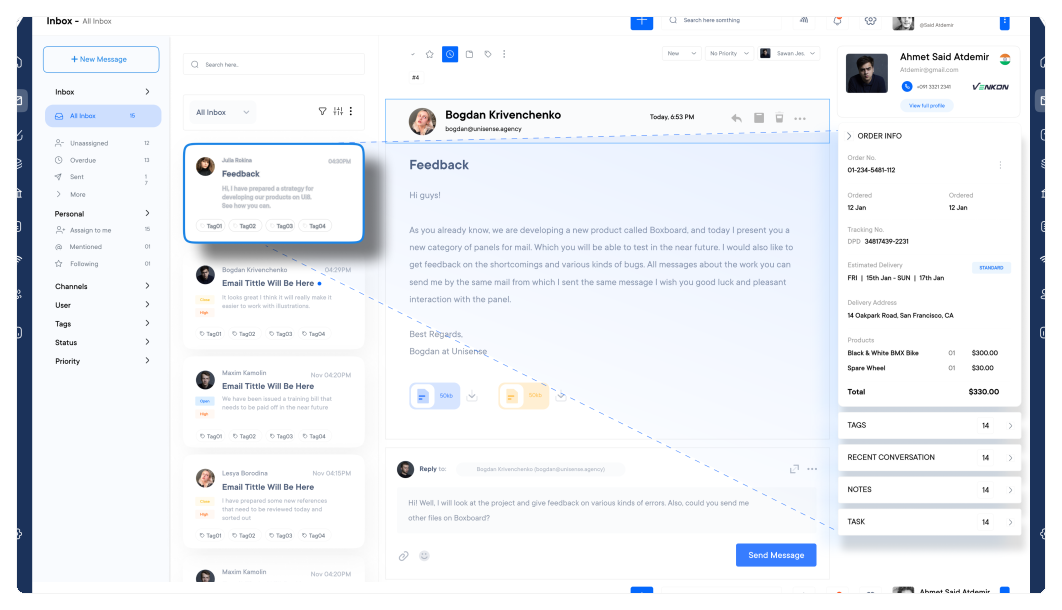
9. Sales Inbox

Many enterprise customer relationship management now offer a sales inbox feature to centralize communication and improve efficiency. The integrates email, chat and other communication channels directly within the CRM interface. Sales representatives can manage all their conversations in one place, with the added benefit of automatically logging interactions and associating them with the relevant contacts.

10. Quotes and Proposals

Streamlining the quote and proposal process is crucial for closing deals efficiently. Enterprise CRM software often includes tools for creating, sending and tracking quotes or proposals. The features may include customizable templates, approval workflows, e-signature capabilities for complex pricing scenarios.

13 Best Enterprise CRM Software and Tools

We have compiled a list of the best enterprise CRM tools, each specifically designed to optimize workflows, enhance communication and support long-term business success.

1. Veemo Sales

Best enterprise CRM for customer opportunity management

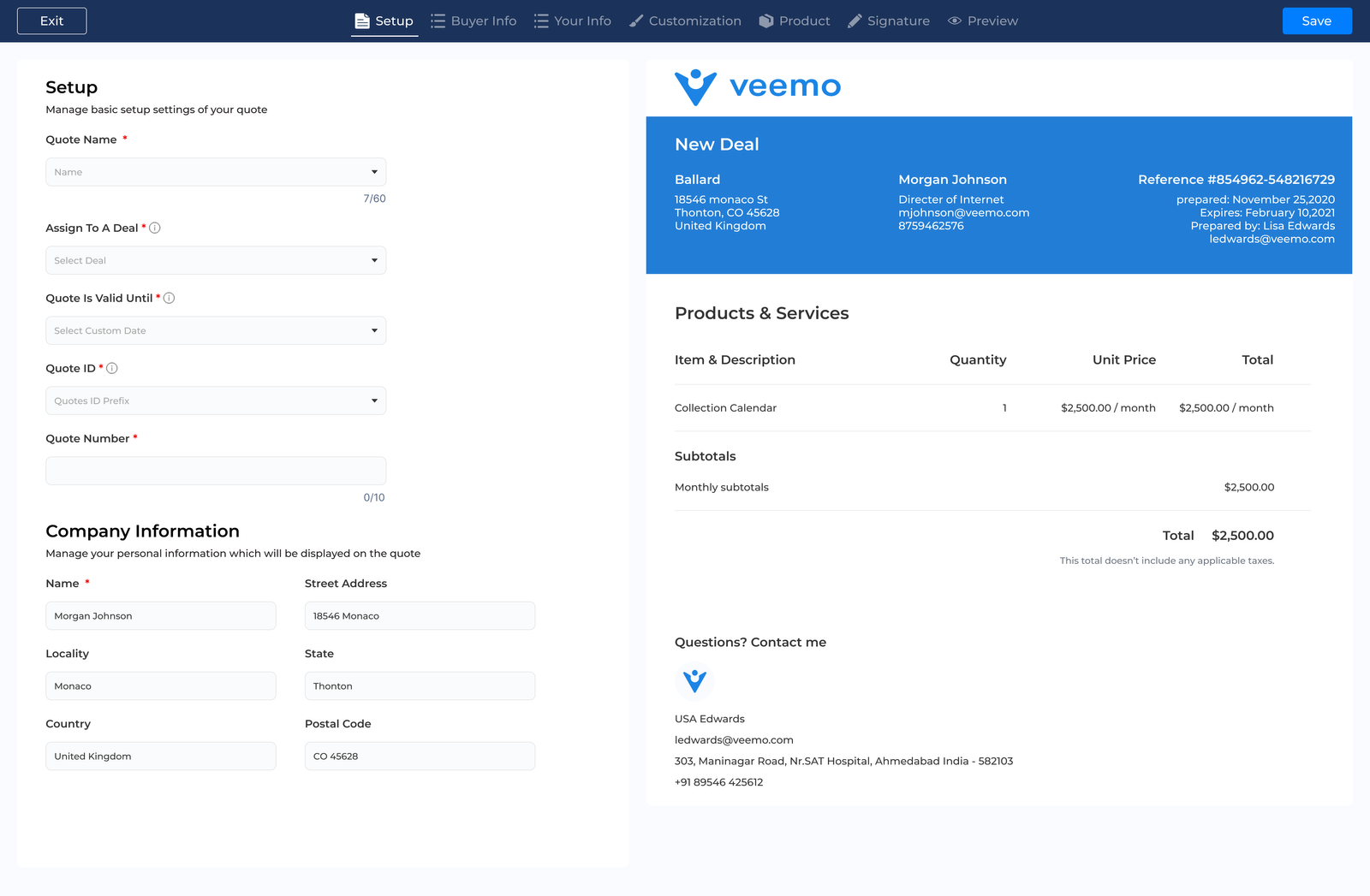
Veemo Sales Quotes

Veemo Sales is a cutting-edge enterprise CRM software designed to streamline and optimize sales processes for large-scale organizations. The tool offers a comprehensive suite of tools that cater to the complex needs of enterprise-level sales teams. Veemo Sales stands out for its user-friendly interface, powerful automation capabilities and robust analytics, making it a top choice for businesses looking to enhance their performance.

Key Features:

  • Advanced AI-powered lead scoring that automatically ranks the most promising prospects based on multiple criteria and behavioral patterns.
  • Customizable sales pipeline visualization with drag-and-drop functionality. Sales teams can easily track and manage deals at every stage of the sales process.
  • Intelligent email automation system that personalizes communication at scale, tracks engagement and suggests optimal sending times for maximum impact.
  • Comprehensive reporting dashboard that provides real-time insights into sales performance, team productivity and revenue forecasts.
  • Seamless integration capabilities with a wide range of third-party tools and platforms. The integration ensures a smooth workflow and data synchronization across the entire sales ecosystem.

Pricing: The Growth plan consists of 3 inboxes and costs $29. While the Enterprise plan is for $129 and consists of unlimited inboxes. Visit Veemo’s pricing page for more details.

2. Zendesk Sell

Robust enterprise CRM for mobile accessibility

Zendesk Sell Enterprise CRM

Zendesk Sell is a robust enterprise CRM software designed to streamline sales processes and enhance customer relationships. The tool offers a user-friendly interface that integrates seamlessly with Zendesk’s customer service platform, providing a unified view of customer interactions.

Advanced pipeline management, customizable reporting and mobile accessibility are the key attributes of the solution. Its USP lies in its tight integration with Zendesk’s support suite, enabling sales and support teams to collaborate effortlessly. The platform also offers powerful automation tools and AI-driven insights for improved decision-making.

3. Creatio

Comprehensive company CRM for Advanced Analytics and Reporting

Creatio Enterprise CRM

Creatio is a CRM platform designed for enterprise-level businesses. The platform offers a unified solution for sales, marketing and service automation. Creatio enables organizations to streamline processes and enhance customer relationships across departments.

The platform offers low-code/no-code development capabilities, AI-driven predictive analytics and robust process automation tools. Creatio’s USP is its ability to combine CRM functionality with business process management, allowing for seamless integration of customer data and operational workflows.

4. Salesforce

Extensive enterprise CRM for opportunity tracking

SalesForce Enterprise CRM

Salesforce is a leading cloud-based CRM platform designed for enterprise-level businesses.
The tool offers a comprehensive suite of tools for managing customer relationships, sales processes and marketing campaigns.

Salesforce integrates various departments, providing a unified view of customer interactions across the organization. The primary abilities are lead management, opportunity tracking and analytics. Salesforce’s USP lies in its customizability, scalability and extensive ecosystem of third-party apps.

5. Zoho CRM

Seamless enterprise CRM for Customizable Sales Pipelines

Zoho CRM Enterprise CRM

Zoho CRM is an AI-powered customer relationship management platform designed for enterprises. Zoho CRM offers a unified solution to manage sales, marketing and customer support processes, enabling businesses to streamline operations.

The essential characteristics include contact management, sales automation, analytics and customizable workflows. Zoho CRM’s unique selling points are its AI-powered assistant, Zia and its extensive integration capabilities with other Zoho or third-party applications.

6. EngageBay

Robust enterprise CRM for email marketing

EngageBay eEnterprise CRM

EngageBay is a well-known CRM software designed for enterprise-level businesses. The platform offers an all-in-one platform that integrates sales, marketing and customer support functionalities, streamlining operations.

EngageBay consists of lead management, email marketing, automation and analytics. The USP lies in its affordability and scalability, providing enterprise-grade tools at a fraction of the cost of competitors.

7. Hubspot CRM

Comprehensive company CRM for contact and deal management

HubSpot CRM Enterprise CRM

HubSpot CRM is a cloud-based customer relationship management platform designed for enterprise-level businesses. The tool offers a centralized hub for managing customer interactions, sales pipelines and marketing campaigns across multiple departments.

The tool offers deal management, email tracking, meeting scheduling and advanced reporting. HubSpot’s USP lies in its seamless integration with marketing tools, providing a unified ecosystem for customer engagement and data analysis.

8. Salesmate

Extensive enterprise CRM for Advanced Customer Segmentation

SalesMate Enterprise CRM

Salesmate is a robust CRM software designed for enterprise-level businesses. Salesmate offers a comprehensive platform that streamlines sales processes, enhances customer relationships and boosts productivity.

The intuitive interface allows for easy adoption across large teams. The software offers advanced pipeline management, customizable workflows and powerful analytics. Salesmate’s USP lies in its seamless integration capabilities with various third-party tools and its mobile-first approach, enabling sales teams to access crucial data on the go.

9. Pipedrive

Seamless enterprise CRM for robust reporting capabilities

PipeDrive Enterprise CRM

Pipedrive is a user-friendly, sales-focused CRM software designed to streamline and optimize the sales process for businesses of all sizes. The tool offers a visual pipeline management system that helps teams track deals, manage contacts and forecast sales with ease.

Pipedrive consists of customizable pipelines, AI-powered sales assistants, automation tools and robust reporting capabilities. The USP lies in its intuitive interface and focuses on driving sales productivity through visual deal tracking.

10. Freshsales

Robust company CRM for automation workflows

FreshSales Enterprise CRM

Freshsales is a robust enterprise CRM software designed to streamline sales processes and enhance customer relationships. Freshsales offers a comprehensive suite of tools for lead management, contact organization and sales pipeline visualization, all within an intuitive interface.

The main attributes include AI-powered lead scoring, built-in phone, automation workflows and advanced analytics. Its USP is the seamless integration of marketing, sales and customer support functions, providing a 360-degree view of customer interactions.

11. Keap

Seamless company CRM for Document Management and Storage

Keap Enterprise CRM

Keap is an advanced Enterprise CRM software designed to streamline business operations. The tool offers a comprehensive platform that integrates contact management, marketing automation and sales processes, enabling businesses to manage customer relationships.

The essential capabilities of Keap include automated email marketing, lead scoring and pipeline management. Its USP is the seamless integration of CRM with e-commerce and payment processing. Businesses are enabled to handle transactions and customer data in one place.

12. Insightly

Extensive company CRM for Advanced Customer Segmentation

Insightly Enterprise CRM

Insightly is a comprehensive Enterprise CRM software designed to streamline business processes and enhance customer relationships. The tool offers a unified platform for sales, marketing and project management, enabling organizations to manage their entire customer lifecycle efficiently.

Amongst the highlighted attributes of Insightly are lead routing, workflow automation and advanced reporting. Insightly’s unique selling point is its seamless integration of project management capabilities within the CRM, allowing businesses to track projects from opportunity to completion.

13. Bonsai

Seamless company CRM for customizable dashboards

Bonsai Enterprise CRM

Bonsai is an enterprise CRM software designed to streamline customer relationship management for businesses of all sizes. Bonsai offers a comprehensive platform that integrates sales, marketing and customer service functions into a single, user-friendly interface.

Bonsai offers AI-powered lead scoring, automated workflow management and customizable dashboards. Bonsai’s USP is its adaptive learning algorithm, which continuously optimizes processes based on user behavior and customer interactions, significantly improving efficiency.

What are the Key Benefits of Enterprise CRM Systems?

Understanding the key benefits of enterprise CRM systems is crucial for leveraging their full potential in driving business growth and success.

Benefits of Enterprise CRM Systems

1. Increased Team Productivity
Enterprise CRM centralizes customer data, communication history and task management, allowing teams to work more efficiently. Eliminating the need to switch between multiple platforms enables employees to focus on high-value activities. Automated workflows and reminders ensure that important tasks are never overlooked, while intuitive interfaces reduce the learning curve for new members.

2. Accelerated Sales Cycles
Sales teams can identify and address bottlenecks quickly with a comprehensive view of each prospect’s journey. CRM software enables personalized communication at scale, ensuring that leads receive timely and relevant information. The targeted approach helps move prospects through the sales funnel faster, reducing the time from initial contact to closed deal.

3. Increase Sales Velocity
Enterprise CRM empowers sales teams to close more deals in less time. Salespeople can tailor their approach for maximum impact by providing insights into customer behavior and preferences. Lead scoring features help prioritize high-potential opportunities, allowing teams to focus their efforts where they’re most likely to succeed.

4. Clear Accountability on Deals Management
CRM systems offer transparent deal tracking, assigning clear ownership and deadlines for each stage of the sales process. The visibility ensures that nothing falls through the cracks and enables managers to identify areas for improvement. Regular reports and dashboards provide a real-time overview of team performance.

5. Get 360-degree Customer View
Enterprise CRM provides a holistic view of each customer’s interactions with the company by consolidating data from various touchpoints. The comprehensive perspective enables personalized service, targeted marketing and informed decision-making. Teams across the organization can access this information, ensuring consistency in customer interactions.

6. Book Meetings on Autopilot
Many Enterprise CRM solutions include built-in scheduling tools that sync with team calendars. Prospects can book meetings directly, reducing the back-and-forth typically associated with scheduling. Automated reminders and follow-ups ensure that both parties are prepared for the meeting, increasing the likelihood of positive outcomes.

7. Better Sales and Marketing Alignment
CRM software bridges the gap between sales and marketing teams by providing a shared platform for collaboration. Marketers can track the performance of their campaigns in generating qualified leads, while sales teams can provide feedback on lead quality. The alignment ensures that marketing efforts are focused on generating the most valuable opportunities, improving ROI.

You can rely on us

Let our specialists help you in every step to deliver an awesome customer service your customers deserve. Comes with 30 days money back guarantee.

Omnichannel Helpdesk and Ticketing System

Turn Every Support Issues into Personalized Conversations with Veemo’s Omnichannel Helpdesk and Ticketing System. Make customer happiness your top priority with a digital first customer experience (CX) approach

Radically new solutions for data

Sed ut perspiciatis unde omnis iste natus error sit voluptatem accusantium doloremque laudantium, totam rem aperiam, eaque ipsa quae ab illo inventore veritatis et quasi architecto beatae vitae dicta sunt explicabo.

Radically new solutions for data

Sed ut perspiciatis unde omnis iste natus error sit voluptatem accusantium doloremque laudantium, totam rem aperiam, eaque ipsa quae ab illo inventore veritatis et quasi architecto beatae vitae dicta sunt explicabo.

How to Choose the Right CRM Solution for Enterprise?

Selecting the right CRM solution for an enterprise is a crucial decision that can impact organizational efficiency.

How to Choose CRM for Enterprise

1. Assess the Business Needs
Before selecting a CRM, thoroughly evaluate the organization’s needs. Consider the sales processes, customer service workflows and marketing strategies. Identify pain points in the current system and determine which features are essential for improving efficiency. The assessment will guide the decision-making process and ensure the chosen CRM aligns with the business objectives.

2. Scalability and Flexibility
Enterprise-level organizations require CRM solutions that can grow with them. Look for a system that can handle increasing data volumes, user counts and complex workflows. The CRM should offer customization options to adapt to the evolving business needs without requiring a complete overhaul. Ensure it can integrate with the existing software ecosystem and accommodate future technological advancements.

3. Integration Capabilities
A robust CRM should seamlessly integrate with the current tech stack, including ERP systems, marketing automation tools and communication platforms. The integration enhances data flow, reduces manual data entry and provides a unified view of customer interactions across departments. Evaluate the CRM’s API capabilities and pre-built integrations to ensure compatibility with the critical business applications.

4. User Experience and Adoption
The success of a CRM implementation largely depends on user adoption. Choose a solution with an intuitive interface that minimizes the learning curve for the team. Look for customizable dashboards, mobile accessibility and user-friendly features that encourage widespread adoption. Consider the availability of training resources and support to facilitate a smooth transition.

5. Data Security and Compliance
CRM enterprise systems must prioritize data security and comply with industry regulations. Evaluate the CRM’s security measures, including data encryption, access controls and backup protocols. Ensure the system adheres to relevant compliance standards such as GDPR, CCPA, or industry-specific regulations. Consider the vendor’s track record in handling security breaches and their commitment to ongoing security updates.

6. Analytics and Reporting Capabilities
Advanced analytics and reporting features are crucial for deriving actionable insights from customer data. Look for a CRM that offers customizable reports, real-time dashboards and predictive analytics capabilities. The ability to visualize data trends, track KPIs and generate comprehensive reports will empower the team to make data-driven decisions.

7. Vendor Reputation and Support
Choosing the right CRM vendor is as important as selecting the software itself. Research the vendor’s reputation, financial stability and long-term product roadmap. Evaluate their customer support options, including response times, available channels and the quality of documentation. Consider engaging with existing customers or reading case studies to gain insights into the vendor’s reliability and commitment to customer success.

Elevate Business with the Best Enterprise CRM Platform

A robust CRM tool centralizes customer data, streamlines processes and enhances communication across departments. Providing a 360-degree view of customer interactions enables personalized experiences and informed decision-making.

Implementing a top-tier CRM solution can significantly boost productivity, improve customer satisfaction and drive revenue growth. Sales teams are empowered with valuable insights, support marketing efforts with targeted campaigns and enable efficient customer service. Investing in the best enterprise CRM platform is not just advantageous—it’s necessary for sustained success and competitive advantage.

FAQs About Best Enterprise CRM Software and Tools

Not everyone needs enterprise CRM software. Small businesses with limited client interactions may not require the advanced features and costs associated with enterprise solutions. Large companies with complex customer relationships and a need for extensive data management would benefit from the capabilities of software to streamline operations.

Good software should be user-friendly, customizable to fit specific business needs, offer comprehensive customer data and have seamless integration capabilities. The tool should also offer robust security features, analytics tools and excellent customer support. A good enterprise CRM software helps businesses improve customer relationships and drive growth.

Companies in industries such as finance, healthcare and retail, where customer relationships are crucial, should consider investing in enterprise CRM software. The companies can benefit from features like advanced analytics, customer segmentation and automation tools to better manage their customer base. Any company looking to improve customer satisfaction and increase sales can benefit from the solution.

Choosing between a standard CRM or an enterprise CRM depends on the size and needs of the business. A standard CRM is suitable for small to medium-sized businesses with basic customer management requirements. An enterprise solution is more comprehensive, offering advanced features and scalability for larger organizations with complex customer relationships. Consider the business size and requirements before deciding on a CRM system.

Security is a top priority for enterprise CRM software providers. Most software offers advanced security features such as encryption, access controls and regular security updates. It’s important to choose a reputable software provider with a strong track record of data security and compliance.

Implementing enterprise CRM software in the organization requires careful planning and coordination. It’s important to involve key stakeholders in the decision-making process and provide adequate training for employees. Many software providers offer implementation support to help companies successfully set up and integrate the software into the business processes.