Sales Automation

What is Sales Automation? Process, Benefits & Best Practices

Discover the power of sales automation in transforming your sales strategy! Unlock the full potential of automation for smarter, faster and more efficient selling.

No credit card required. Easy setup

Sales Automation

Trusted by Leading Brands

Accelerate Sales, Automate Success with Sales Automation

Discover how sales automation can help you close deals faster, boost productivity, and drive business growth effortlessly. Say goodbye to manual tasks and focus on what matters—accelerating your success!

Task Automation

Say goodbye to repetitive tasks with automation! Free up the sales reps and let them focus on what truly matters—closing deals and growing the business.

Lead Nurturing

Keep leads engaged effortlessly with automated follow-ups and personalized messaging. Now ensure the leads receive timely, relevant communications tailored to their specific needs.

Workflow Streamlining

Simplify and speed up sales processes through automated workflows. Enhance efficiency, save time and create a smoother, more reliable sales process!

Data Accuracy

Say goodbye to manual data entry errors! Automation keeps customer information accurate and up-to-date, ensuring teams have reliable data for making informed decisions.

Sales Forecasting

Leverage the power of automation to analyze data and uncover key trends that shape more accurate sales forecasts. Process large data sets in real time and make smarter, data-driven decisions for future success.

Performance Tracking

Monitor sales activities in real time with automated reports, delivering actionable insights at the fingertips. Now it’s easy to understand when to fine-tune strategies, optimize results and ensure ongoing sales improvements.

Repetitive tasks quietly consume the hours sales reps could spend nurturing leads, having meaningful conversations and closing deals. 

Automation in sales helps reduce this workload by handling repetitive activities such as data entry, lead updates and follow-ups. Teams spend more time on selling, helping improve productivity and lead quality without losing the personal touch. 

Explore our guide on sales automation to understand how teams can apply it across different stages of the sales process.

What is Sales Automation?

Sales automation refers to the use of software to streamline and automate repetitive sales tasks. It involves leveraging digital tools to manage customer relationships, track leads and optimize sales workflows. Sales teams can focus on high-value activities that require human touch and expertise.

How Does Automating the Sales Process Work?

Automating the sales process involves using software to handle repetitive tasks and streamline workflows. It starts with automated lead capture, followed by personalized email campaigns and task scheduling. The system manages customer data, tracks interactions and moves leads through the sales pipeline, prompting actions at each stage.

Key objectives are:

  • Increase efficiency by reducing manual tasks and streamlining workflows.
  • Enhance lead management through automated follow-ups and personalized communications.
  • Improve data accuracy for better decision-making and forecasting.
  • Standardize sales processes to ensure consistency and best practices across the team.

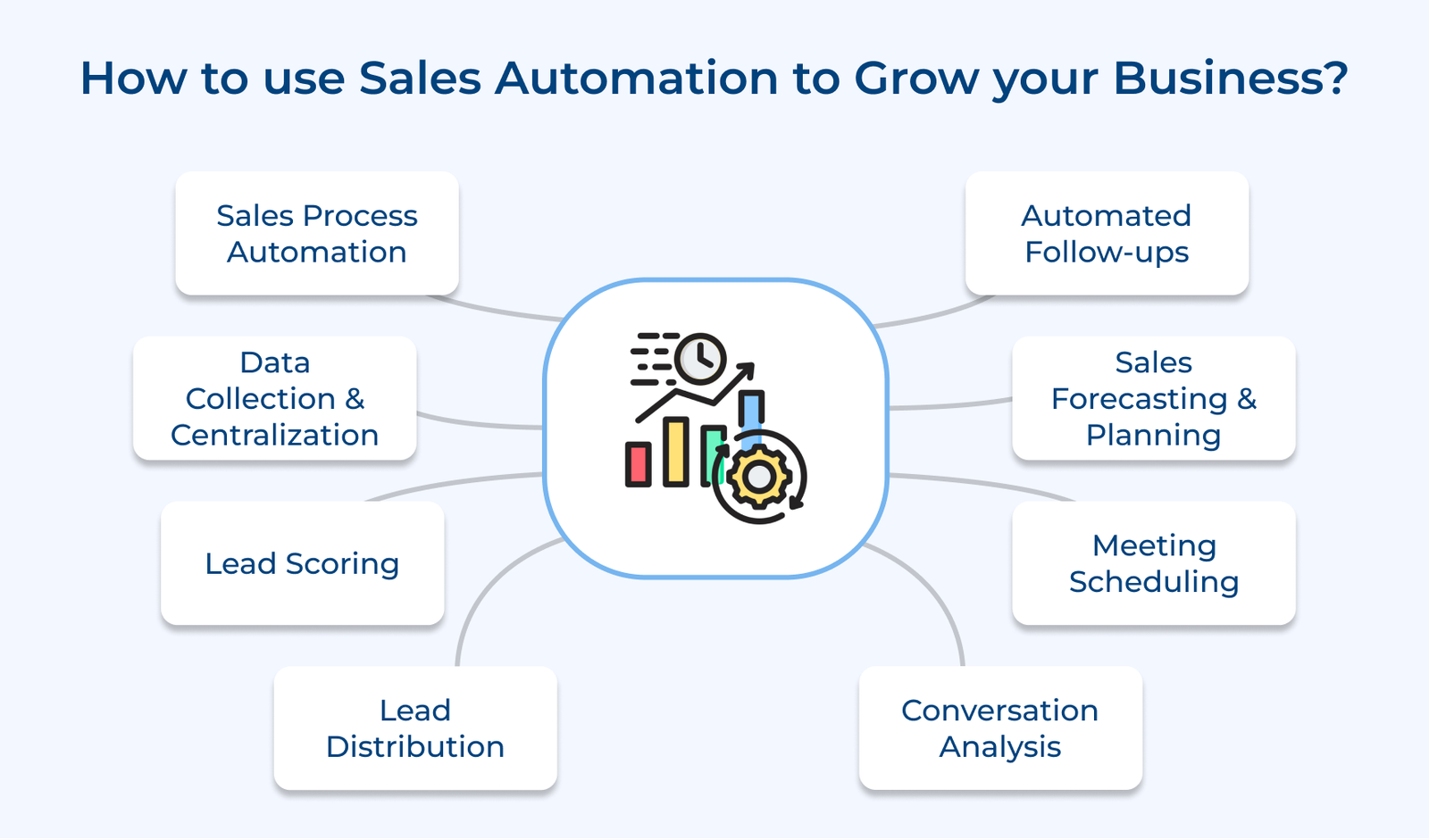
How to use Sales Automation to Grow your Business

We will explore how businesses can harness the power of sales automation to propel their business to new heights. Let’s dive in.

How to Use Sales Automation to Grow Your Business

1. Sales Process Automation

Sales process automation is a powerful way to leverage sales automation for business growth. Sales teams can focus more on high-value activities like building relationships by streamlining repetitive tasks, such as data entry, email follow-ups and report generation. 

Automation significantly improves efficiency by reducing manual work, minimizing human error and accelerating the sales cycle. The result is a more productive sales team that can handle a higher volume of leads and opportunities driving revenue growth.

Pro tips:

  • Start small by automating one process at a time to avoid overwhelming the team.
  • Regularly review and refine automated processes to ensure they align with evolving business needs.
  • Provide comprehensive training to ensure all team members can fully utilize the automated systems.

2. Data Collection and Centralization

Data collection and centralization are crucial components of sales process automation that can significantly boost business growth. Automated data gathering streamlines the process of collecting customer information from various touchpoints. The data is then consolidated into a centralized customer database, creating a single source of truth for all customer-related information.

A centralized database offers numerous benefits, including unified data access for all team members. The accessibility ensures that sales reps, marketers and customer service agents have a comprehensive view of each customer’s history. The holistic perspective enables more personalized and effective customer engagements, leading to improved conversion rates.

Pro tips:

  • Integrate the CRM with other business tools to ensure seamless data flow.
  • Establish clear data governance policies to maintain data quality and consistency.
  • Regularly train the team on how to leverage the centralized database for better customer insights.

3. Lead Scoring

Lead scoring is a powerful sales automation tool that can significantly boost business growth. Companies can rank potential customers based on their likelihood to convert by implementing automated lead qualification. The process uses predefined criteria and behavioral data to assign scores to leads.

Prioritizing the qualified leads allows businesses to concentrate their efforts on opportunities with the greatest potential for success. The targeted approach increases conversion rates and shortens sales cycles. 

Pro tips:

  • Define clear scoring criteria aligned with the ideal customer profile.
  • Regularly analyze and refine the scoring model based on actual conversion data.
  • Integrate lead scoring with the CRM system for seamless workflow and insights.

4. Lead Distribution

Lead distribution is a crucial aspect of sales automation that can significantly boost business growth. Companies can streamline their operations and maximize efficiency by automating the process of assigning leads to sales representatives. 

Effective lead distribution systems can analyze lead characteristics. Sales rep profiles to make optimal assignments, considering factors like industry knowledge and communication style.
Personalized matching enhances the chances of building strong client relationships and closing deals.

Pro tips:

  • Establish clear criteria for lead distribution and rep matching to ensure optimal assignments.
  • Regularly analyze performance metrics to refine and improve the distribution algorithm.

5. Automated Follow-ups

Automated follow-ups are a powerful tool in sales process automation, enabling businesses to grow by maintaining consistent communication with prospects and customers. Companies can deliver personalized customer messages at scale by leveraging automation.

The approach nurtures leads through the sales funnel, guiding them from initial interest to purchase decision with strategically timed touchpoints. Automated follow-ups help sales teams stay organized and efficient, allowing them to focus on high-value activities.

Pro tips:

  • Segment the audience based on behavior and preferences to ensure targeted messaging.
  • Create a diverse content library for different stages of the buyer’s journey.
  • Regularly analyze and optimize the automated sequences based on performance metrics.

6. Sales Forecasting and Planning

Sales forecasting and planning, leveraging sales automation, is a powerful strategy to drive business growth. Companies can analyze historical sales data, market trends and customer behavior to make informed decisions by utilizing data-driven prediction models.

Strategic resource allocation becomes more effective when based on reliable forecasts. Companies can efficiently distribute personnel, budget and marketing efforts across various products, regions, or customer segments.

Pro tips:

  • Integrate CRM systems with forecasting tools for real-time data analysis.
  • Train sales teams to input quality data consistently for accurate predictions.
  • Regularly adjust forecasts based on market changes and performance metrics.

7. Meeting Scheduling

Meeting scheduling automation is a powerful tool for growing the business through enhanced sales processes. Companies can streamline client interactions and reduce the time spent on manual scheduling tasks by implementing automated appointment booking systems.

Another key benefit is reduced scheduling conflicts, as automated systems can sync with multiple calendars and prevent double bookings. Sales representatives are always available when clients need them, improving customer satisfaction and conversion rates.

Pro tips:

  • Customize booking pages to reflect the brand and include relevant information for clients.
  • Set up automated reminders to reduce no-shows and improve meeting attendance rates.

8. Conversation Analysis

Conversation analysis leverages AI-powered call analytics to dissect sales interactions, providing valuable insights into customer behavior and sales performance. Businesses can identify successful patterns and techniques used by top-performing sales representatives by examining large volumes of customer conversations.

Actionable tips:

  • Implement AI-powered transcription tools to automatically process and categorize sales calls.
  • Establish key performance indicators (KPIs) based on successful conversation patterns and regularly review them with the team.
  • Create a feedback system that integrates AI insights with human coaching to continuously improve sales techniques.
Difference Between Sales Automation & Marketing Automation

While both sales automation and marketing automation aim to streamline processes and improve efficiency, they serve distinct functions within a business.

Difference Between Sales Automation

1. Focus and Objectives
Marketing automation primarily focuses on nurturing leads through various channels, aiming to generate interest and create brand awareness. It’s designed to guide potential customers through the early stages of the buying process.

Sales automation concentrates on converting qualified leads into customers. It streamlines the sales process, helping representatives close deals more efficiently and effectively.

2. Target Audience
Marketing automation typically targets a broader audience, often including individuals who may not yet be aware of their need for a product or service. It casts a wide net to capture potential leads at various stages of interest.

Sales process automation is geared towards a more specific audience of qualified leads who have shown a clear interest in the product or service and are closer to making a purchasing decision.

3. Processes and Activities
Marketing automation encompasses activities such as email campaigns, social media management, content distribution and lead scoring. It often involves creating and distributing content across multiple channels to engage potential customers.

Sales automation focuses on tasks directly related to the sales process, such as lead prioritization, follow-up scheduling, proposal generation and pipeline management. It aims to streamline repetitive tasks that sales representatives perform daily.

4. Timing in the Customer Journey
Marketing automation is primarily used in the early to middle stages of the customer journey, from initial awareness to consideration. It nurtures leads over time, providing them with relevant information and gradually moving them towards a purchasing decision.

Sales process automation comes into play in the later stages of the customer journey, typically after a lead has been qualified. It assists in the final push towards conversion and in maintaining customer relationships post-purchase.

5. Metrics and KPIs
The success of marketing automation is often measured by metrics such as website traffic, engagement rates, lead generation and brand awareness. The metrics indicate how effectively the marketing efforts are attracting and nurturing potential customers.

Sales automation is evaluated based on metrics directly tied to revenue generation, such as conversion rates, sales cycle length, deal size and sales productivity. The focus is on quantifiable results that directly impact the bottom line.

Best Practices to Maximize the Value of Sales Automation

These best practices help businesses get more value from sales automation, covering the execution details that determine long-term success.

1. Pilot with Top-Performing Reps First

Businesses must test the new automation with the strongest performers first. It will reveal what will actually work before rolling it out company-wide. Their feedback tends to be more actionable since they already understand what drives results.

2. Document Automated Workflows as Playbooks

Clear documentation for each automated sequence helps new hires understand how the system works without relying on other team members. It also reduces knowledge loss when employees leave and gives teams a clear reference point for troubleshooting issues when something goes wrong.

Here’s what a solid playbook typically includes:

  • Trigger conditions: What action or event starts each automated sequence.
  • Expected outcomes: What should happen if the workflow runs correctly.
  • Escalation steps: Who to contact when automation doesn’t behave as expected.

3. Align Automation with Sales and Marketing Handoffs

Automated workflows should clearly define where marketing hands a lead over to sales, rather than focusing only on internal sales tasks. Poorly defined handoff points can leave leads unattended, even when the rest of the automation works as intended.

4. Provide Ongoing Training, Not Just Initial Onboarding

A single training session usually doesn’t cover everything reps need as they discover new use cases through daily use. Businesses must have periodic sessions planned as they’re needed to help the team use the system’s full capabilities.

Ongoing training also gives reps a space to share workarounds and shortcuts they have discovered through their daily work. These peer insights can reveal repetitive tasks and automation opportunities that leadership may have overlooked.

5. Choose Tools That Fit the Existing Tech Stack

Choosing automation software that works with your existing tools helps prevent fragmented systems that can disrupt long-term adoption. A poor fit with the current tech stack can leave the software underused within months, limiting its value and creating another system for teams to manage.

What to check before committing to a new platform:

  • Native integrations: Direct compatibility with the CRM and email tools already in use.
  • API availability: Flexibility to build custom connections if needed later.
  • Data portability: Ability to export data cleanly if switching tools down the road.

Challenges to Implement Sales Automation and How to Resolve

Here are five challenges along with the way to overcome them, businesses face when implementing sales automation:

  1. Resistance to change
    Sales teams can hesitate to adopt new technologies when they fear job displacement or disruption to workflows they have relied on for years. That hesitation can slow adoption, even when the tool addresses real challenges and fits naturally into the team’s existing processes.
  2. Data quality and integration issues
    Sales automation depends on accurate, up-to-date data, so poor data quality or integration issues with existing systems can quickly limit its effectiveness. Automation built on incomplete or unreliable data can create errors, disrupt workflows, and add more problems than it solves.
  3. Limited customization and flexibility
    Off-the-shelf automation solutions may struggle to accommodate unique business processes, creating inefficiencies and forcing teams to rely on manual workarounds. These limitations can disrupt established workflows and leave teams spending more time adapting their processes to the tool.
  4. Losing the human touch
    Over-reliance on automation can make customer interactions feel impersonal, which can weaken relationships built on genuine connection and trust. Customers often notice when communication feels automated rather than thoughtful. It makes it harder for businesses to create meaningful interactions and maintain strong relationships.

Addressing these obstacles requires a clear plan that focuses on solving each issue at its root. The following steps explain how businesses can tackle these challenges and keep their efforts on track:

  • Involve the team early: Include sales reps in the rollout process and provide thorough training to build genuine buy-in.
  • Audit and clean data first: Conduct a data audit to identify gaps and select tools that work well with your existing systems and workflows.
  • Choose customizable platforms: Select automation tools that can adjust to your sales process as workflows, customer needs and team requirements change over time. 
  • Reserve automation for routine tasks: Use automation for repetitive tasks while keeping human involvement in complex situations that require judgment, context or stronger customer relationships. 
  • Track clear KPIs from day one: Define measurable goals upfront and refine strategies based on real performance data.

Why Sales Automation in Necessary for you Business?

Let us go through the benefits of sales automation to understand how automation can revolutionize the sales efforts and drive long-term growth.

Benefits of Sales Automation

1. Increase Efficiency and Productivity
Sales automation eliminates time-consuming manual tasks, allowing sales teams to focus on high-value activities. Reps can dedicate more time to close deals by automating repetitive processes like data entry, follow-up emails and appointment scheduling.

2. Boost Sales
Sales reps can engage more prospects and nurture leads more effectively by automating the handling of routine tasks. Automated lead scoring helps prioritize the most promising opportunities, while targeted campaigns increase conversion rates.

3. Improve Lead Generation
Automation tools can capture and qualify leads from multiple sources, ensuring every potential customer is caught up. Businesses can guide prospects through the sales funnel with timely content by implementing lead-nurturing workflows. Consistent engagement keeps leads warm and increases the likelihood of conversion.

4. Retain More Customers
Sales automation continues beyond closing deals. It also aids in customer retention by facilitating ongoing communication and support. Automated reminders for check-ins, renewals and upsell opportunities help maintain strong customer relationships.

5. Report Creation
Automated reporting tools provide real-time insights into sales performance, pipeline health and key metrics. The data-driven reports enable sales managers to make informed decisions, identify trends and optimize strategies.

6. Better Onboarding for Sales Reps
Sales process automation platforms often include training modules and resources that streamline the onboarding process for new hires. Automation helps new reps become productive more quickly by providing procedures and access to relevant information.

7. Improve the Customer Experience
Automation enables a more personalized and responsive approach to customer interactions. Sales reps can tailor their communications and offers to individual preferences by leveraging customer data and behavior analytics.

Top 5 Sales Automation Software

We’ll explore the top sales automation software solutions that can revolutionize how businesses approach selling and empower the team to achieve unprecedented success.

1. Veemo Sales

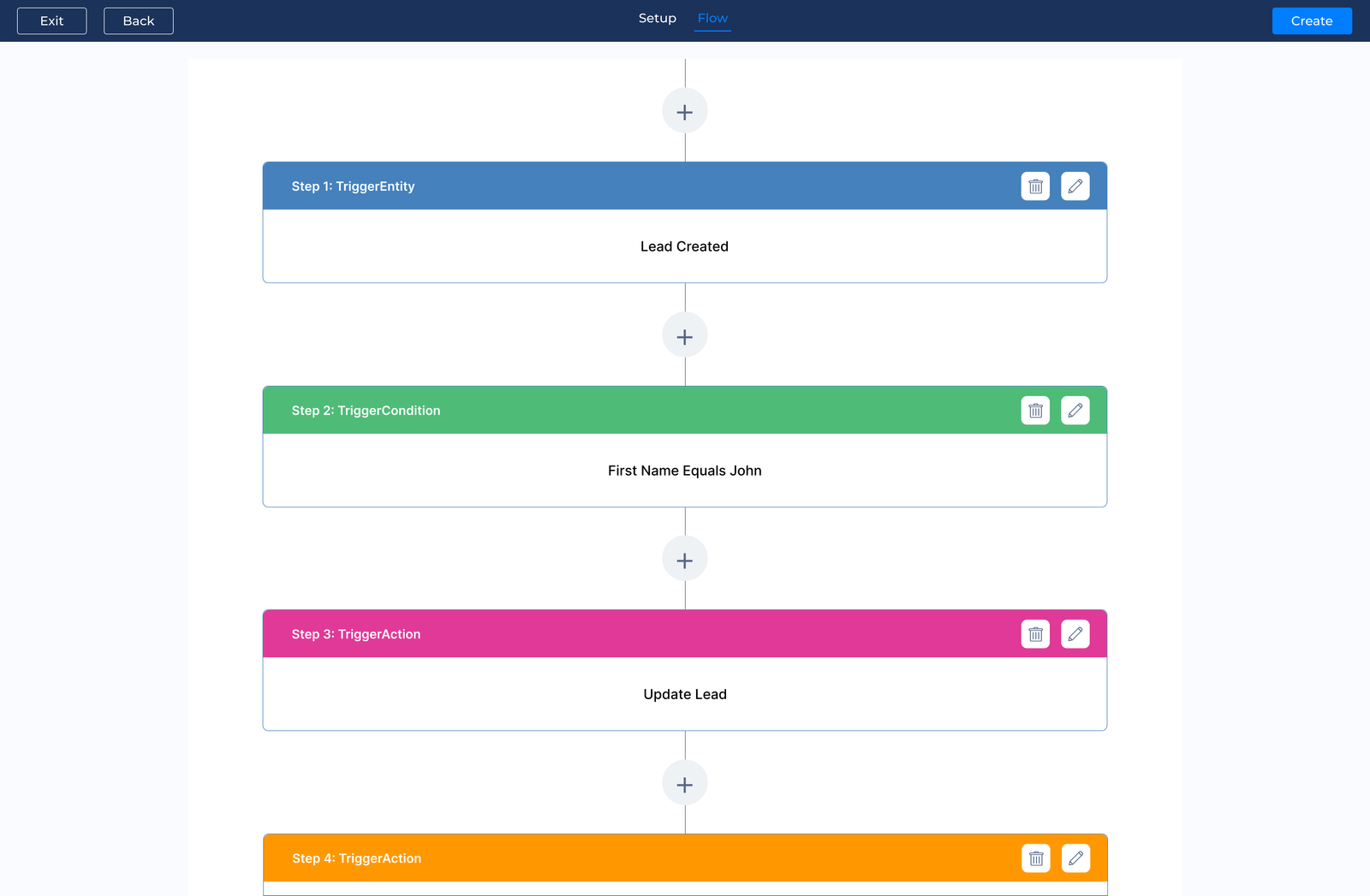
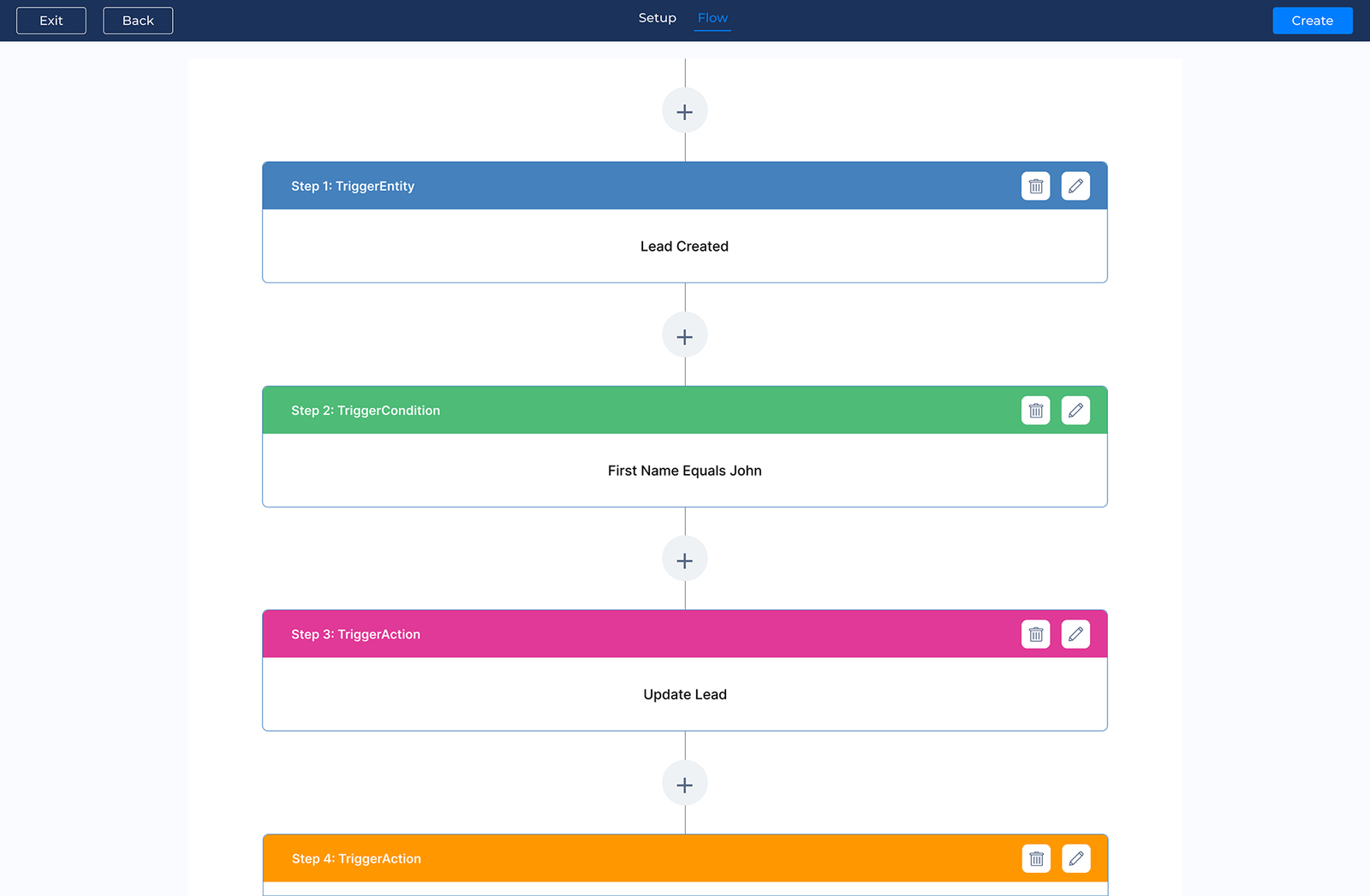
Veemo Sales Workflow

Veemo Sales is a sales CRM with advanced sales automation capabilities, combining an intuitive interface with AI-driven features. It supports the complete sales lifecycle, helping teams manage everything from lead generation and deal progression to closing and post-sale follow-ups. The platform’s adaptive algorithms learn from user interactions and continuously refine insights, helping sales teams make more informed decisions as they work.

Key features:

  • AI-powered lead scoring: Veemo’s advanced algorithms analyze multiple data points to automatically rank and prioritize leads.
  • Intelligent email sequencing: Creates personalized, automated email sequences that adapt based on recipient interactions, maximizing engagement.
  • Predictive analytics dashboard: Veemo offers real-time insights and forecasts through its interactive dashboard, helping sales managers make data-driven decisions.
  • Smart meeting scheduler: Automates the process of scheduling meetings, considering time zones, availability and past interactions to suggest optimal meeting times.

Pricing: The Growth plan costs $29/user/month with 3 inboxes, 1 knowledge base and omnichannel support. The Team plan is $69/user/month with 10 inboxes, 3 knowledge bases and a support widget. The Enterprise plan is $129/user/month with unlimited inboxes, a client portal and advanced asset management. Visit Veemo’s pricing page for more details.

2. Salesforce

Salesforce is a leading cloud-based customer relationship management (CRM) platform that offers comprehensive sales automation solutions. It provides businesses with a centralized system to manage customer interactions and analyze performance.  

Primary abilities of Salesforce include lead management, opportunity tracking and sales forecasting. Its USPs are its extensive ecosystem of third-party integrations, AI-powered insights through Einstein AI and highly scalable architecture. 

3. HubSpot Sales Hub

HubSpot stands out as a leading sales process automation software, offering a comprehensive platform that integrates marketing, sales and customer service functionalities. Its user-friendly interface and robust features make it suitable for businesses of all sizes, from startups to enterprise-level organizations.

HubSpot consists of lead scoring, email tracking, meeting scheduling and pipeline management. Its unique selling proposition lies in its all-in-one approach, providing a seamless experience across the entire customer journey. The platform’s extensive integration capabilities and powerful analytics tools further enhance its value proposition for businesses seeking to optimize their sales processes.

4. Zoho CRM

Zoho offers a comprehensive sales automation solution as part of its broader CRM suite. The platform integrates seamlessly with other Zoho applications, providing a unified ecosystem for businesses to manage their sales processes and marketing efforts. Its user-friendly interface and customizable workflows make it accessible to businesses of all sizes.

The solution offers sales process automation including contact management, pipeline visualization, email automation and advanced analytics. Its unique selling points are its affordability, extensive integration capabilities and AI-powered assistant Zia, which offers intelligent automation.

5. Pipedrive

Pipedrive is a leading sales automation software designed to streamline and optimize sales processes. It offers a user-friendly interface that helps sales teams manage their pipelines effectively, track deals and increase productivity. The platform provides real-time insights and analytics to support data-driven decision-making.

Pipedrive’s attributes are customizable sales pipelines, contact forms, email integration and mobile accessibility. Its unique selling proposition lies in its visual approach to sales management, allowing users to easily visualize their sales process.

Sales Automation Metrics & KPIs to Track

The right sales automation KPIs reveal where automation saves time, improves lead handling and supports faster movement through the sales pipeline. 

  1. Lead response time

The metric tracks how quickly automated sequences reach new leads after they enter the pipeline. Faster response times often correlate with higher conversion rates. It makes it a useful indicator of how effectively automation is helping teams engage leads at the right stage.

  1. Task Completion Rate

Tracking how many automated tasks are completed successfully versus those that need manual intervention helps identify where workflows break down. A high completion rate indicates that automation is working reliably and requires less ongoing oversight.

  1. Time saved per rep

The metric measures the hours saved from repetitive tasks such as data entry and follow-up scheduling. Tracking the time shows how automation improves team capacity and puts a measurable value on the work it removes. 

  1. Lead-to-opportunity conversion rate

The metric tracks how many automated leads move from initial engagement to qualified opportunities compared with previous manual processes. A rising conversion rate indicates that automated nurturing and lead scoring are consistently improving lead quality.

  1. Sales cycle length

Measuring the time from first contact to closed deal shows how automation is affecting the sales cycle. A shorter cycle indicates that automation is helping teams remove delays, move prospects through key stages faster, and reach decisions with less friction.

Automate the Sales Process to Drive Consistent Growth

Sales automation has become essential for teams that need to grow without increasing headcount at the same pace. It takes repetitive work off sales reps’ plates, improves lead qualification and helps teams maintain relevant communication as their pipeline grows.

  • Automating routine tasks frees reps to focus on relationships and closing complex deals.
  • Consistent, automated follow-ups reduce the risk of missed opportunities.
  • The right automation strategy lets businesses respond quickly while still personalizing at scale.
Last update: September 30, 2026

FAQs about Sales Automation

Sales automation streamlines and automates repetitive tasks in the sales process, saving time and reducing human error. It helps sales teams focus on building relationships and closing deals instead of administrative work. Businesses can easily boost their efficiency with features like lead scoring, email automation and CRM integration.

Start by choosing a CRM system that supports sales process automation natively, so the automation fits naturally into the team’s existing workflow instead of relying on a separate tool. Define each stage of the sales process clearly, then create automation rules that match how the team actually manages leads, opportunities, and follow-ups.

Customize the integration to match your sales processes and test it thoroughly before introducing it across the organization. Train the sales team to use the system consistently, ensuring the automation fits into daily workflows and continues to produce reliable results over time.

Sales automation improves productivity by handling repetitive tasks more efficiently. It gives the reps more time to build customer relationships and move deals forward instead of spending hours on administrative work. Several areas tend to see the greatest impact as sales teams adopt automation across their day-to-day workflows.

  • Lead nurturing handled through timely, automated sequences that keep prospects engaged throughout the buying process.
  • Follow-ups triggered consistently based on prospect actions, reducing the need for manual tracking and reminders.
  • Data entry reduced through automatic logging and updates that keep customer records accurate and up to date.

Ecommerce, SaaS and B2B companies often see significant value from automated sales processes. They manage high customer volumes and longer sales cycles. Their teams handle numerous leads and recurring touchpoints. It makes automation useful for managing routine tasks while keeping sales activities consistent.

Automated solutions help these businesses manage lead generation, nurturing and conversions more efficiently. The sales teams can handle rising demand without increasing headcount and overhead costs at the same pace.

While sales automation can streamline processes and increase efficiency, there are some downsides to consider. One potential downside is the risk of depersonalizing interactions with customers, leading to a loss of rapport. There may be limited customization options with automation tools, which could hinder the ability to tailor sales strategies to individual clients.