Omnichannel Chat Widget: Benefits, Features & Best Practices

Bring all your customer communication in one unified platform with Veemo’s omnichannel chat widget. Talk to your customers on websites, apps, social media and messaging channels.

No credit card required. Easy setup

Omnichannel Widget Omnichannel Chat Widget

Trusted By Leading Brands

Unified Customer Experience with Omnichannel Live Chat Widget

Bring all your conversations across sales, marketing and support in an omnichannel inbox with a chat widget.

Omnichannel Widget Omnichannel Chat Widget Dashboard1

Unified Customer Experience

Allows you to streamline all your customer communication channels into one platform. Ensures consistency from every chat channel and avoids any communication gaps while using multiple channels separately.

Faster Sales Cycle

The dynamic 365 customer service ensures queries are answered in real time, eliminating the need to wait for responses through other channels. Improves customer satisfaction and increases the likelihood of making a purchase.

Multi Device Accessibility

Customers can reach out for support from their preferred device, enhancing convenience. Contributes to a positive customer experience as they can engage with your business whenever they need assistance.

Consistent Brand Experience

Ensures that customers receive a consistent brand experience across all channels. Creates a cohesive brand identity, strengthening your company’s reputation. Messaging tone and style remain consistent.

Omnichannel Widget Omnichannel Chat Widget Dashboard2

Businesses are turning to omnichannel solutions to meet their customers’ expectations with the rise of online shopping. An omnichannel chat widget allows businesses to provide real-time support and enable engagement with customers on various platforms. Hence, resulting in improved customer satisfaction as well as increased conversions.

We will explore the benefits of using a custom chat widget, provide examples of successful implementation, and discuss best practices to help businesses make the most of this powerful tool. Understand how the potential of the live chat widget can significantly elevate your customer service capabilities.

What is an Omnichannel Chat Widget?

An omnichannel chat widget is a customer communication tool that allows businesses to engage with their customers in real-time across multiple communication channels. It can be on websites, mobile apps, and/or social media platforms, to provide a consistent experience.

Omnichannel Widget Omnichannel Chat Widget

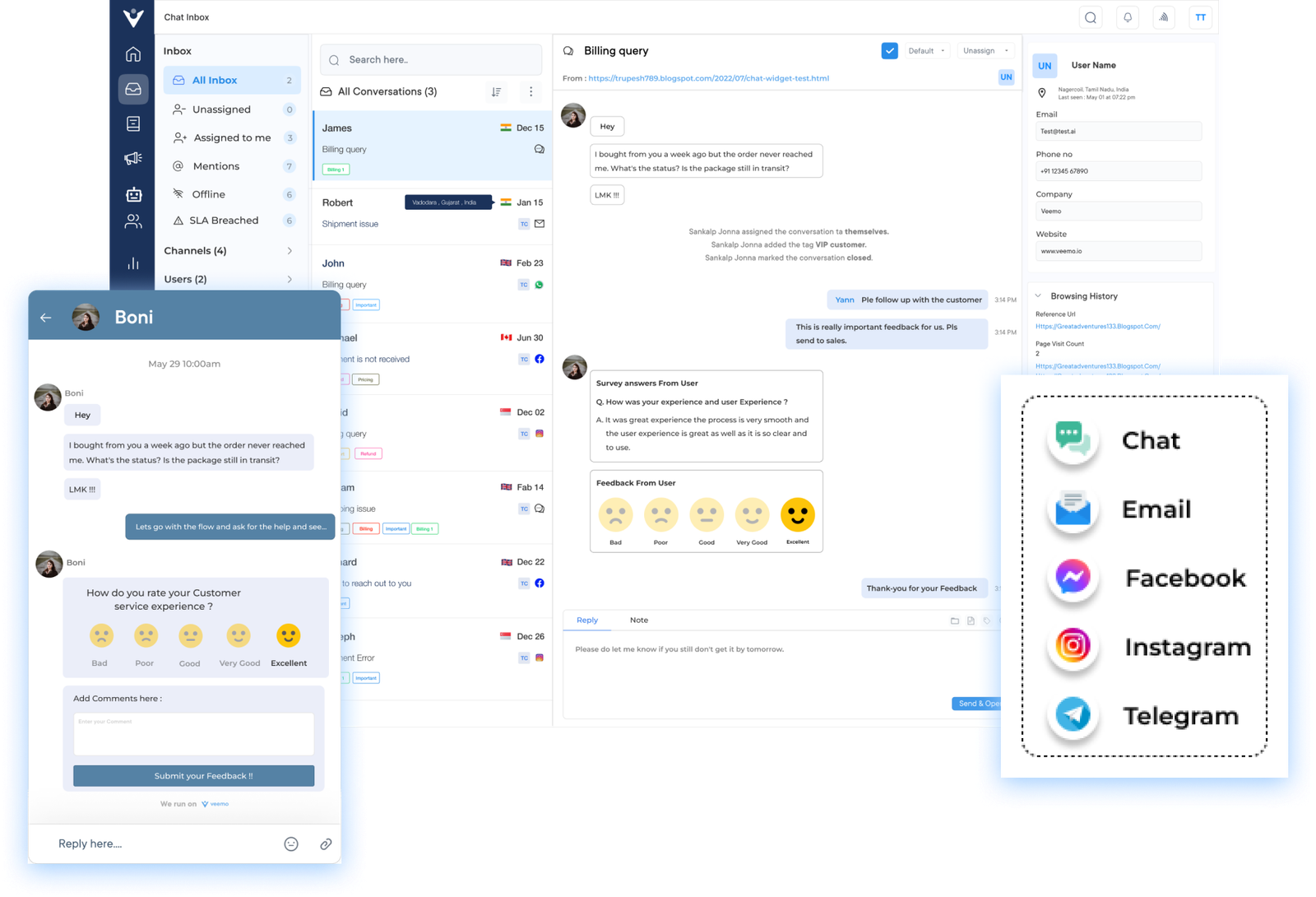
The omnichannel chat widget integrates with various communication channels and consolidates all incoming customer messages into a single dashboard. It enables businesses to respond to customer inquiries promptly, track customer interactions, and maintain a unified conversation history across channels.

Key objectives:

  • Enhance customer experience: Personalized experience for customers by allowing them to choose their preferred communication channel. 
  • Improve customer engagement: Multiple communication channels reduce the average wait time for customer that increases engagement.
  • Increase efficiency and productivity: Assign customer inquiries to the appropriate team members for faster issue resolution.

Why Businesses Need an Omnichannel Chat Widget?

Omnichannel widgets revolutionized customer service by allowing communication in real-time, regardless of the channels. Below are key features of a chat widget:

1. Unified Messaging Interface

One of the primary features of an omnichannel chat widget is its ability to integrate seamlessly across multiple platforms. The customer service tool ensures that customers can reach out for help from any platform they prefer.

2. Seamless Switching

The omnichannel chat widget enables customers to switch channels during their interactions with businesses. It ensures that you have persistent chat consistency where even file attachments aren’t lost. The feature ensures that customers can engage with businesses through their preferred channels, leading to a more convenient experience.

3. Conversational AI

Many chat widgets incorporate AI-powered chatbots, which are programmed to handle basic customer inquiries and provide instant responses. Chatbots offer round-the-clock support, ensuring customers can receive assistance even outside business hours. Human agents also get to handle more complex issues that cannot be answered by these bots.

4. Intelligent Routing

Efficient routing and assignment of customer inquiries are crucial for delivering prompt as well as accurate support. The smart widget should incorporate intelligent routing capabilities that automatically assign inquiries to the most suitable agent.

5. Customization and Branding

Omnichannel chat widgets should offer robust customization options, allowing businesses to tailor the user interface, chat window, and messaging templates to align with their brand identity as well as unique requirements. Businesses should be able to customize the widgets according to their themes.

How to Implement Effective Omnichannel Chat Widget

Let’s explore the best practices for implementing and managing an omnichannel widget for streamlining your marketing strategy:

How to Implement Effective Omnichannel Chat Widget

1. Define your Objectives and Goals

Before implementing an omnichannel chat widget, define your objectives and goals clearly from the very start of planning. Decide your business needs, such as if you want improved customer satisfaction, increased sales conversions or meaningfully lower support costs.

Define clear goals early to choose the right success indicators later:

  • Timeline clarity: Set a realistic rollout schedule with review checkpoints.
  • Stakeholder alignment: Get buy-in from sales, support, and marketing teams.
  • Budget scope: Define spending limits before evaluating platform options.

2. Choose the Right Omnichannel Platform

A deep dive into the implementation process means starting right from selecting the most suitable platform for your team. Large organizations can use dedicated enterprise live chat software to offer deeper integrations, scalability and advanced support features for high-volume teams.

Consider key factors such as ease of use, customization options and integration capabilities before committing to any single provider. The right platform should align closely with your business’s specific operational needs and long-term growth plans.

A few practical considerations often get overlooked during selection:

  • Vendor support: Availability of onboarding help and ongoing technical assistance.
  • Data security: Compliance certifications and encryption standards offered by the vendor.
  • Pricing model: Per-agent, per-conversation or tiered pricing structures compared.

3. Design a User-Friendly Interface

A user-friendly interface is essential for successful chat widget implementation and long-term adoption. Design the widget to be visually appealing, intuitive, and genuinely easy for visitors to navigate.

Consider the proper placement and size of widget carefully so it remains accessible without changing important page content. A well-placed call-to-action button lets users start a chat session effortlessly and without delay.

4. Integrate Across Multiple Channels

Your chat widget should be integrated across multiple channels to achieve a truly omnichannel customer service experience. This integration allows customers to enjoy consistent experiences across all channels, boosting convenience and overall satisfaction. 

A unified setup also reduces internal duplication of effort across support teams:

  • Unified inbox: All channel conversations managed from a single dashboard.
  • Consistent branding: Same tone and visuals maintained across every platform.
  • Channel-specific rules: Different response workflows set per platform as needed.

5. Personalize the Chatbot Experience

Utilize personalized chatbots to enhance the quality of every customer interaction across your channels. Incorporate AI-powered bots that understand basic queries and handle simple requests independently and efficiently.

Thoughtful personalization design also depends on a few operational safeguards working correctly:

  • Fallback handling: Clear responses when the bot can’t understand a query.
  • Tone matching: Bot language reflecting your brand’s voice and personality.
  • Continuous training: Regularly updating bot knowledge based on new queries.

Strike a careful balance between automation and genuine human support wherever possible. It is also recommended to provide a clear option to escalate conversations to a live agent for a more personalized touch.

6. Implement Proactive Chat

Proactive chat is a valuable strategy that enhances customer engagement across the customer journey. Use visitor tracking and behavior analysis tools to identify when a user might need assistance.

Initiate proactive chats at strategic points in the customer journey to offer help, answer questions or guide purchases. This proactive approach improves overall user satisfaction and builds long-term trust.

  • Frequency control: Avoid overwhelming visitors with repeated proactive prompts.
  • A/B testing: Compare different trigger messages to see what converts better.
  • Segmentation: Tailor proactive messages based on new versus returning visitors.

7. Enable Message Continuity

Maintain message continuity across channels to provide a seamless, frustration-free customer experience at every touchpoint. Customers should be able to continue conversations across channels without repeating information.

A few practices that help continuity function smoothly behind the scenes:

  • Unique customer ID: Track individual customers consistently across every channel used.
  • Agent notes: Internal context notes shared during conversation handoffs between teams.
  • Time-stamped logs: Maintain accurate records of when each message occurred.

8. Monitor and Analyze Performance

Monitor and analyze your chat widget’s performance to drive long-term improvement across your support operations. Track metrics such as:

  • Response time
  • Satisfaction ratings
  • Chat duration
  • Conversion rates.

Use this data to identify improvement areas and refine your chat strategy over time. Ongoing optimization ensures your widget delivers measurable value as expectations evolve.
Omnichannel vs. Multichannel Chat Widgets: What’s the Difference?

Understanding this distinction between Omnichannel and multichannel chat widgets helps businesses choose the right solution for their support strategy.

Channel Integration

Multichannel widgets function as separate tools per platform that require manual coordination, while omnichannel widgets unify all channels into one connected system for agents.

Data Sync

Widget for multichannel tools store conversation data in isolated silos per channel, limiting visibility for agents. Omnichannel widgets, on the other hand, sync customer data in real-time, giving agents a complete, unified interaction history.

Customer Experience

Multichannel support often feels disjointed since each channel operates independently of the others. Omnichannel widgets, in comparison, ensure a consistent, cohesive experience regardless of which platform the customer chooses to engage.

Agent Context

Agents lack visibility into a customer’s prior interactions on other channels with multichannel widgets. Omnichannel widgets provide complete context, enabling faster and more informed responses.

Channel Switching

Multichannel setups force customers to repeat information whenever they switch platforms, creating frustration. Omnichannel widgets, on the other hand, preserve conversation continuity, letting customers switch channels without losing context.

Top 4 Omnichannel Chat Widget Software

The right omnichannel chat widget impacts how efficiently your team manages customer conversations. Look at leading solutions worth considering for your business.

Veemo Chat

Veemo Chat is the best business messaging platform, offering a customizable omnichannel chat widget built for seamless customer communication. It unifies conversations across website, email and social channels into a single dashboard. Teams can use it to deliver faster and personalized support without switching multiple tools.

Key features:

  • Unified Inbox: Manage website, email and social conversations from a single centralized shared inbox.
  • Customizable Widget: Tailor the chat widget’s design, branding and placement to match your website.
  • Smart Routing & Automation: Automatically assign conversations to the right agent based on rules and availability.
  • Real-Time Analytics: Track key metrics such as response times, agent performance and customer engagement in one unified dashboard.

Omni24

Omni24 is an AI-powered customer engagement platform that unifies three suites: support, sales and marketing into one connected system. Its omnichannel chat widget brings live chat, email and social messaging, helping businesses manage customer conversations and nurture sales leads.

Key Features:

  • Shared inbox: Access and manage all customer conversations from a single unified interface.
  • 24/7 AI-Powered Support: Automate responses to common queries around the clock without agent involvement.
  • Cross-Channel Continuity: Let customers switch platforms without repeating information or context.
  • Intelligent Ticket Routing: Assign conversations based on agent skill, workload, and availability.
  • Performance Reporting: Gather real-time insight into response times, resolution rates and customer satisfaction with detailed analytics

Intercom

Intercom is a widely used platform offering AI-powered messaging alongside a polished, customizable widget. It suits mid-market teams seeking a unified inbox with strong automation, targeting, and conversational support capabilities across channels.

Zendesk

Zendesk is best suited for large enterprises needing a full CRM-style service suite. It combines omnichannel messaging with robust ticketing, reporting and workflow tools built for high-volume support operations.

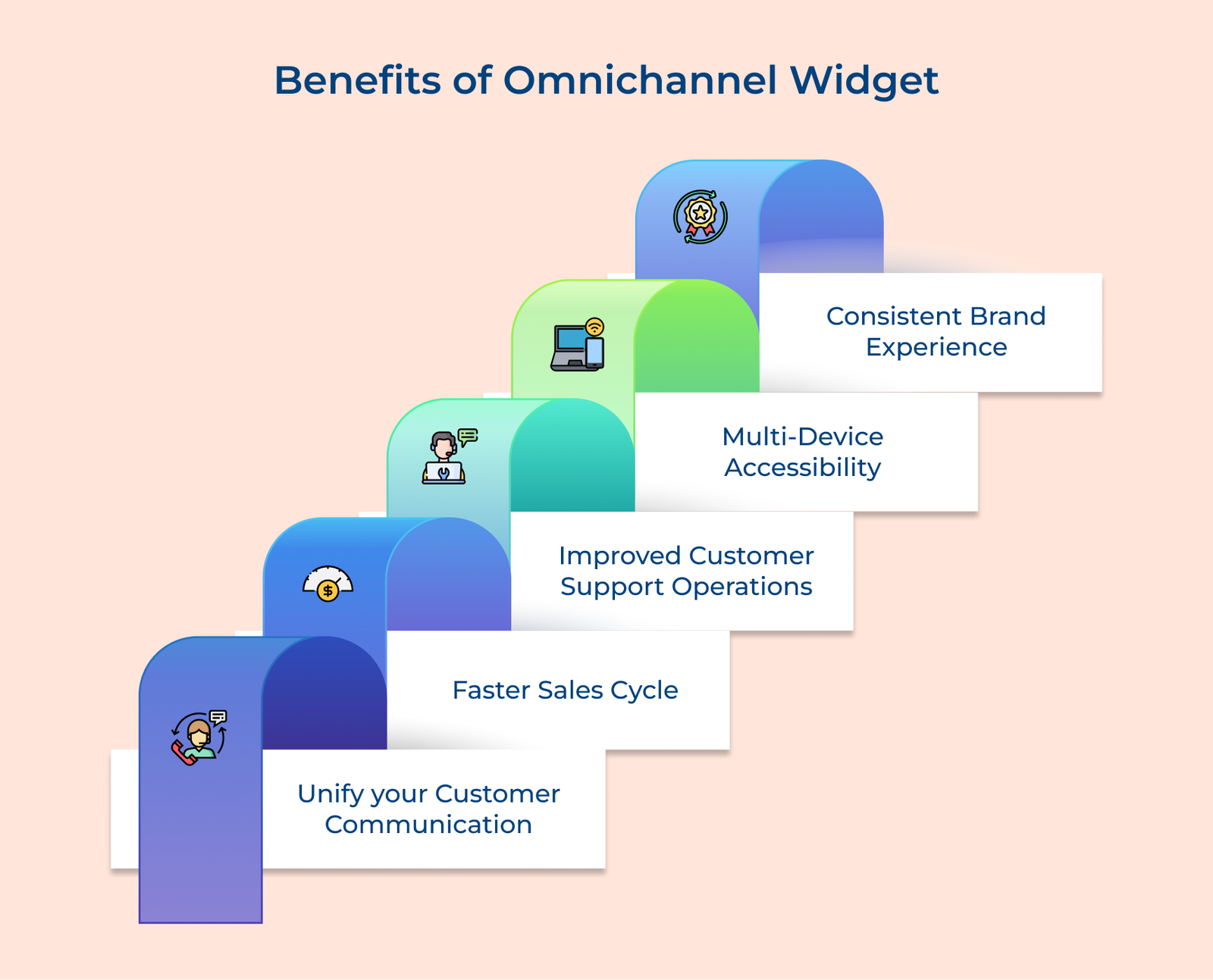
5 Benefits of Omnichannel Widget

The omnichannel chat widget offers a range of benefits that can greatly enhance your customer communication and overall business operations. Here are the key benefits of the chat widget:

Benefits of Omnichannel Widget

1. Unify your customer communication: One of the major advantages of Omnichannel Chat Widget is that it allows you to streamline all your customer communication channels into one platform. It ensures consistency and avoids any communication gaps or delays that may occur when using multiple channels separately.

2. Faster sales cycle: Businesses can provide immediate assistance to their potential customers, leading to faster sales conversions. Customers get real time answers to their queries, eliminating the need to wait for responses through other channels. The instant support significantly improves customer satisfaction and increases the likelihood of making a purchase.

3. Improved customer support operations: The Omnichannel Chat Widget enables businesses to provide personalized customer support. Agents can access customer information and order history, allowing them to understand the customer’s context while providing tailored solutions quickly. The faster issue resolution leads to improved customer satisfaction.

4. Multi-device accessibility: Another benefit is its compatibility with different devices including desktops, laptops and tablets. Customers can reach out for support from their preferred device, enhancing convenience. The flexibility contributes to a positive customer experience, as they can engage with your business wherever and whenever they need assistance.

5. Consistent brand experience: Omnichannel Chat Widget ensures that customers receive a consistent brand experience across all channels. Whether they interact with your business through social media, email, or chat, the messaging tone and style will remain consistent. The dynamic 365 customer service creates a cohesive brand identity, strengthening the company’s reputation.

Common Challenges of Omnichannel Chat Widgets

Implementing omnichannel chat widgets always includes obstacles. Businesses need to be aware of these common challenges to plan a sustainable rollout.

  1. Data Silos Across Systems: Businesses with omnichannel intentions often struggle to fully integrate all customer data sources, leading to incomplete profiles. This limits agents’ ability to access a truly unified view of every interaction.
  2. Inconsistent Agent Handoffs: When conversations move from chatbots to human agents or between team members, critical context can get lost. Customers are forced to repeat information, undermining seamless omnichannel.
  3. Over-Reliance on Automation: Businesses sometimes depend too heavily on chatbots to cut costs, leading to frustrating experiences with complex queries. Poorly configured bots fail to escalate issues to human support.
  4. High Implementation Costs: Multiple channels into one cohesive widget require significant upfront investment. Smaller businesses might find the cost and technical complexity difficult to manage.

Each of these challenges has practical solutions that businesses can implement:

  • Data Silos: Invest in integrated CRM and unified customer data platforms.
  • Agent Handoffs: Enable shared notes and context logs during transitions.
  • Automation Reliance: Set clear fallback rules for bot-to-human escalation.
  • Implementation Costs: Start with a phased rollout across priority channels.

Scale your Business Messaging with Veemo’s Omnichannel Widget

An omnichannel widget is no longer optional for brands aiming to deliver a superior customer experience. Businesses can resolve issues and build meaningful customer relationships through chatbots, live chat or personalized messages.

Messaging channels also add real business value beyond accessibility, offering insights into customer behavior and pain points. These insights enable brands refine marketing strategies, tailor personalized offers and identify new opportunities.

Last update: August 21, 2026

FAQs about Omnichannel Live Chat Widget

An omnichannel widget works by aggregating customer communications from different channels into one centralized dashboard for agents to manage efficiently across every conversation. This dashboard enables agents to view and respond to inquiries in real time.

The widget also tracks customer data and interaction history, giving agents full context of each channel a customer used. The continuity enables delivering more personalized responses consistently.

Most omnichannel chat widget providers offer extensive customization options to match your brand identity across customer touchpoints. It makes sure the widget feels natural on your website instead of a generic third-party tool. Common customization options are:

  • Color schemes and typography to match brand guidelines
  • Widget size and screen position for optimal visibility
  • Custom branding elements such as logos and welcome messages
  • Chat window layout tailored to your website’s design

Yes, an omnichannel chat widget suits businesses of every size, not just large enterprises with dedicated support teams. Small businesses with limited resources find it a cost-effective way to offer round-the-clock support without a large team.

Smaller businesses can also compete with larger competitors by matching the same level of convenience and responsiveness. Flexible pricing plans make this accessible even during a tight budget.

An omnichannel chat widget collects various types of customer data depending on the features and integrations in use. It gives businesses a complete picture of each customer’s history and preferences across every interaction. Commonly collected data includes:

  • Contact information and chat transcripts for reference
  • Purchase history and previous interaction records
  • Browsing behavior and engagement patterns on the site
  • CRM-integrated data for deeper, personalized insights

Omnichannel chat widget integration into existing systems is straightforward for most businesses, regardless of team size. Most providers offer easy-to-use APIs for quick setup. Based on your requirements, the widget can also connect with CRM or other business tools. The flexibility streamline the overall support workflow.