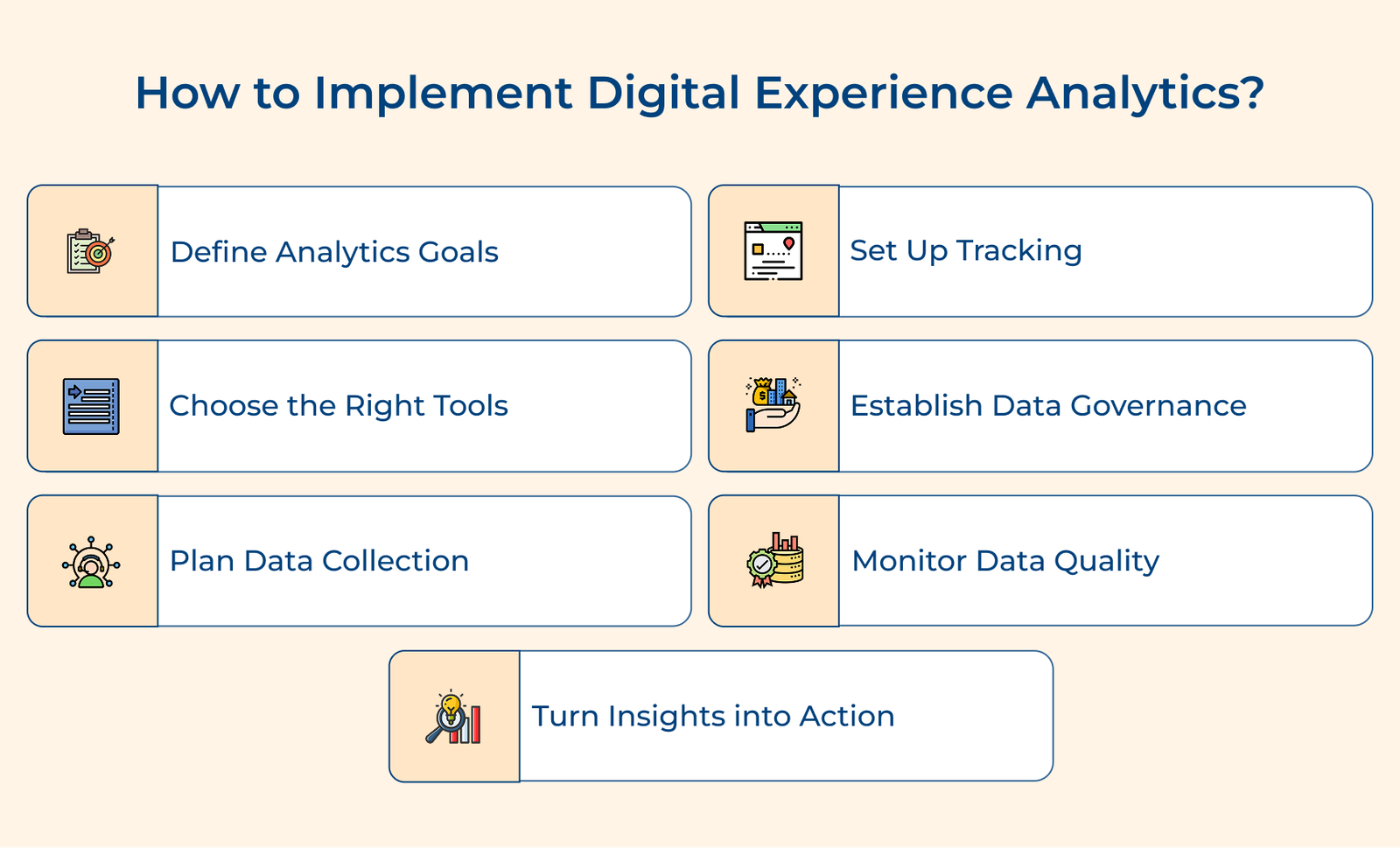
1. Define Clear Digital Analytics Goals
Before diving into tools and data, start by knowing exactly what you’re trying to learn or improve. Clear goals keep your analytics efforts focused and meaningful. Without them, it’s easy to collect lots of data without learning anything useful.
Then turn the needs into clear goals tied to measurable actions. Break each goal down into metrics you can actually track. It gives your analytics work structure and purpose.
Pro tips:
- Use the SMART method(Specific, Measurable, Achievable, Relevant, Time-bound) to avoid vague or unrealistic goals.
- Build a goal hierarchy: start with broad business priorities, then narrow down to specific metrics. It keeps everyone aligned and shows how analytics supports the bigger picture.
2. Select the Right Analytics Tools Platform
Picking the right analytics platform isn’t just about features—it shapes how well you understand your users and how quickly you can act on what the data tells you. The tool you choose affects everything from how easily you gather data to how clearly you can see what’s working and what’s not.
What are your specific analytics requirements?
Start with your goals. The clearer you are on what you want to know, the easier it is to pick a tool that fits. Some platforms go deep in one area but don’t offer much breadth. Others try to cover everything, but not in great detail. Match the tool to your specific needs.
How will the tool integrate with your tech stack?
Look at how the tool connects with the systems you already have—your CRM, email platform, support software and so on. Check for built-in integrations, solid API support and ease of setup. A tool that doesn’t fit your stack will slow you down or create gaps in your data.
What level of technical expertise is required?
Some tools are plug-and-play. Others need custom code, tagging and ongoing developer involvement. Know your team’s skills and bandwidth. If you’re short on technical resources, a simpler tool with strong support might work better, even if it means giving up some advanced features. Review available guides, training materials and user communities to see how steep the learning curve will be.
How does the tool handle data privacy and security?
Don’t overlook how the tool handles user data. Make sure it complies with privacy laws like GDPR and CCPA. Look into how it stores data, how it manages user consent and what security measures are in place. Even if you’re not legally required to meet the standards today, your users expect their data to be handled responsibly. A breach of trust can do lasting damage.
3. Plan Data Collection Strategy Carefully
A good data collection strategy gives you a clear, intentional way to gather digital experience data that supports your business goals. Instead of collecting everything and hoping for the insights, you collect the right things. Without a plan, it’s easy to miss key user behaviors or collect data that doesn’t help you make better decisions.
- User journey mapping plan: Start by identifying every point where users interact with your digital platforms. Map out the full journey, from landing pages to checkouts. Make a list of actions you want to track, including moments when users convert, drop off or engage in meaningful ways.
- Data point prioritization plan: Not all data is equally valuable. Rank the data points you want to collect based on how directly they support your goals. Focus on metrics that tie to key outcomes like conversions, engagement or user retention.
- Technical implementation plan: Lay out how you’ll put your tracking in place. Define what needs to be tagged, how events will be logged and how often data will be collected.
- Quality assurance plan: Good data is accurate data. Set up regular checks to catch missing or broken tracking, incorrect values or unexpected behavior. Create rules to validate new data as it comes in and flag anything that doesn’t look right.
One of the hardest parts of building a data strategy is collecting enough detail without overstepping privacy boundaries. You’ll need to figure out what’s essential and what can be left out, especially when users opt out of tracking or when privacy laws limit what you can collect. The goal is to get useful insights while staying respectful and compliant.
4. Configure Tracking System Implementation Process
Tracking setup is the backbone of digital experience analytics. Done right, it gives you reliable, useful data about how people interact with your digital platforms. Done wrong, it can leave gaps in your insights or lead you in the wrong direction.
Set Up the Base Tracking Code Properly
The first step is getting the core tracking code in place across all your websites or apps. The code captures essential data like page views, session durations and user IDs. Make sure it’s placed correctly in your site’s structure so that it loads on every page. Test it thoroughly to confirm that it’s collecting data without delay or error.
Implement Custom Event Tracking Carefully
Base tracking gives you the big picture. Custom event tracking fills in the details. Identify the specific actions you want to monitor, like clicks on key buttons, form submissions or interactions with dynamic elements.
5. Establish Data Governance Framework Structure
A data governance framework sets the rules for how you manage analytics data across its lifecycle, from collection to deletion. It helps ensure that your data stays accurate, consistent and secure while staying in line with regulations. Without a solid framework, your analytics can quickly become disorganized, unreliable or even violate data protection laws.
Create Clear Data Handling Policies
Start by defining how data should be collected, stored and used. Be specific about retention timelines, acceptable use cases and how sensitive information should be handled. The rules should support your business goals while also meeting legal requirements. Clear policies help reduce guesswork and prevent misuse.
Define Data Access Control Levels
Not everyone needs full access to everything. Set up user roles with clearly defined permissions to decide who can view, edit or export different types of data. It helps you protect sensitive information without slowing down teams that rely on data to do their jobs.
Document Management Procedures Thoroughly
Write down your data procedures. It includes how you collect data, how your systems are configured and how updates should be handled. Good documentation ensures everyone follows the same steps and that knowledge isn’t lost when team members change. Keep it up to date and easy to find.
6. Train Teams on Analytics Usage
Even the most advanced analytics setup is useful if your teams don’t know how to use it. Training isn’t just a one-time task, it’s a critical part of making your digital experience analytics program work. When people know how to interpret and apply data in their daily work, better decisions follow.
- Foundation training: Every team needs to understand what digital experience analytics is and why it matters. Introductory training should cover both the concepts and the tools, with clear examples of how the data connects to their day-to-day responsibilities.
- Role-based advanced training: Not everyone uses analytics the same way. Marketers may need to track campaign performance, while product managers are focused on user flows and feature usage.
- Hands-on workshop sessions: Reading about analytics isn’t enough—people need to try it out. Run regular workshops where teams can explore the tools, solve real problems and learn from common mistakes.
- Continuous learning programs: Tools change. So do teams. It is why training shouldn’t stop after onboarding. Set up a rhythm for ongoing learning – short refreshers, updates on new features and advanced techniques for experienced users.
7. Monitor and Validate Data Quality
Good decisions start with good data. If your user experience analytics is off even slightly, so are the insights you’re basing your choices on. That’s why monitoring data quality isn’t optional. It’s an ongoing process that keeps your system healthy, catches issues early and makes sure you can trust what your data is telling you.
Implement Regular Quality Check Systems
Start by reviewing your data collection regularly. Look for gaps, weird spikes or numbers that don’t match what you’d expect based on past patterns. The checks help you catch issues early, before they mess with your analysis. Create benchmarks, compare against them and dig into anything that looks off.
Set up Automated Monitoring Alerts
You don’t want to find out something went wrong after a report’s already been shared. Set up automated alerts that notify your team when something isn’t right, like traffic dropping suddenly or key metrics behaving unusually. Define clear thresholds and make sure your alert system includes who should be notified or what action they should take.
Create Data Validation Testing Methods
Just because your tracking code is installed doesn’t mean it’s working correctly. Create test cases that walk through different user journeys across platforms and devices. Validate whether the data being collected matches what happened.
8. Create an Action Plan From Insights
User experience analytics data only delivers value when it leads to action. Collecting data and spotting patterns is just the start—what matters is what you do with it. Without a clear process for turning insights into steps, even the best analytics can end up unused.
Develop Analysis Framework Structure
An analysis framework provides a consistent method for interpreting digital experience analytics data. It means establishing standard processes for reviewing data, identifying significant patterns and drawing meaningful conclusions.
Establish Regular Reporting Processes
Regular reporting keeps stakeholders informed about user experience analytics insights and their business impact. It involves creating standardized report formats, determining appropriate reporting frequencies and establishing channels for sharing insights.
Create a Recommendation Development System
A recommendation system turns analytics insights into concrete action steps. It means developing processes for translating findings into practical suggestions. You’ll need to establish criteria for prioritizing changes based on impact, create templates for implementation plans and set up tracking methods to measure the impact of implemented changes.
Digital Experience Analytics Example
Let’s go through some compelling examples of how leading brands are leveraging digital customer experience analytics to transform their business operations.
Nike
Nike uses digital experience analytics to fine-tune its mobile app and website for each customer. It delivers tailored content that matches individual interests by tracking how people shop, work out and browse.
They also monitor interactions with features like virtual try-ons and size tools to improve usability. The focus on personalization has paid off. Customers spend more time exploring Nike’s digital platforms, return more often and make more purchases. The result is stronger engagement, higher sales and increased customer loyalty.
Netflix
Netflix takes a deep dive into how people watch content – what they watch, how long they watch, how they navigate and which devices they use. The insights fuel their recommendation engine and shape the user interface.
Their data-led strategy keeps viewers watching. Netflix reduces subscriber churn by making smart, relevant suggestions and improving platform ease-of-use.
Amazon
Amazon analyzes every step of the customer journey—from search habits and buying decisions to how users leave reviews. They also monitor how their site performs across devices to ensure a smooth shopping experience.
Amazon makes it easier for customers to find what they want and complete purchases quickly by constantly refining search. It has boosted conversion rates, customer satisfaction and repeat business.
Spotify
Spotify keeps track of how users listen, what they skip, how they find new music and how they interact with playlists. The data feeds into personalized playlists and improves music discovery features.
Listeners stay on the app longer, explore more and feel like the platform “gets” their taste. The personalization has made Spotify a go-to for daily listening and music discovery.
Starbucks
Starbucks uses analytics to improve its app experience, especially mobile ordering and rewards. They study how customers place orders, use payment options and engage with rewards features.
The result is a faster, more intuitive app that customers rely on. It’s easier to order favorite drinks, earn rewards and find nearby stores—leading to higher app usage.
Digital Experience Analytics Best Practices
Below are some additional best practices that can enhance your digital experience analytics implementation beyond the basic strategies.