Unified Customer View: Benefits, Components & Key Steps
Learn what a unified customer view is, why it matters and how to build one effectively.

Learn what a unified customer view is, why it matters and how to build one effectively.
Why do customers get frustrated repeating the same issue every time they’re transferred to a new agent? The information is simple. Their information is spread across disconnected systems instead of being available in one place. The numbers back it up, too! Research shows that 54% of customers abandon the brand after being forced to repeat their issue.
A unified customer view solves the issue by bringing customer interactions, transactions and preferences into a single profile that every team can access. When businesses work with disconnected customer data, they face issues like longer resolution times and missed opportunities to deliver better service.
A unified customer view refers to a single, real-time profile that brings every customer interaction into one place. It combines data from sales, support, billing, marketing and other connected systems, giving teams a complete picture of each customer instead of scattered pieces of information.
Customer data often lives across multiple disconnected systems, forcing agents to search through different tools or ask customers to repeat information they’ve already shared. The repeated conversations slow down resolution, create frustration and make every interaction feel less personal.
Giving agents access to purchase history, previous conversations, billing details and support records from one screen helps them understand the customer’s situation immediately. Faster access to complete information leads to quicker resolutions, fewer transfers and a more consistent customer experience.
Key objectives:
Let’s go through the key unified customer view benefits and see how bringing customer data into one place helps businesses improve long-term customer relationships.
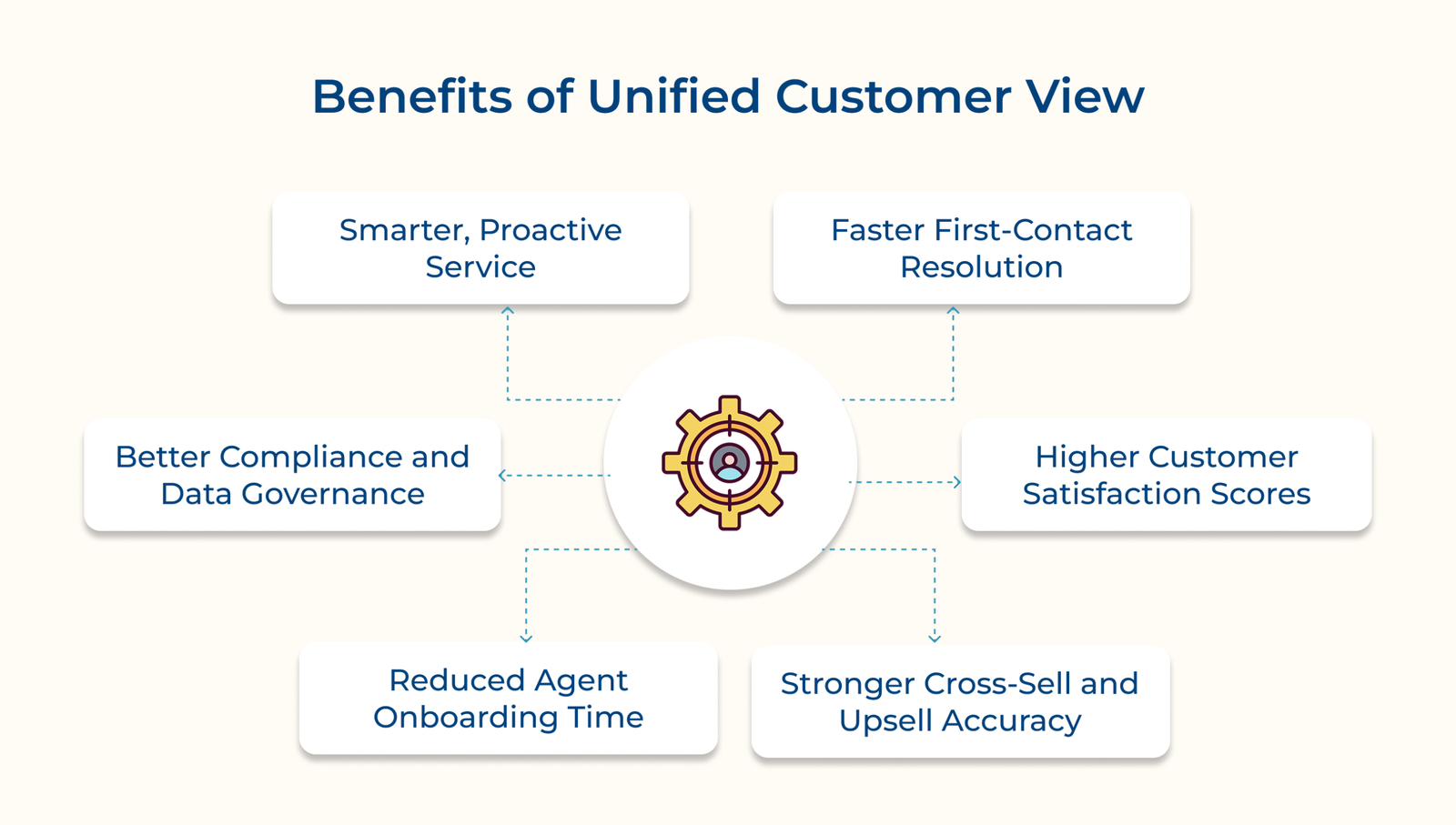
A unified customer view gives support teams instant access to customer history, purchases and previous interactions from one place. Agents stop digging through five tabs to find one answer, since every detail sits in a single dashboard. It alone can cut resolution time by 20-30% for support teams handling complex, multi-product accounts.
Customers appreciate not having to repeat the same issue every time they’re transferred to another agent. Complete customer context allows conversations to continue naturally, creating a smoother experience that often leads to higher satisfaction.
Sales teams can identify buying patterns and product usage without relying on incomplete records. A unified customer view makes it easier to recommend relevant products and services that match each customer’s actual needs.
New agents become productive faster when complete customer information is available in one place. Easy access to customer history reduces training time and helps new team members handle conversations with greater confidence.
A unified customer view centralizes customer information, making it easier to manage consent, retention policies and customer data requests. Keeping records together also reduces data gaps that often create problems during audits and regulatory reviews.
Patterns like repeated complaints or usage drop-offs become visible before a customer ever files a ticket. The predictive layer lets teams reach out first, which builds trust in ways reactive support never can.
The following are the core components of unified customer view that need to come together for that profile to actually be useful.
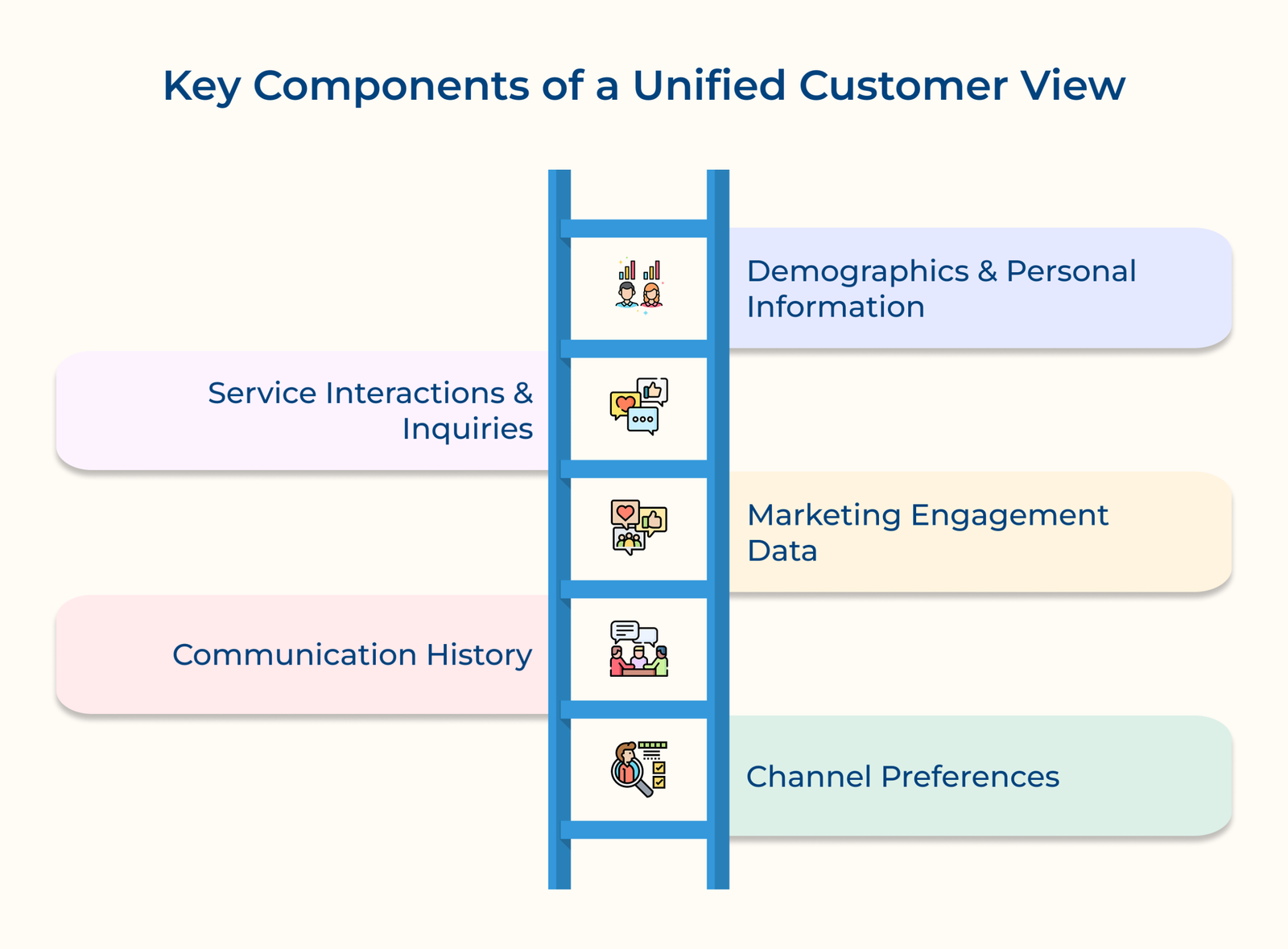
1. Demographics and Personal Information
Demographic and personal information forms the foundation of a unified customer view. Details like name, age, location and account information create the core customer profile that supports every other data point.
Customer information changes over time, so these records need regular updates instead of being treated as a one-time task. Accurate profile data keeps personalization, communication and reporting reliable across every team.
Key questions:
2. Service Interactions and Inquiries
Service interactions are a key part of a unified customer view because they capture support tickets, calls, chats and customer inquiries in one place. Complete interaction history helps teams understand previous conversations and avoid asking customers to repeat the same information.
Support history becomes much more valuable when every interaction is categorized by issue type, resolution time, and customer sentiment. Organized records help teams identify recurring problems and improve future support.
Key points:
3. Marketing Engagement Data
Marketing engagement data adds valuable context to a unified customer view by showing how customers interact with emails, campaigns and your website. Shared visibility helps support, sales and marketing teams stay aligned during every customer conversation.
Email opens, campaign clicks and on-site browsing behavior reveal what customers are interested in before they contact your business. The context helps every team provide more relevant conversations and recommendations.
Key takeaways:
Disconnected marketing and support data often creates inconsistent customer experiences. Bringing both together helps every team work with the same customer context. Customers receive more relevant conversations because every team sees the same history, preferences and recent interactions.
4. Communication History
Every email, phone call, chat and message should appear in one complete timeline, regardless of which team handled the conversation. A unified customer view gives every employee access to the same communication history, creating smoother and more consistent customer interactions.
Conversation history becomes much more useful when timestamps, communication channels and follow-up actions are recorded alongside each message. Complete context helps agents understand the customer’s journey before responding.
5. Channel Preferences
Reaching customers through the right communication channel makes every interaction more effective. A unified customer view keeps channel preferences together, making it easier to contact customers where they are most likely to respond.
Customer behavior often tells a different story from account settings. Someone who selected email during signup may consistently reply faster through chat or text, making actual engagement patterns just as important as stated preferences.
Key signals:
The following are the essential steps to build a unified customer view, helping you connect customer data and deliver more consistent customer experiences.
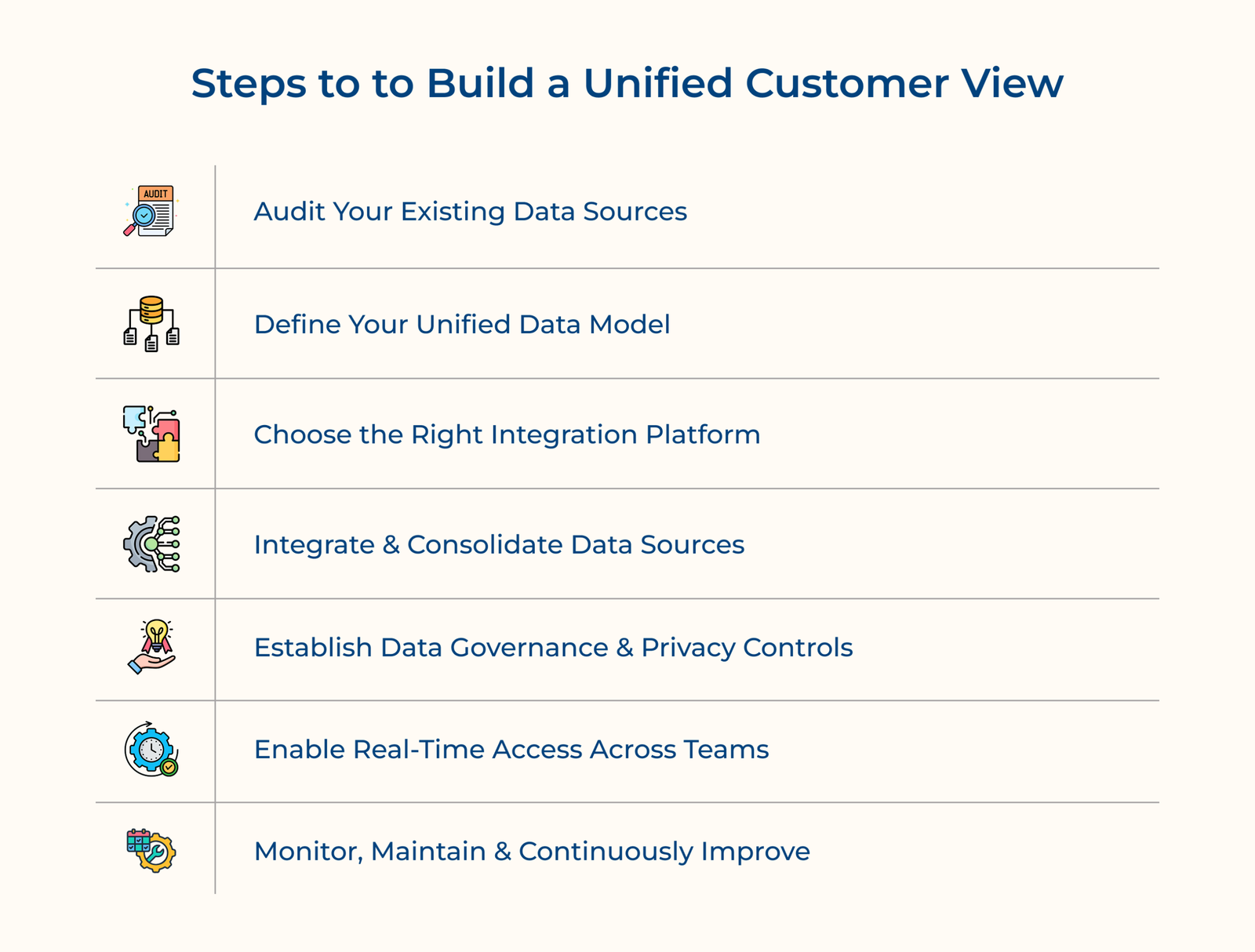
Building a unified customer view starts with understanding where your customer data already lives. Auditing every system before integration helps uncover duplicate, outdated and incomplete records that can create problems later.
Key questions:
The step helps identify data gaps before they become part of your unified customer view. Cleaning the issues early makes the entire integration process faster and far more reliable. Wondering where to begin?
Export customer data from each system, then compare records using customer IDs or other unique identifiers. CRM and support platforms are usually the first places where duplicate customer records appear.
Pro tips:
What exactly does a data model do? It acts as the blueprint for your unified customer view, defining which fields matter, who owns them and how they are labeled across every connected system. Without that blueprint, integration simply moves inconsistent data into one place instead of improving it.
Key ways:
Choosing the right integration platform is a critical step in building a reliable unified customer view. The right solution connects your systems smoothly today and continues to support your business as your customer base grows.
Key factors:
This is where the technical work begins. Connecting every audited system into a single data pipeline creates the foundation of a reliable unified customer view. Done correctly, every team works from the same accurate customer record instead of disconnected pieces of information.
Connect Core Business Systems
Start with your CRM, support and billing platforms since they contain the most important customer information. Connecting the systems first helps eliminate repeated questions and gives teams immediate access to essential customer context.
Sync Marketing and Transactional Data
Once core systems are connected, layer in marketing engagement and transaction history for fuller context. The addition is what shifts the profile from basic record-keeping to genuinely predictive insight.
Resolve Duplicate Customer Profiles
Merge records that belong to the same customer across different systems. Removing duplicate profiles improves data accuracy and ensures every interaction contributes to one complete customer record.
Data governance becomes essential once customer information is connected into a unified customer view. Protecting customer data means controlling who can access it, keeping it secure and meeting privacy requirements across every system.
Key points:
A unified customer view delivers the most value when every team can access the latest customer information instantly. Real-time access keeps support, sales and marketing teams working from the same up-to-date customer record instead of outdated reports.
Real-time access means every update is available as soon as it happens. A support agent, salesperson and marketer should all see the same customer information at the same time. That shared visibility helps teams respond faster and keeps customer conversations consistent.
Key ways:
Real-time access brings every part of a unified customer view together. Customer data becomes far more useful when every team can see accurate information the moment they need it. Faster access also helps teams make informed decisions without slowing down the customer experience.
A unified customer view needs regular maintenance to stay accurate and useful. Customer data changes over time, new systems get added and information becomes outdated if nobody reviews it consistently.
Many businesses assume the work ends once the system is live, but that’s when ongoing maintenance becomes most important. Regular reviews help keep customer records accurate and ensure teams continue working with reliable information.
Check out the following examples to see how different industries use a unified customer view to improve customer experiences and deliver faster, more personalized service.
1. Retail and E-commerce
Retailers use a unified customer view to bring purchase history, browsing behavior and loyalty data into one customer profile. Support agents can instantly see exactly what a customer purchased, returned or browsed without switching between multiple systems.
The complete view helps recover abandoned carts, resolve order issues faster and identify relevant product recommendations. Customers receive quicker, more informed support, while businesses benefit from higher repeat purchases and fewer escalated complaints.
2. Banking and Financial Services
Banks use a unified customer view to combine account activity, transaction history, and previous service requests into one place. Relationship managers can quickly identify unusual spending patterns, missed payments or recent interactions before assisting the customer.
The complete customer context improves fraud detection and makes financial conversations more relevant. Customers spend less time repeating information, while banks strengthen trust and improve long-term customer retention.
3. Healthcare Providers
Healthcare providers use a unified customer view to combine patient records, appointment history and insurance information into one place. Doctors, nurses and administrative teams can access the same patient information without contacting multiple departments.
This reduces administrative errors, shortens appointment or billing processes and improves coordination across teams. Patients spend less time repeating information and gain greater confidence in the quality of care they receive.
4. Telecom and Utilities
Telecom and utility providers combine billing records, service usage and support history into a unified customer view. Support teams can immediately check network issues, previous complaints and account status before starting the conversation.
The visibility cuts down on repeat calls for the same unresolved issue, which is historically one of telecom’s biggest complaint drivers. Providers using the approach often see measurable drops in churn tied to service frustration.
Let’s go through the differences between a unified customer view and a traditional customer database to understand why one provides complete customer context while the other stores disconnected records.
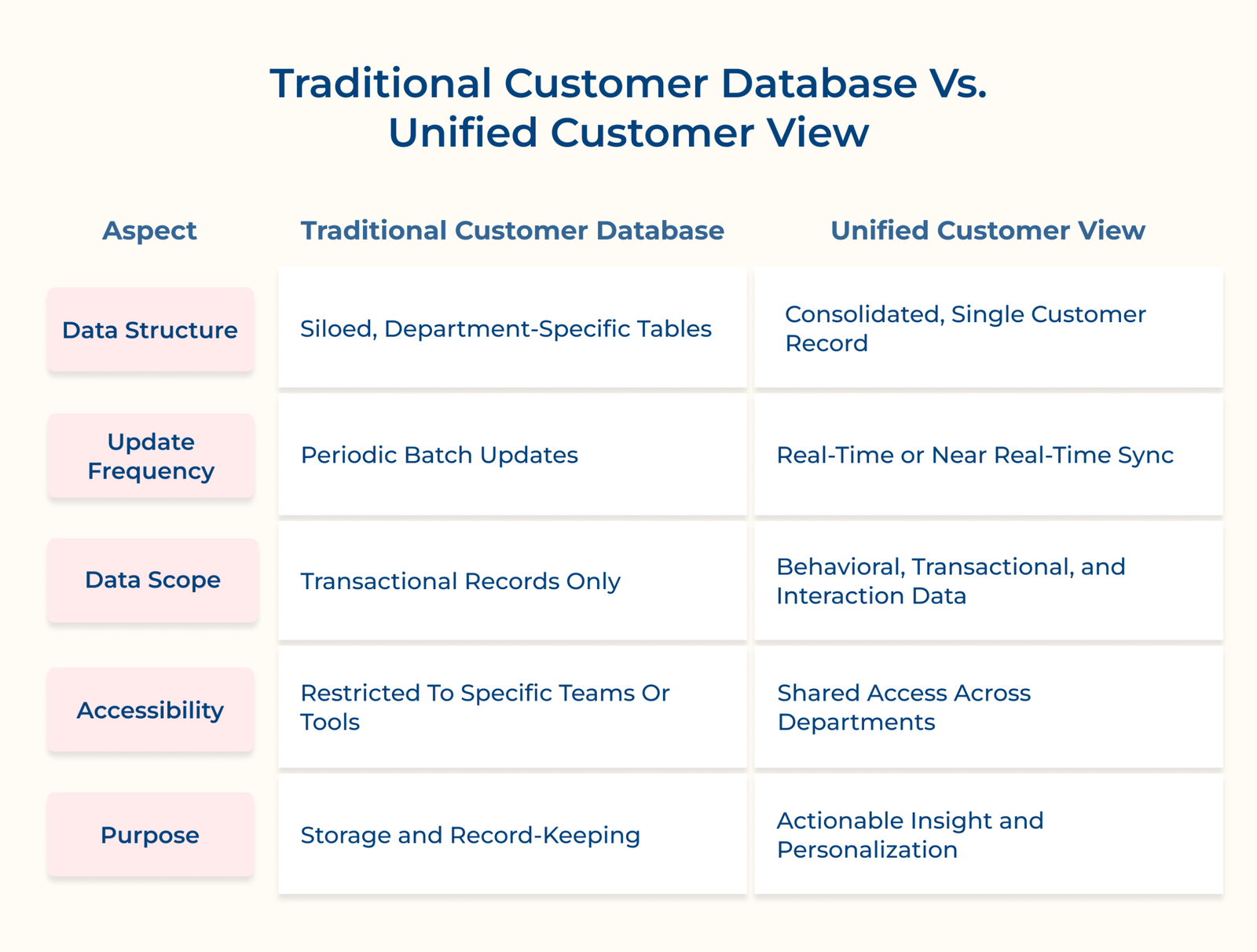
1. Data Structure
A traditional customer database stores information in separate systems built around individual departments. Sales, support and billing often maintain their own records, making it difficult to see the complete customer picture.
A unified customer view brings all customer information into one shared profile that every team can access. Everyone works from the same customer record instead of comparing information across multiple systems.
2. Update Frequency
Traditional customer databases usually refresh data at scheduled intervals, which means customer information may already be outdated when someone needs it. Delayed updates make it harder for teams to respond with the latest context.
A unified customer view updates customer information in real time or as close to it as possible. Teams can respond using the most recent customer activity, making every interaction more accurate and relevant.
3. Data Scope
Traditional customer databases mainly store account details, purchases, billing records and other transactional information. Customer behavior and interaction history often remain scattered across different platforms.
A unified customer view pulls transactional, behavioral and interaction data into one coherent picture. That breadth is what allows teams to predict needs instead of just recording what already happened.
4. Accessibility
Traditional customer databases usually limit access to the department that owns the system. Employees often have to switch between multiple tools or request information from another team.
A unified customer view gives every relevant team access to the same customer information. Shared visibility reduces repeated questions and creates more consistent customer experiences. Customers spend less time explaining their situation because every team already has the context they need.
5. Purpose
Traditional customer databases are built to store customer records and maintain historical information. Their primary role is record keeping rather than supporting day-to-day customer interactions.
A unified customer view exists to drive action, surfacing insights agents and marketers can use immediately. That shift from passive record-keeping to active insight is really the core difference between the two systems.
A unified customer view is what separates reactive support teams from the ones customers actually trust. Every team works with the same customer context, making conversations more consistent and reducing unnecessary back-and-forth.
Key takeaways:

A unified customer view combines data from CRM platforms, support systems, billing software, marketing tools, website activity and purchase history. Bringing the sources together creates one complete customer profile that every team can use.
Measure success using metrics such as first contact resolution, average handle time, customer satisfaction scores and repeat contact rates. Comparing the numbers before and after implementation shows the impact of a unified customer view.
A unified customer view gives teams access to customer purchase history, preferences and past interactions into one place. The context helps businesses deliver more relevant recommendations, conversations and support based on each customer’s history.
Yes, agents resolve issues faster when they see the complete history instead of asking customers to repeat themselves. It reduces frustration and noticeably improves the overall service experience customers receive.
Businesses typically use Customer Data Platforms (CDPs), CRM systems with integration capabilities and middleware tools that connect multiple applications. Popular solutions include Salesforce, HubSpot, Segment and other enterprise data integration platforms.

Grow Customer Relationships and stronger team collaboration with our range of products across the Conversational Engagement Suite.
Omnichannel Customer Support & Help Desk Software
AI Enabled Business Messaging and Chatbot Software
Sales Engagement & CRM Software
Call Center Software & Virtual Phone System
Product Marketing & Experience Platform
Customer Experience & Feedback Management Software
 Scroll to top