Omnichannel Help Desk Software Guide: Features, Benefits & Tools

A comprehensive guide to maximize customer support through omnichannel help desk software. Get in-depth insights into leveraging multiple communication channels to deliver seamless support.

No credit card required. Easy setup

Omnichannel Help Desk Software

Trusted By Leading Brands

Omnichannel Help Desk Software for Unified CX

Let the customers reach out to their preferred communication channels and manage them in a single interface to deliver a superior customer experience.

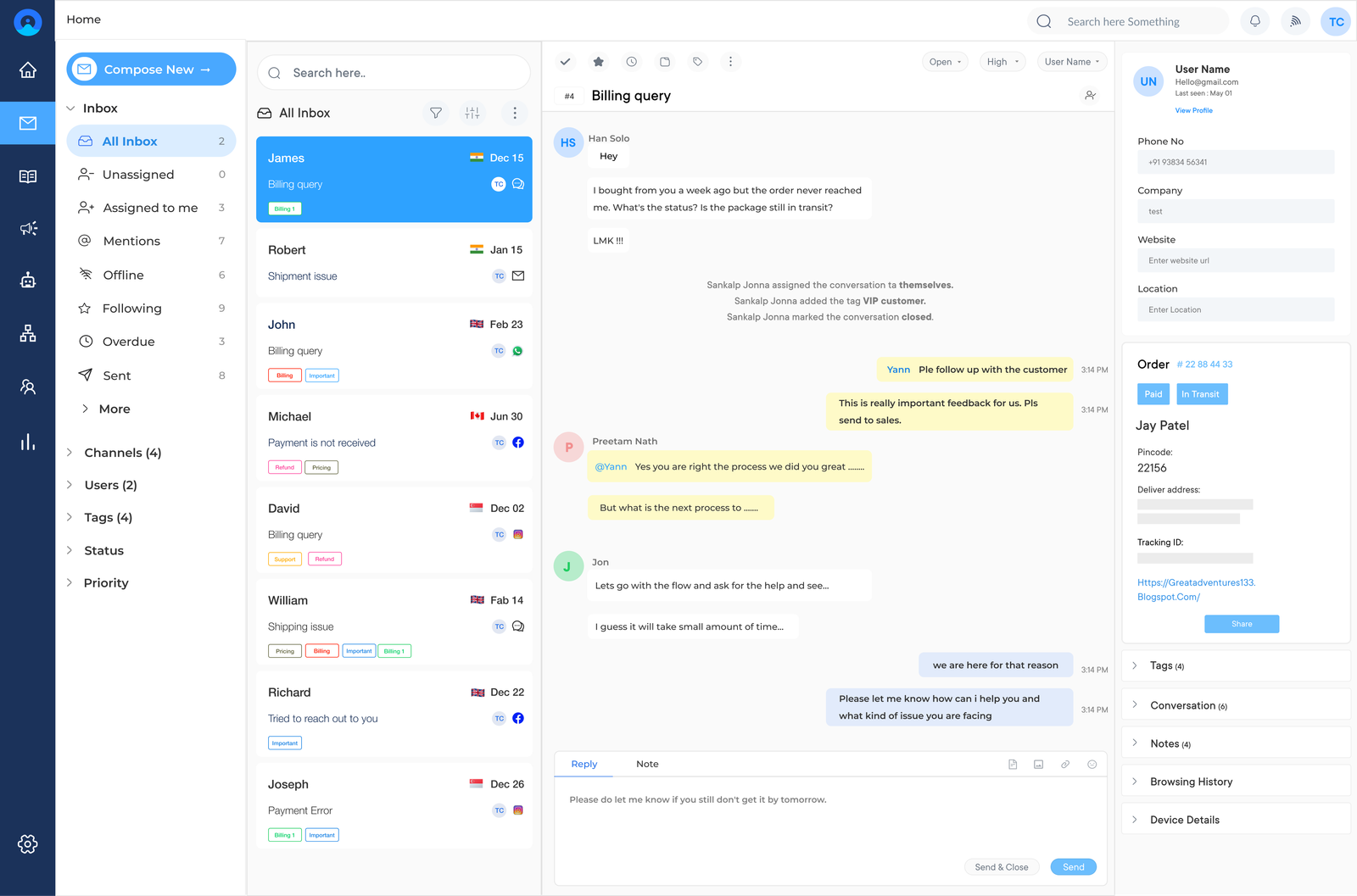
Omnichannel Help Desk Software Dashboard 2

Seamless & Consistent Customer Experience

Ensure a consistent customer experience across multiple channels such as email, live chat, social media and phone support. The customers can easily reach out for assistance using their preferred communication method.

Centralization of Inquiries

Centralize all customer inquiries in one platform, streamlining the support process and reducing response times. The agents no longer have to switch between different systems or channels.

Unified View of Interactions

Provide agents with a unified view of customer interactions across all channels, enabling personalized and context-aware support. It ensures the agents have a complete understanding of each customer’s needs.

Facilitate Collaboration

Facilitate collaboration among support teams, providing a centralized communication and knowledge-sharing platform. Agents can then easily collaborate on resolving complex customer issues.

Omnichannel Help Desk Software Dashboard 2

The customers expect seamless support across multiple channels. Many businesses struggle to manage inquiries from various platforms, leading to frustrated customers and overwhelmed support teams. The team wastes precious time switching between tools, while customers grow increasingly impatient waiting for resolutions.

Getting the best omnichannel help desk software is the way to go as it serves as a powerful tool that centralizes all customer interactions into a single and intuitive interface. It streamlines communication, improves response times and provides a 360-degree view of customer interactions. The platform empowers the team to deliver exceptional support across all channels.

What is an Omnichannel Help Desk Software?

Omnichannel help desk software refers to support software that integrates multiple communication channels into a unified customer service platform. It allows businesses to manage and respond to customer inquiries across various touchpoints from one centralized interface.

Omnichannel support goes beyond basic multichannel operation by preserving complete customer context when customers switch between channels. This eliminates repetitive explanations and ensures personalized service throughout the customer journey.

The unified approach enables businesses to respond faster, which drives stronger customer satisfaction and loyalty over time.

Features of an Omnichannel Helpdesk Software

Discover essential features of omnichannel helpdesk software that are important to improve response times and deliver seamless experiences across various platforms:

Features of an Omnichannel Helpdesk Software

1. Omnichannel Ticketing Inbox

The central feature consolidates customer interactions from various channels  into a single unified interface. Every customer message converts into a ticket regardless of its source, priority or status. It helps agents to stop switching between different platforms to track a single conversation.

This shared inbox prevents duplicate replies when multiple agents access the same conversation using assignment rules and internal notes.

2. Knowledge Base

An integrated knowledge base serves as a repository for common solutions, product information and FAQs. The deflection reduces overall support ticket volume across busy service teams.

A well-structured knowledge base allows agents to find instant answers through internal search, cutting resolution time. Dedicated knowledge base analytics reveal articles that need updates based on search failures.

3. Automation

Automation handles repetitive tasks such as ticket routing and canned responses using predefined rules or customer attributes. It reduces manual workload while improving response consistency across agents.

Workflow automation enforces business logic such as auto-assigning tickets or flagging overdue tickets automatically. This makes sure no messages slip through cracks during high-volume support periods.

4. SLA Management & Business Hours

SLA management sets clear response and resolution deadlines based on ticket priority with automatic breach alerts, keeping teams accountable to committed service standards.

Business hours configuration ensures SLA timers stop outside working hours or across different time zones. Teams across multiple regions benefit most from schedules reflecting actual local availability.

5. Client Portal

A client portal gives customers a dedicated space to submit tickets, track status and view past interactions without support repeatedly. It helps build transparency while reducing routine inquiries. 

Portals enable businesses to share announcements or updates securely with specific customers, transforming support from reactive ticketing into ongoing relationship management.

6. Asset & Task Management

Links tickets to specific hardware, software licenses or equipment with asset management, giving agents full context on the failure. It breaks complex tickets into trackable subtasks assigned across different teams, keeping collaborative work organized.

How to Choose the Right Omnichannel Help Desk Software

Owing to the numerous options available for omnichannel help desk software, it’s important to understand how to evaluate different solutions and make the decision to choose the best option:

How to Choose the Right Omnichannel Help Desk Software

1. Assess Business Needs

Before diving into options evaluate the specific requirements. Consider the customer base size, the channels they prefer (e.g., email, chat, social media, phone) and the team’s workflow. Identify pain points in the current support process and determine which features would address them. The assessment will help focus on solutions that align with business goals and customer service strategy.

2. Evaluate Channel Integration Capabilities

The core of omnichannel service desk software is its ability to seamlessly integrate multiple communication channels. Look for software that can consolidate interactions from various platforms into a single interface. The integration should allow agents to switch between channels effortlessly while maintaining context.

3. Consider Scalability and Customization

Choose a solution that can grow with the business. Scalability ensures the software can handle increasing customer inquiries and expanding support teams without compromising performance. Look for customization options that allow the brand to tailor the software as per the specific needs.

4. Analyze Reporting and Analytics Features

Robust reporting and analytics capabilities are crucial for improving customer service performance. Look for software that offers detailed insights into key metrics such as response times, customer satisfaction scores and agent productivity. Advanced features like real-time reporting can help make data-driven decisions and identify areas for improvement.

5. Prioritize User Experience and Ease of Use

The effectiveness of the help desk software largely depends on how easily the team can adopt and use it. Look for an intuitive interface that minimizes the learning curve for agents. Consider factors like ticket management efficiency, knowledge base integration and automation capabilities. .

6. Evaluate Security and Compliance Features

The increasing importance of data protection ensures the software the brand chooses must have robust security measures. Look for features like end-to-end encryption, multi-factor authentication and regular security audits. Verify that the software complies with relevant standards (e.g., GDPR, HIPAA). Consider the vendor’s data backup and disaster recovery policies to ensure business continuity.

Best Omnichannel Help Desk Software Reviewed

Let’s look at the comparison of the best omnichannel help desk solutions to find the perfect fit for seamless, integrated customer support across all communication channels.

#1. Veemo Support

Top omnichannel help desk software to enhance customer satisfaction

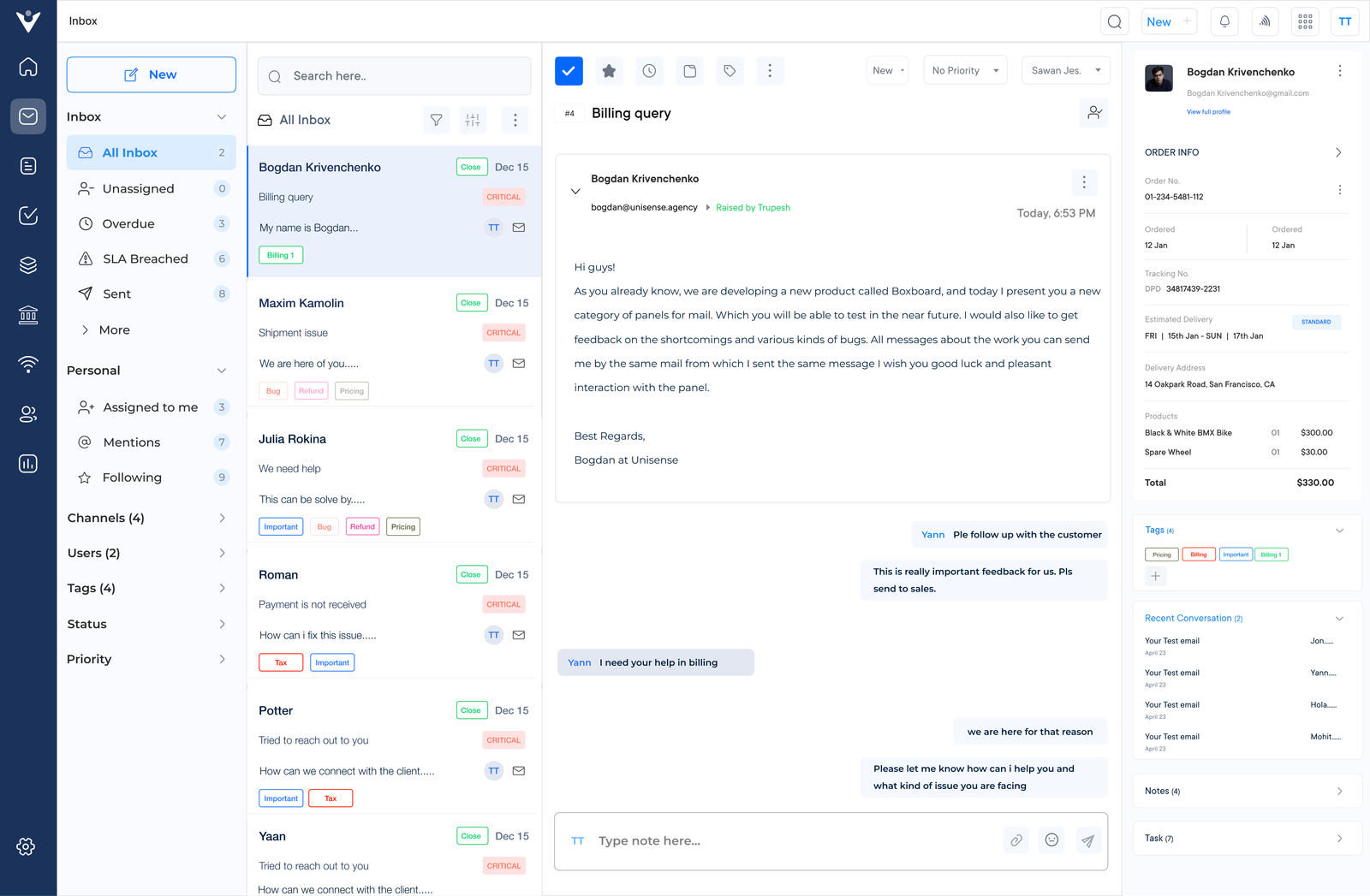
Veemo Support Inbox

Veemo Support is a leading omnichannel customer communication platform designed to streamline and enhance customer interactions. It offers solutions for businesses seeking to unify their customer service operations, improve efficiency and deliver exceptional customer experiences.

Veemo Support integrates various communication channels into a single and intuitive interface. The platform is well-suited for businesses that aim to provide seamless and personalized customer support while maximizing agent productivity.

Key features:

  • AI-powered automation: Veemo Support utilizes advanced artificial intelligence to automate routine tasks, route inquiries and provide instant responses.
  • Unified omnichannel inbox: The platform consolidates all customer interactions from various channels into a centralized inbox.
  • Smart routing and prioritization: Employs intelligent algorithms to automatically route inquiries to the most suitable agent based on skills, availability and inquiry type.
  • Customizable workflows and integrations: The software offers extensive customization options and integrates seamlessly with existing business tools.
  • Comprehensive analytics and reporting: Veemo Support provides detailed insights and performance metrics through its robust analytics dashboard.

Pricing: The Growth plan consists of 3 inboxes and costs $29. While the Enterprise plan is for $129 and consists of unlimited inboxes. Visit Veemo’s pricing page for more details.

#2. Omni24

Best omnichannel service desk software for personalized support

Omni Inbox

Omni24 is a leading customer engagement platform that offers a comprehensive omnichannel service desk software solution. The platform integrates all customer interactions into a single conversation thread. It provides agents with a 360-degree view of the customer’s history and context. It helps agents deliver personalized and efficient support, improving customer satisfaction.

Key features:

  • Multichannel Support: Omni24 offers support across various channels such as live chat, email, social media and SMS.
  • AI-Powered Chatbots: Utilize AI-powered chatbots to provide instant responses and improve efficiency.
  • Real-Time Visitor Monitoring: Track and analyze visitor behavior in real time to better engage with customers.
  • Knowledge Base: Create and maintain a centralized knowledge base to provide customers with self-service options.
  • Reporting and Analytics: Generate detailed reports and analytics to identify areas for improvement in customer support.

Pricing: The pricing starts from $29/month with one inbox feature and extends up to $149/month for unlimited inboxes. They are currently running a 14-day free trial. Sign up now!

#3. Zoho Desk

Top omnichannel help desk software to streamline workflow processes

Zoho Desk Omnichannel Help Desk software

Zoho Desk is a comprehensive omnichannel service desk software that streamlines customer support across multiple channels. It offers a unified platform for managing customer interactions via email, phone, chat, social media and self-service portals. The intuitive interface and powerful automation tool help businesses efficiently handle customer inquiries.

AI-powered assistance, customizable workflows, robust reporting and seamless integrations with other business tools are the standout features of the platform. Zoho Desk is suitable for businesses of all sizes particularly those looking for a scalable solution that can grow with their customer support needs.

#4 Hiver

Comprehensive omnichannel service desk software for seamless integrations

Hiver Omnichannel Help Desk Software

Hiver is a powerful omnichannel help desk software designed to streamline customer support directly from Gmail. It transforms Gmail into a robust support platform, allowing teams to manage shared inboxes, assign tasks and collaborate efficiently. Hiver’s intuitive interface eliminates the need for extensive training, making it ideal for small to medium-sized businesses.

Key features include shared inbox management, email assignment, collision detection and analytics. Hiver also offers automation tools, SLA tracking and integrations with popular business apps. It’s particularly suitable for businesses already using G Suite and customer-centric companies looking for a seamless email-based support solution.

Common Challenges in Implementing Omnichannel Help Desk Software

Most omnichannel help desk software comes with friction, even when the long-term benefits are clear. Below are common challenges businesses face during implementation.

1. Data Migration Complexity
Historical customer data and conversation history migration from multiple systems into one platform often involves technical complexity. Incomplete or corrupted data transfers disrupt customer context, affecting the continuity of omnichannel software promises.

2. Agent Training Resistance
Support agents familiar to single-channel workflows face difficulty in adopting new tools or automation-driven processes. This resistance slows adoption and without proper process, productivity dips during the initial transition.

3. Maintaining Consistency Across Channels
Uniform tone, response quality and resolution speed across multiple channels requires deliberate effort. Customer experience can feel inconsistent depending on which channel they happen to use without clear guidelines.

Here are five practical solutions to help ease the transition.

  • Phased Rollout: Migrate data and channels gradually instead of doing it all at once.
  • Structured Training Programs: Invest in hands-on, channel-specific training for every agent.
  • Vendor-Assisted Integration: Work closely with vendors that offer dedicated integration support.
  • Standardized Response Guidelines: Create shared pre-defined templates and tone guidelines across channels.

How to Run & Manage an Omni Channel Help Desk (Best Practices)

Only when the omnichannel help desk is leveraged in an ideal manner, does it ensure business is supporting its customers seamlessly across multiple channels.

Best Practices to Manage an Omnichannel Help Desk

1. Identify Customer Touchpoints to Map Their Journey

Identifying customer touchpoints and mapping their journey is a crucial strategy for managing an omnichannel help desk. Start by listing all customer interaction channels including social media, email, phone, live chat and in-person interactions. Examine how customers move between touchpoints and which channels they prefer for different types of interactions.

Create a visual customer journey map that illustrates the typical paths customers take when seeking support. The map should highlight key touchpoints, pain points and opportunities for improvement. It serves as a valuable tool for understanding the customer experience holistically and identifying areas for optimization.

Pro tips:

  • Involve cross-functional teams in the mapping process to gain diverse perspectives.
  • Use customer feedback to validate and refine the journey map.
  • Regularly update the map to reflect changing customer behaviours and new touchpoints.

2. Plan an Omnichannel Support for Seamless CX

Planning an omnichannel support strategy is essential for delivering seamless customer experiences (CX). Begin by ensuring consistent messaging across all channels, maintaining a uniform brand voice and information accuracy.

Design a unified customer view by consolidating data from various touchpoints into a single platform. The comprehensive profile helps agents understand the customer’s entire journey, leading to more contextual and effective support.

How to implement:

  • Develop a centralized content repository to maintain consistency across channels.
  • Invest in robust CRM software that integrates with all the support channels.
  • Conduct regular cross-channel training for support agents to ensure they can handle inquiries on any platform.

3. Document Help Desk Processes & SLAs

Documenting help desk processes and Service Level Agreements (SLAs) is crucial for maintaining consistency in omnichannel support. Start by defining standard operating procedures for each channel. Outline step-by-step instructions for handling various types of customer inquiries.

Establish clear SLAs that set expectations for response times, resolution times and escalation procedures across all channels. These agreements should be realistic, measurable and aligned with customer expectations. Create process flowcharts for common scenarios to visually guide agents through complex issues.

Pro tips:

  • Involve frontline agents in the documentation process to capture practical insights.
  • Regularly update procedures to reflect changing customer needs and new technologies.
  • Use a collaborative document management system for real-time updates to processes and SLAs.

4. Create a Comprehensive Knowledge Base for 24×7 Support

Creating a comprehensive knowledge base is essential for providing 24/7 support in an omnichannel help desk environment. Start by developing detailed FAQs and troubleshooting guides that address common customer issues across all channels. The resources should always be clear, concise and easy to navigate.

The portal should be user-friendly, searchable and accessible across devices. Regularly update and maintain the knowledge base to ensure its relevance. Set up a system for agents to flag outdated information and contribute new content based on their interactions with customers.

Pro tips:

  • Use analytics to identify frequently searched topics and prioritize content creation accordingly.
  • Implement a feedback mechanism for users to rate and comment on knowledge base articles.
  • Integrate the knowledge base with live chat and chatbot systems for seamless information retrieval during customer interactions.

5. Setup The Workflow Automation & Rules

Setting up workflow automation and rules is crucial for efficiently managing an omnichannel help desk. Begin by identifying repetitive tasks that can be automated such as categorizing incoming tickets or sending follow-up emails. Implement ticket routing and assignment rules to ensure inquiries are directed appropriately.

Set up automated responses for common inquiries across all channels. These can provide immediate acknowledgement of receipt, offer self-help resources or even resolve simple issues without agent intervention.

Pro tips:

  • Start with simple automation and gradually increase complexity as the brand assesses its effectiveness.
  • Regularly review and refine automation rules based on performance data.
  • Use A/B testing for automated responses to optimize their effectiveness in resolving issues and satisfying customers.

6. Measure Key Help Desk Metrics to Track Performance

Measuring key help desk metrics is essential for tracking performance and improving omnichannel support. Begin by defining relevant Key Performance Indicators (KPIs) such as average response time and channel-specific metrics. Make sure these KPIs align with overall customer service goals and SLAs.

Regularly review performance data and act on the insights gained. Schedule periodic performance reviews to identify trends, areas for improvement and best practices. Use the information to make data-driven decisions about resource allocation, training needs and process improvements.

Pro tips:

  • Customize the analytics dashboard to focus on the most critical metrics for the business.
  • Set up automated alerts for KPIs that fall below acceptable thresholds.
  • Share performance data transparently with the team to foster a culture of continuous improvement.

7. Train The Support Team

Training the support team is crucial for managing an effective omnichannel help desk. Provide channel-specific training to ensure agents are proficient in handling interactions across all platforms. It includes mastering the nuances of written communication and developing strong phone etiquette.

Emphasize the development of soft skills, particularly empathy and communication. These skills are essential for understanding customer needs, de-escalating tense situations and providing a personalized experience. Role-playing exercises and real-case scenarios can help agents practice these skills in a controlled environment.

Pro tips:

  • Use a mix of training methods, including e-learning modules, peer mentoring and hands-on practice.
  • Encourage cross-channel training to build versatility and improve overall team flexibility.
  • Regularly assess agent performance. Provide personalized coaching based on individual strengths and areas for improvement.

How AI and Automation Are Transforming Omnichannel Help Desks

Only when the omnichannel help desk is leveraged in an ideal manner, does it ensure business is supporting its customers seamlessly across multiple channels.

1. Instant AI-Powered Responses
Chatbots handle common queries instantly across channels to resolve simple issues without human intervention. This reduces wait times while freeing agents to focus on complex, high-value conversations that require attention.

2. Intelligent Ticket Routing
Omnichannel help desk software includes automation that analyzes ticket urgency and agent expertise to route inquiries to the right person. Agents can eliminate manual triage, reduce misrouted tickets and make sure customers reach someone equipped to help immediately.

3. Predictive Issue Resolution
AI uses historical data to predict issues before they escalate, suggesting proactive fixes. This shift in approach supports moving from reactive firefighting to anticipating customer needs before problems fully escalate.

4. Sentiment Analysis for Prioritization
Customer frustration or urgency is detected through language patterns to identify and prioritize at-risk conversations. Agents can intervene in inquiries faster on emotionally charged interactions, preventing escalations while improving overall retention rates.

5. Automated Knowledge Base Suggestions
AI identifies relevant help articles in real time based on ticket content to speed up resolution times. Agents can provide consistent answers while reducing the mental load on repetitive support work.

Why is Omnichannel Help Desk Software Important for Business?

Check out the various advantages of implementing an omnichannel help desk solution and how it can positively impact a business’s customer service operations.

1. Improved Customer Experience
Omnichannel service desk software allows businesses to provide a seamless and consistent customer experience across multiple channels. It ensures that customers can easily reach out for assistance using their preferred communication method.

2. Enhanced Efficiency
Businesses can centralize all customer inquiries and support tickets in one platform with omnichannel help desk software. It streamlines the support process, reduces response times and eliminates the need for agents to switch between different channels. Businesses can handle customer inquiries more efficiently.

3. Increased Agent Productivity
Omnichannel service desk software provides agents with a unified view of customer interactions and history across all channels. It enables agents to have a complete understanding of each customer’s needs and previous interactions. Agents can resolve customer issues more quickly and effectively, leading to increased productivity.

4. Better Collaboration
Omnichannel help desk software facilitates collaboration among support teams by providing a centralized communication and knowledge-sharing platform. Agents can easily collaborate on resolving complex customer issues, share information and provide consistent responses across all channels.

5. Real-Time Analytics and Reporting
Omnichannel service desk software provides businesses with real-time analytics and reporting capabilities. It allows businesses to track and measure key metrics such as response times across all channels. The insights enable businesses to identify areas for improvement, make data-driven decisions and optimize their support processes.

Deliver Seamless Service Across Every Channel with Veemo Support

The omnichannel help desk is now the standard for customer service. By leveraging AI tools like chatbots and automated concierge services, brands can offer accurate, round-the-clock support while cutting down on manual effort and resource strain.

Beyond convenience, an omnichannel approach gives companies rich insights into customer behavior — enabling sharper, more targeted campaigns. The payoff: stronger ROI and greater customer trust, making it a must-have for businesses aiming to scale.

Traditional multichannel support treats each channel as a separate silo which forces agents to switch tools and lose context. Omnichannel help desk software unifies these channels into one connected system, preserving full conversation history regardless of which channel the customer reaches out.

Omnichannel help desk software benefits businesses of every size and small businesses often gain the most value. It allows them to compete with larger companies by delivering an efficient customer service experience.

Many providers offer flexible pricing and features to fit smaller teams and budgets. This makes enterprise-level capabilities accessible without a large support staff or dedicated IT resources.

Omnichannel help desk software intensifies the customer experience by delivering seamless support across every channel customers prefer. Some of the Key benefits are:

  • Consistent support across phone, email, chat and social media
  • Customers’ flexibility to choose their preferred channel
  • Faster resolutions through centralized conversation history

Yes, businesses can use an omnichannel help desk solution to save time and resources by reducing manual workload across support team. It automates repetitive tasks such as routing inquiries to the right agent and self-service options to resolve issues independently.

This frees agents to focus on high-value issues instead of repetitive administrative work within the entire journey. Businesses can improve overall efficiency and reduce burnout to help entire support team work seamlessly.

The best platform allows businesses to track and manage customer interactions across all channels in one location. It ensures inquiries are addressed consistently regardless of entry point. Key improvements that need to be made are:

  • Centralized tracking of every customer interaction and channel
  • Automated ticket routing to reduce response delays
  • Built-in AI-powered analytics and reporting to identify recurring service gaps
  • Consistent service quality across every communication channel