10 Effective Email Sequence Templates in 2026
Email sequence templates help businesses send timely, consistent messages that nurture leads. It improves responses and saves time by guiding prospects through each stage of the customer journey.
Email sequence templates help businesses send timely, consistent messages that nurture leads. It improves responses and saves time by guiding prospects through each stage of the customer journey.
Most sales emails get deleted before they’re finished being read and the ones you spent an hour writing are no exception. Generic outreach floods every inbox and prospects have become skilled at spotting a templated pitch the moment it lands.
The real problem isn’t volume or timing. It’s that most email sequences are built around what the sender wants to say, not what the reader actually needs to hear at that moment.
Well-structured email sequence templates change that dynamic completely. Each message earns its place by delivering something genuinely useful in the form of context, proof, or a relevant insight. Together, they move a prospect through a natural progression from awareness to action without requiring you to manually track where each person stands.
An email sequence refers to a planned series of automated messages sent to subscribers at predetermined intervals. The messages follow a strategic pattern designed to guide recipients through a specific journey. The sequence triggers based on user actions or timeline and delivers relevant content at each stage.
A template acts as the structural framework for your automated email series. It outlines subject lines and body content along with timing instructions for each email. Think of it as your blueprint that ensures consistency across the campaigns.
Key types:
A sequence begins when someone takes an action, such as joining a list or requesting information. Each message sends automatically on a set schedule, allowing people to move through the sequence without manual follow-up.
Key objectives:
Let’s go through ten best templates that promise to transform your email marketing strategy and maximize your impact in the inbox.
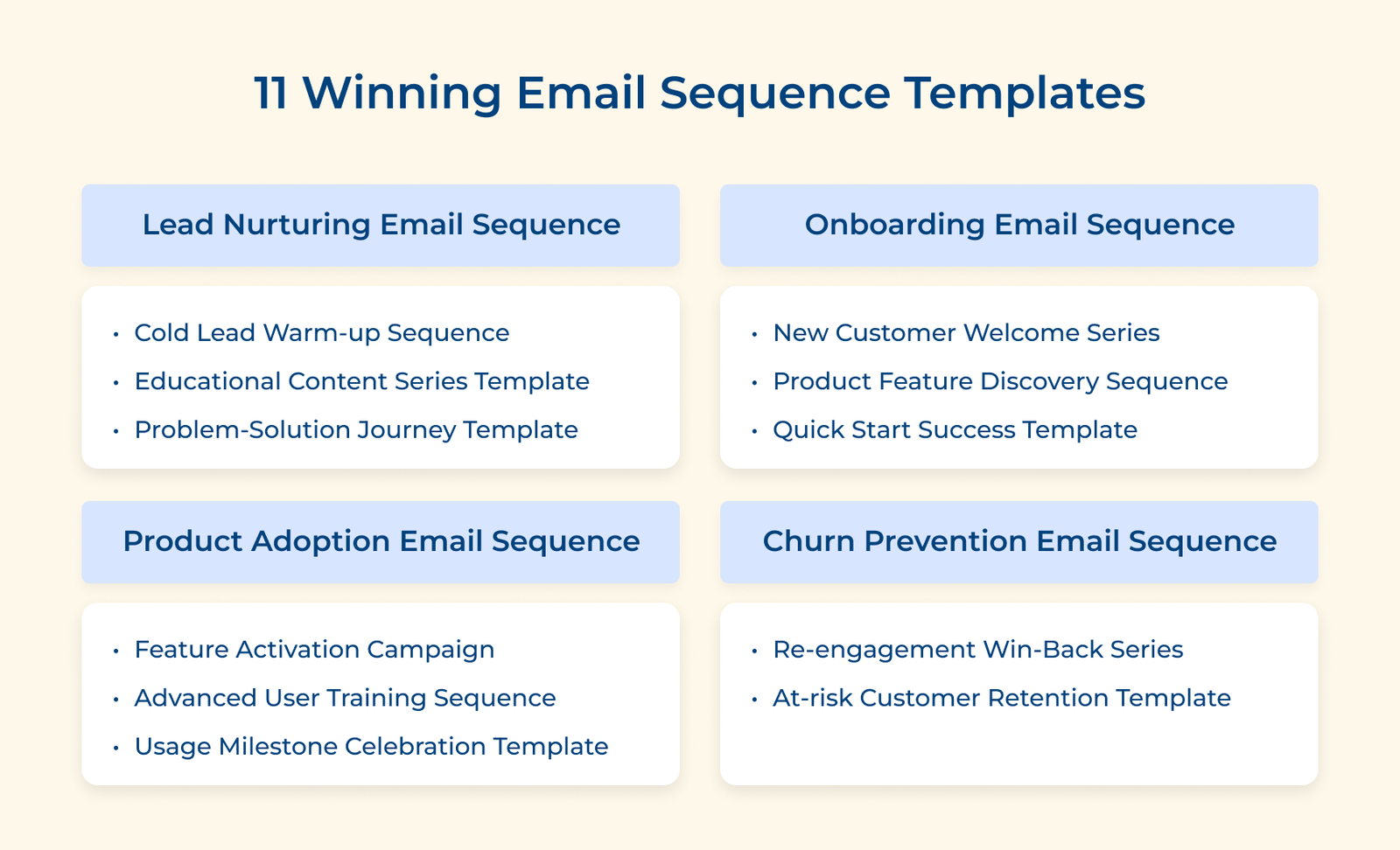
The email sequences of this type help build familiarity with leads who showed interest but have not engaged much yet. The focus stays on being helpful, not pushy. Each message adds value and earns attention over time.
Key purpose:
Email 1: Initial Value Introduction (Day 1)
Acknowledge their interest and deliver something useful right away.
Example:
Subject: Here’s that resource you requested
Hi [Name],
Thanks for your interest in improving [specific problem]. We created a short guide on [topic] that explains the most common mistakes and how to avoid them.
Grab it here: [Link to Guide]
I’ll check back in a few days with additional insights.
Best,
[Your Name]
Email 2: Educational Deep Dive (Day 4)
Share a case study showing how others solved similar challenges. Link to a comprehensive tutorial or webinar recording that showcases your methodology.
Example:
Subject: How [Company] solved the exact problem
Hi [Name],
[Company Name] was struggling with [specific problem] and losing [impact] every month. They implemented our framework and saw [specific results] within [timeframe].
[Your Name]
Email 3: Social Proof and Engagement Check (Day 8)
Present testimonials from customers in similar situations. The email includes a soft engagement question to assess their needs. Add links to customer success stories.
Example:
Hi [Name],
Several teams in [industry] told us their biggest challenge is [pain point]. Does it sound familiar?
Here’s how they’re tackling it: [Link to Success Stories]
What’s your biggest priority right now?
[Your Name]
Email 4: Next Steps Invitation (Day 12)
Offer a low-commitment way to explore your solution through a demo or consultation. Include a calendar link for scheduling.
Example:
Hi [Name],
If you’re thinking this might work for your situation, I’d be happy to show you exactly how it would look with your specific setup. No sales pitch.
Here’s my calendar: [Calendar Link]
[Your Name]
The email templates are used to deliver a structured learning journey that addresses specific challenges in logical progression. The sequence educates rather than sells but naturally leads prospects toward your solution.
Key goals:
Email 1: Understanding the Challenge (Day 1)
Introduce the problem and explain why familiar methods no longer work.
Example:
Hi [Name],
Most teams try to solve [problem] using [traditional method]. But here’s what’s changed: [key market shift]. It means the old playbook creates more problems than it solves.
Here’s a breakdown of why: [Link to framework article]
[Your Name]
Email 2: Solution Methodology Overview (Day 3)
Introduce the framework that effectively addresses the challenge. Share actionable steps they can implement immediately. Link to a detailed methodology guide.
Example:
Hi [Name],
The teams getting results use a three-part system. First, they [step one]. Then they [step two]. Finally, they [step three].
Here’s the detailed guide with templates: [Link to Framework]
You can start implementing this today.
[Your Name]
Email 3: Implementation Roadmap (Day 10)
Present a step-by-step plan where your product naturally fits as an enabler. Include a product demo link or free trial sign up.
Example:
Subject: A simple 30-day plan
Hi [Name],
Week one: [actions]
Week two: [actions]
Week three: [actions]
Week four: [actions]
Most teams can do it manually, but it takes time. That’s why we built [Product] to automate the heavy lifting.
Here’s what it looks like: [Link to Demo]
[Your Name]
You can help readers think through their situation step by step through email sequences like these. Each message focuses on clarity, making the conversation feel helpful and grounded instead of sales-driven.
Email 1: Pain Point Identification (Day 1)
Describe the specific symptoms and frustrations your prospects likely experience. Link to an assessment tool or diagnostic checklist.
Example:
Subject: Is it slowing down your team?
Hi [Name],
Your team spends hours on [task], but the results are inconsistent. Different people do it different ways and nobody’s sure which works. When something goes wrong, you can’t figure out why.
The short checklist helps identify where things break down: [Link]
[Your Name]
Email 2: Cost of Inaction Analysis (Day 4)
Quantify what continuing with the status quo costs and also include a calculator tool or ROI comparison content.
Example:
Hi [Name],
If your team spends [time amount] per week on [task] at [hourly cost], you’re looking at [annual cost] in wasted time. It doesn’t count [additional cost] or [missed opportunity].
Even a partial solution could save [estimated amount] this year.
Email 3: Solution Landscape Overview (Day 7)
Present different approaches available, including DIY methods and vendor options. Link to comparison guides.
Example:
Subject: Your options (honest breakdown)
Hi [Name],
You’ve got four ways to solve it. Build in-house (takes [timeframe] and requires [resources]). Hire [service provider] (costs [amount] but doesn’t scale). Use [competitor type] (handles [feature] but struggles with [limitation]).
Here’s an honest comparison: [Link]
Which makes sense for your situation?
Best regards
Businesses use these to help new users feel confident from the very start. Clear guidance and small wins reduce confusion. It helps people see value quickly, which lowers drop-off early on.
Key sequence:
Key structure:
Email 1: Welcome and first action (Sent immediately)
The welcome message congratulates them on joining and provides one clear action to take right now that delivers immediate value. The email removes confusion by focusing on a single important step.
Example:
Subject: Welcome! Start here for quick results
Hi [Name],
Welcome to [Product]. Your account is ready and I want you to see results in 10 minutes.
Do the three things now. Click here to access your dashboard. Complete the 60-second setup wizard.
Hit reply if you get stuck.
[Your Name]
Email 2: Quick win tutorial (Day 2)
The message guides them through completing their first meaningful task within your product. It celebrates the milestone and explains how this foundational skill opens up more possibilities for their success.
Example:
Subject: Get your first win today
Hi [Name],
Today, you’re going to create your first automated workflow, which most successful users accomplish in week one.
Watch the 3-minute tutorial. Then try it with the sample data in your account. Takes about 10 minutes and you’ll have a working automation.
[Your Name]
Email 3: Feature discovery path (Day 5)
The email introduces complementary features that enhance what they’ve already accomplished without creating overwhelm. It shows how capabilities work together to solve their broader challenges effectively.
Example:
Subject: Ready for more?
Hi [Name],
You’ve mastered automated workflows. Three features pair perfectly with what you’re doing.
Scheduling runs workflows at specific times. Notifications alert your team when workflows are complete. Analytics shows exactly how much time you’re saving.
[Your Name]
The template introduces advanced features only after users feel comfortable with the basics. Each message connects directly to what someone is already doing, which keeps learning relevant and avoids overload.
Key sequence:
They’ve been actively using core features for a week and are ready to expand their capabilities beyond the basics.
Their usage patterns indicate they’re performing tasks manually that could be automated with advanced features they haven’t discovered yet.
Key structure:
Email 1: Usage pattern recognition (Day 7)
The email acknowledges what they’ve been doing successfully and introduces one logical next feature based on their actual behavior. The personalized approach shows you’re paying attention to their specific journey.
Example:
Subject: I noticed something about your workflow
Hi [Name],
I saw you’ve been using data import daily. The automated sync connector would eliminate manual uploads. Instead of downloading or uploading files, connect directly and everything syncs automatically every hour. Most users cut import time by 85 percent.
Here’s the setup walkthrough. Takes about five minutes to configure.
[Your Name]
Email 2: Efficiency Multiplier Feature (Day 14)
The message presents an automation or shortcut that dramatically improves something they’re already doing manually. It demonstrates time savings or quality improvements they’ll gain from adoption.
Example:
Hi [Name],
You’re spending time on data formatting that could be completely automated.
Before: 30 minutes of daily cleaning data
After: 2 minutes setup and it happens automatically
That’s 120 hours saved annually. The feature is Smart Formatting and it’s already in your account.
Want me to walk you through the setup?
[Your Name]
Email 3: Advanced Capability Unlock (Day 21)
The email introduces a powerful feature that opens entirely new possibilities they haven’t explored yet. It frames this as a natural evolution of their growing expertise with the product.
Example:
Subject: Ready to explore what comes next?
Hi [Name],
You’ve been using our platform for three weeks. Time to show you what power users can’t live without.
I recorded a 12-minute masterclass with real examples. Once you start using it, you’ll wonder how you managed without it.
[Your Name]
The sequence reaches out to subscribers who went quiet after showing interest earlier. The goal is to restart the conversation and learn what changed, not to pressure anyone into staying. The point here is reopening dialogue and understanding the reasons. Getting inactive subscribers to respond helps you understand what went wrong and how to fix it.
Key questions:
Key structure:
Email 1: Friendly Check-in (Day 30 of inactivity)
The email acknowledges their silence warmly while asking a simple question about their current interests. It opens a conversation rather than making assumptions about why they stopped engaging.
Key factors:
Example:
Subject: Are we still relevant to you?
Hi [Name],
I noticed you haven’t opened our emails in a month. Are we still sending you stuff you care about?
Reply and tell me what you’re working on or what challenges you’re solving. I can adjust what we send.
Or change your frequency here: [Preference Link]
[Your Name]
Email 2: Best Content Showcase (Day 37 of Inactivity)
The message highlights your most popular content from the period they were inactive to show what they missed without guilt.
Core elements:
Example:
Subject: You missed some good stuff
Hi [Name],
Here’s what you missed. Our guide on [Topic One] got 5,000 downloads. The case study shows how [Company] achieved [result]. Our framework for [Topic Three] simplifies the complicated process.
Direct links: [Link One] [Link Two] [Link Three]
Worth a look?
[Your Name]
Email 3: The Breakup Email (Day 44 of Inactivity)
The email gives subscribers an easy way to either recommit or unsubscribe cleanly without guilt while making staying feel like an active decision.
Key factors:
Example:
Subject: Should we break up?
Hi [Name],
I will pause emails unless I hear from you. You haven’t opened anything in six weeks.
If you don’t click below, I’ll remove you in seven days. If our content still matters, click here: [Keep Me Subscribed Button]
Either choice is fine.
[Your Name]
Use these to nudge users to try features that quietly solve problems they already deal with. Small actions build confidence and lead to deeper product use over time. Getting users to explore one new feature creates momentum that leads to broader product adoption.
Key questions:
Key structure:
Email 1: Feature Spotlight (Day 1)
The email highlights one specific feature they haven’t used yet and explains exactly why it matters for their specific use case. It connects the feature directly to a problem they’re likely experiencing based on their current usage patterns.
Key elements:
Example:
Hi [Name],
I noticed you haven’t tried [Feature Name] yet. Based on how you’re using [Current Feature], you’re probably spending extra time on [specific task].
The feature automates it completely. Here’s a 90-second video: [Link]
Click to activate: [Activation Link]
Email 2: Success Story Proof (Day 3)
The message shares a concrete example of another user or company that activated this feature and experienced measurable improvements. It provides social proof and demonstrates real-world application to overcome skepticism or hesitation.
Core elements:
Example:
Hi [Name],
[Similar Company] activated [Feature Name] last month. They were doing [manual process, taking 45 minutes daily and after activation, their time dropped to 5 minutes.
Here’s their setup: [Screenshot Link]
Ready to try? [Activation Link]
[Your Name]
The template guides experienced users toward mastering advanced capabilities that dramatically increase the value they extract from your product regularly.
Key factors:
Key structure:
Email 1: Advanced Capabilities Introduction (Day 30)
The email congratulates them on becoming an experienced user and introduces the concept of advanced capabilities. It frames advanced features as the natural next step in their product journey and previews what’s possible.
Key elements:
Example:
Hi [Name],
You’ve been crushing it with [Product] for a month now. Time to unlock the advanced capabilities:
[Feature One] for complex automation, for team collaboration and for custom reporting.
[Your Name]
Email 2: Deep Dive Training (Day 33)
The message delivers comprehensive training on the first advanced capability with detailed examples and use cases. It provides step-by-step instruction that respects their existing expertise while introducing new concepts.
Core elements:
Example:
Hi [Name],
[Advanced Feature] is the most powerful capability you’re not using. I recorded a 20-minute masterclass covering setup, three real examples and common mistakes.
Watch here: [Training link]
Then try this challenge: [Specific task]. Reply and show me what you built.
[Your Name]
Email 3: Certification and Community (Day 37)
The email introduces certification opportunities and connects them with the power user community. It creates social reinforcement and ongoing learning opportunities beyond the initial training sequence.
Key elements:
Example:
Hi [Name],
Our Advanced User Certification takes 2 hours and proves you know the platform inside out. Plus, you get access to our power user community: [Community Link]
Monthly workshops coming up: [Date and Registration Link]
[Your Name]
The sequence celebrates when users reach significant usage milestones and encourages them to deepen engagement through recognition and rewards. Creating celebration moments builds emotional connection with your product.
Recognizing achievements makes users feel valued and increases their commitment to continued usage. If they engage with milestone celebrations, they’re more likely to set new goals and push toward the next achievement level in your product.
Key questions:
Key structure:
Email 1: Milestone Achievement (Trigger Day)
The email celebrates the specific milestone they just reached with genuine enthusiasm and recognition. It quantifies their achievement and shows them the impact they’ve created through their product usage.
Core elements:
Example:
Hi [Name],
You just completed your 100th automation in [Product]. It puts you in the top 5 percent of all users and those automations have saved approximately manual work.
Here’s your achievement badge: [Badge Image]
[Your Name]
Email 2: Exclusive Reward or Benefit (Day 1)
The message provides a tangible reward for reaching the milestone, such as unlocking a premium feature or receiving exclusive content. It reinforces that achievements lead to concrete benefits.
Key elements:
Example:
Subject: Your milestone reward is ready
Hi [Name],
Reaching 100 automations unlocks [Premium Feature] at no cost for the next 30 days.
Access it here: [Unlock Link]
Next milestone is 250 automations, which unlocks [Next Reward] permanently.
[Your Name]
Email 3: Success Story Request (Day 3)
The email asks them to share their success story or become a case study participant. It positions them as an expert and creates social proof while deepening their commitment through public association.
Core elements:
Example:
Hi [Name],
Interested in a quick case study? Answer three questions: What problem were you solving, how did you use [Product], and what results did you see?
Takes 5 minutes and we’ll feature you on our blog.
[Your Name]
The sequence invites subscribers to share feedback in a way that feels useful and respectful of their time. Each message makes it clear how their input shapes real decisions and improves their experience.
Getting people to complete surveys gives you actionable insights while showing respondents that their opinions genuinely matter. If they provide thoughtful feedback, they become more invested in your success because they contributed to shaping it.
Key questions:
Key structure:
Email 1: Survey Invitation with Purpose (Day 1)
The email explains exactly why you’re asking for feedback and what you’ll do with responses. It connects participation to tangible improvements they’ll personally benefit from.
Core elements:
Example:
Hi [Name],
We’re making decisions about [specific area] and I want your input first. The survey asks about your biggest challenges with [topic] and what improvements would make the biggest difference.
This takes 5 minutes. Last time we did it, 60 percent of suggestions made it into the product within three months.
Survey link: [Survey Link]
[Your Name]
Email 2: Reminder with Social Proof (Day 3)
The message reminds non-completers while showing how many have already participated. It creates gentle social pressure while reinforcing that their voice still matters.
Example:
Subject: 230 people have shared their thoughts
Hi [Name],
Quick reminder about the survey. We’ve gotten 230 responses and interesting patterns are emerging about what you need most.
Your perspective might be completely different. Takes 5 minutes: [Survey Link]
Closing Friday.
[Your Name]
Email 3: Final Call with Impact Preview (Day 6)
The email gives one last chance while previewing what you’ll do with feedback. It shows responses are leading to real action.
Core elements:
Example:
Subject: Last chance to influence our roadmap
Hi [Name],
Survey closes tomorrow at 5 pm. Based on responses, we’re moving forward with [specific improvement] and rethinking [another area].
Your perspective would still matter: [Survey Link]
[Your Name]
Check out the leading brands that have mastered email sequences to drive engagement and build lasting customer relationships through strategic automation.
Amazon: Product Adoption and Re-engagement Sequence
Amazon keeps customers coming back through emails triggered by browsing and purchase behavior. Each message suggests items that match recent interest, timed to when people are most likely to act.
The sequence dramatically increases repeat purchase rates and customer lifetime value by keeping Amazon top-of-mind. The personalized recommendations reduce decision fatigue and make shopping effortless, which strengthens long-term buying habits.
Nike: Welcome and Feature Discovery Sequence
Nike starts with a strong welcome flow, then slowly introduces app and membership features as users stay active. Early access drops, training plans and member perks appear only after engagement shows real interest.
The approach transforms casual buyers into loyal Nike community members who engage beyond simple transactions. The sequence builds emotional connection while encouraging app usage that leads to higher purchase frequency and stronger brand advocacy.
Spotify: Onboarding and Milestone Celebration Template
Spotify employs an exceptional onboarding sequence that gets new users listening immediately, combined with milestone celebration emails throughout the year. Their personalized playlists arrive at strategic moments while the famous Spotify Wrapped campaign turns usage data into shareable achievements.
The sequence increases daily active users and reduces early churn by providing value immediately through personalized music discovery. The milestone celebrations create viral social media moments that attract new users while making existing subscribers feel valued.
Airbnb: Lead Nurturing and Re-engagement Win-Back Series
Airbnb follows up with people who browse listings but do not book. Emails show homes similar to past searches and remind users when availability is limited. Inactive users receive thoughtful reminders that reconnect travel with emotion
The dual approach converts browsers into bookers while bringing back customers who haven’t traveled recently through emotionally resonant messaging. The sequences maintain Airbnb’s position as the first choice for accommodation without overwhelming users.
Ready-to-use sequence templates help you send the right message at the right time without overthinking every email. They give structure while leaving room to sound human, relevant and helpful.
Start with one template that matches your biggest challenge right now and refine it based on real responses you receive. The brands winning at email sequences didn’t perfect everything overnight but they committed to testing and improving their approach consistently over time.

An email sequence is a set of messages sent automatically after a clear trigger, such as a signup or download. Each email follows the last with a purpose, helping readers move from interest to action without manual follow-ups.
The best B2B email sequence is the educational content series that positions your expertise while solving real business problems. B2B buyers need substantial information before purchasing and respond well to consultative selling. Combining education with case studies creates trust that leads to conversions.
Most sequences perform well with three to seven emails. Short sequences suit welcome or quick onboarding. Longer ones work better when explaining complex products or longer buying cycles.
The correct sequence starts with a compelling subject line followed by a personalized greeting and opening hook. Next comes body content that delivers value, then a clear call-to-action telling recipients what to do. Include professional signature with contact information and an unsubscribe option.

Grow Customer Relationships and stronger team collaboration with our range of products across the Conversational Engagement Suite.
Omnichannel Customer Support & Help Desk Software
AI Enabled Business Messaging and Chatbot Software
Sales Engagement & CRM Software
Call Center Software & Virtual Phone System
Product Marketing & Experience Platform
Customer Experience & Feedback Management Software
 Cold Email Sequence: Steps, Examples & Tools in 2026
Scroll to top
Cold Email Sequence: Steps, Examples & Tools in 2026
Scroll to top