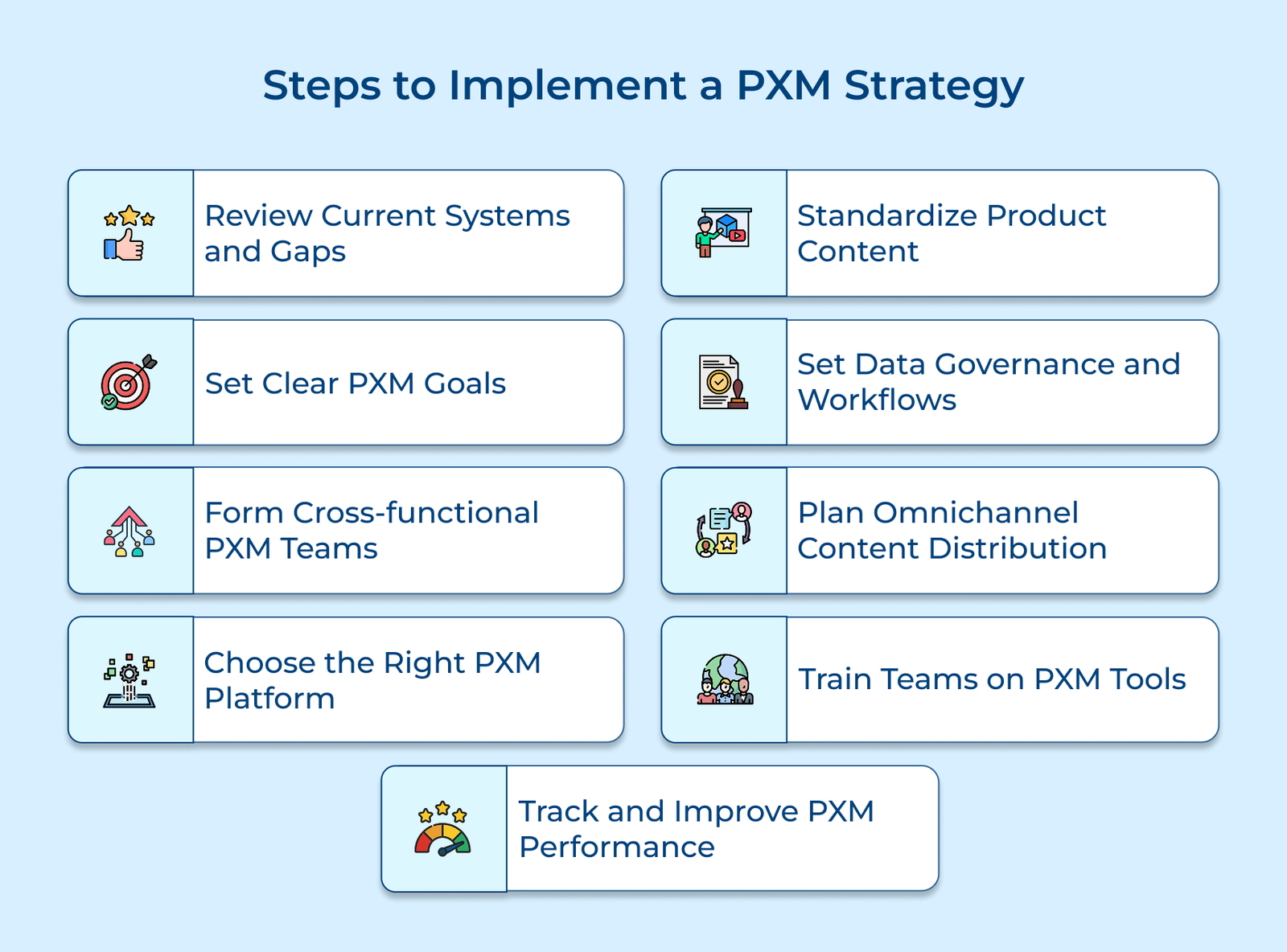
1. Evaluate Existing Systems and Identify Gaps
Before diving into product experience management, take a close look at where you stand. The first step helps you understand what’s working, what’s not and what needs fixing. A solid assessment keeps you from chasing the wrong problems and ensures your efforts meet business needs.
Start by auditing how product data is managed across teams. Look at how information is entered, stored and updated. It will make you familiar with the slowdowns, gaps and inconsistencies that can delay launches or confuse customers. Next, map the full customer journey from product search to purchase and pinpoint where missing or unclear information causes friction.
Pro tips:
- Talk to the people who work with product data every day, as they are the ones who will know where things usually break down.
- Dig into the customer service queries. They are full of clues about what customers aren’t finding or understanding.
2. Define Clear PXM Goals and Objectives
Clear goals are the backbone of any PXM initiative. Without them, you risk pouring time and money into a system that doesn’t improve product experiences or support your business in any real way. So, start by defining KPIs that are focused on measuring the quality of your product content.
Set clear milestones along a timeline to track progress and stay aligned. Make sure each goal connects to a larger business priority like increasing revenue, expanding your market, or improving customer experience. It will ensure your PXM efforts are leading to meaningful results.
Actionable tips:
- Study the product experiences of top competitors to help shape your own goals.
- Break big goals into quarterly targets to keep teams focused and momentum strong.
3. Build Cross-functional PXM Implementation Teams
Strong product experiences don’t come from one department. They’re the result of people across marketing, e-commerce, product and IT working together. A solid PXM setup needs a team with the right mix of skills and clearly defined roles.
Start by figuring out who does what. Make sure each team member’s responsibilities line up with their expertise and the goals of their department. The goal isn’t to create silos, it’s to get the different areas working in sync. Set up simple communication rules so people know how to share updates, raise flags and stay on the same page.
Best practices:
- Let team members try out tasks outside their usual roles to build a broader understanding.
- Casual chats between departments (like coffee check-ins) often uncover useful insights and boost teamwork.
4. Select Appropriate PXM Technology Platform
The right PXM platform should align with how your business actually works, not just in theory. It needs to handle your product data, connect smoothly with your existing tools and be flexible enough to scale as you grow.
Start by looking at how different platforms manage content, integrate with your systems and meet your product-specific needs. We recommend that you go beyond sales promises. Dig into user feedback, support quality and long-term performance.
Pro tips:
- Ask for sandbox access so you can try it with your actual data and use cases.
- Talk to companies already using the platforms to get honest feedback on what works and what doesn’t.
5. Create a Standardized Product Content Framework
A solid content framework keeps product information consistent and useful across every channel. It helps teams work faster, stay aligned with your brand voice and meet customer expectations without reinventing the wheel every time. 87% of customers feel product content is the most important factor when deciding to purchase an item online, as they cannot physically see, feel, or smell the item.
Templates and style guides give structure and consistency to product content. A furniture retailer’s template might include fields such as materials, care instructions, and measurements, while the style guide ensures a consistent tone. The framework should also outline required metadata and attributes like dimensions, fabric types, or eco certifications to ensure completeness. Clear enrichment rules turn basic specs into content that helps customers make decisions.
Key takeaways:
- Review your best-performing product pages to understand what’s working.
- Involve customer service in refining your content, as they are the ones who hear firsthand where information falls short.
6. Establish Data Governance and Workflows
Good data governance keeps your product information accurate, consistent and reliable. Without it, errors slip through, trust erodes and sales can take a hit. Make sure you start with clear quality standards. Define the formats, required fields and rules for things like specifications, prices, or stock levels. It helps teams spot mistakes early and also keep their product info aligned with legal or industry requirements.
Approval workflows ensure updates go through the right checks before going live. Everyone knows who’s responsible and version control logs every change, so there’s a clear trail even if anything goes wrong.
Pro tips:
- Do spot checks by picking random products and reviewing their details for accuracy.
- When governance catches an issue before it becomes a problem, share that story. It helps teams see why the process matters.
7. Design an Omnichannel Distribution Content Framework
The step is about making sure your product content works well wherever customers find it, be it online, on mobile, in marketplaces or stores. The goal is to maintain consistency in messages but flexibility in format.
Start by identifying how each channel displays product info. Your website might allow space for detailed specs and multiple images, while your mobile app needs short, scannable descriptions. Quick, punchy content that gets attention fast. Planning for the differences ensures your content looks right and makes sense in every context.
Actionable tips:
- Watch how customers jump between channels, as it will reveal if there are any weak spots in the content journey.
- Focus your efforts where your customers are, not just where everyone else is posting.
8. Train Teams on PXM Tools
Training is key to getting real value out of your PXM platform. If teams don’t know how to use the system in their daily work, even the best tool will possibly fall flat. Start by tailoring training to each role. Marketers should focus on creating and updating product content, while IT teams need to understand system setup. Use real examples from your business so the training feels relevant and immediately useful.
Hands-on workshops should also be considered to help your teams practice real tasks in a no-risk environment. It will teach them to handle common issues and build confidence before using the system live. Maintain smooth support by using clear how-to guides, simple video tutorials and a list of team contacts for handling complex issues.
Best practices:
- Create short screen recordings for routine tasks. They’re easy to watch and follow.
- Set up a buddy system so new users can learn from experienced ones as they go.
9. Monitor and Optimize PXM Performance
The last step in your PXM journey is making sure it keeps getting better. Regular review will help what’s working, what isn’t and where you can make product content more useful for customers. Track performance using metrics that reflect real outcomes. The data will show if your strategy is on the right track or needs a reset.
Don’t stop at numbers. Listen to what customers are saying through reviews, returns and support tickets. Ask your internal teams where processes slow down or content falls short. Together, the feedback gives you the full picture of what needs to improve.
Key takeaways:
- Set up alerts for sudden drops in key metrics so you can respond fast.
- Pick one part of your strategy each month for a deeper review, like mobile content or product descriptions.
Top Tools for Product Experience Management
Let’s go through the product experience management tools that will help you track user behavior, gather feedback and make informed improvements to keep your product easy to use.