How to Choose a CRM System? A Complete Guide
The guide helps businesses on how to choose a CRM system by outlining features and comparing options. It offers tips to align tools with company goals, budget and workflows.
The guide helps businesses on how to choose a CRM system by outlining features and comparing options. It offers tips to align tools with company goals, budget and workflows.
Managing customer relationships today is messy. There’s too much data, too many interactions and far too many channels to juggle. Without the right system, follow-ups slip through the cracks, sales stall and service quality drops.
That’s where a CRM comes in – it keeps everything organized, helps teams stay in sync and makes sure customers don’t fall through the gaps. 53% of businesses experience improved customer satisfaction and retention with CRM tools.
But here’s the catch: the wrong CRM can make things worse. It can drain time, frustrate your team and create a poor experience for customers. Choosing the right one isn’t about chasing features or hype but about finding a tool that fits how your business actually works. So, let’s understand how to choose a CRM system that aligns with your workflow and delivers real results.
A customer relationship management (CRM) system refers to a tool that helps businesses organize and manage all their customer information in one place. It tracks contact details, communication history, purchase records and more, giving teams a complete picture of every customer.
A CRM isn’t just helpful, it’s essential. It brings order to scattered data, simplifies day-to-day work and helps teams stay on top of leads, sales or customer requests. More importantly, it helps businesses make better decisions based on facts, not guesswork. When used well, a CRM helps teams spot opportunities, follow up at the right time and understand what’s working or what isn’t.
Key principles:
Let’s go through the importance of choosing the right CRM and how it can transform your business landscape for the better.
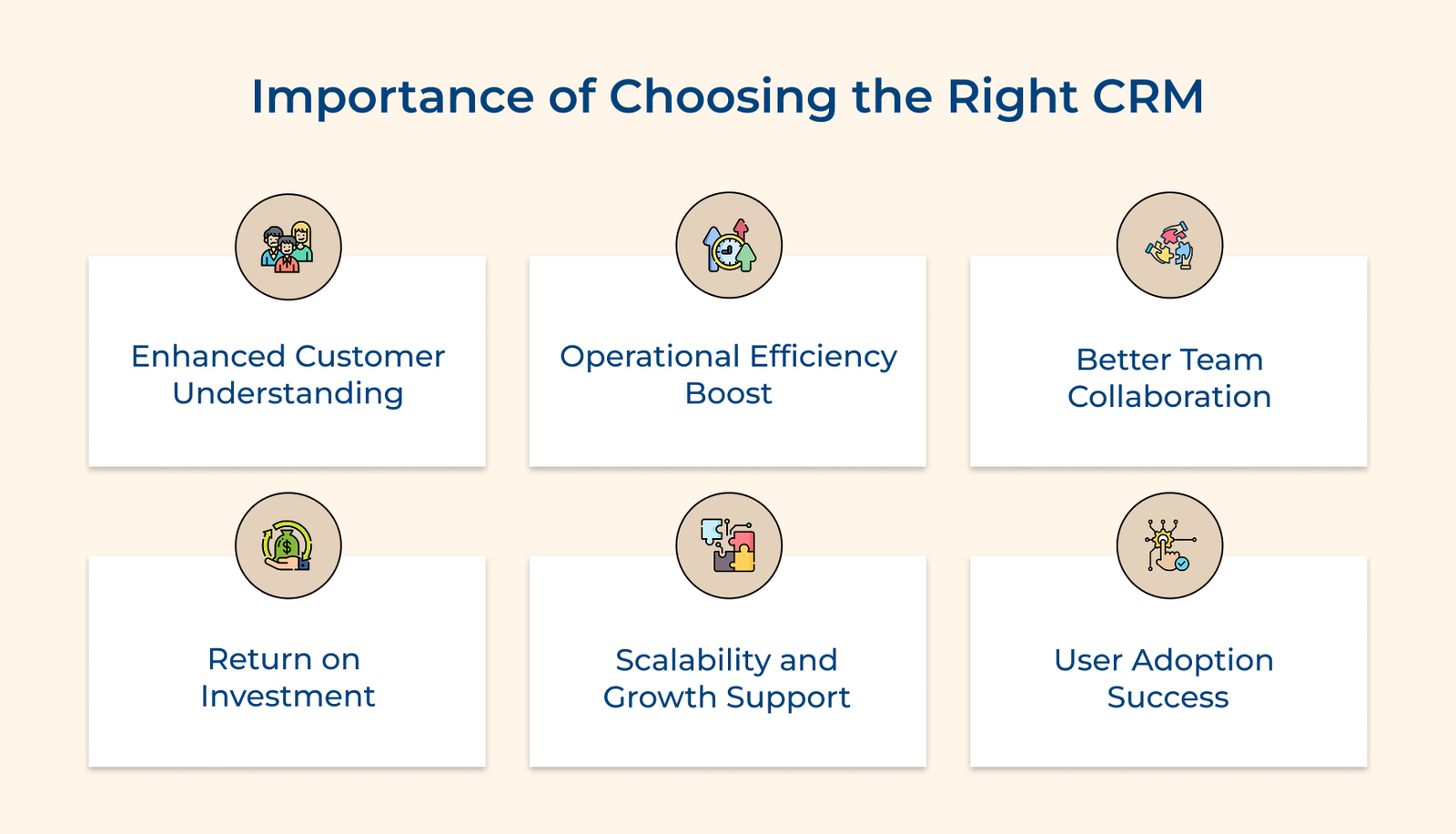
1. Enhanced Customer Understanding
The right CRM helps you see the full picture of each customer like what they’ve done, what they’ve asked for and what they might need next. You can understand their behavior and preferences by tracking every interaction, making it easier to offer timely support.
2. Operational Efficiency Boost
A good CRM takes care of repetitive work. It logs interactions, updates records and sends reminders automatically, thereby cutting down on mistakes. When it fits well with your current tools, it makes everyone’s day-to-day work more efficient.
3. Better Team Collaboration
When everyone works from the same system, handoffs between teams are seamless. Sales can see past service issues. Marketing can learn which campaigns led to deals. The visibility reduces confusion and improves how customers are handled from start to finish.
4. Return on Investment
A well-chosen CRM leads to faster deal closures, better follow-ups and fewer missed opportunities. It also helps reduce wasted time and effort by improving how work is assigned. It results in more sales, lower costs and a stronger return on your investment.
5. Scalability and Growth Support
As your business grows, your CRM should grow with it. It means handling more customers, more users and more complexity – without needing to start over or overhaul your system. A scalable CRM lets you add new features and functions when you’re ready.
6. User Adoption Success
If the system feels natural to your team, they’ll use it. It means better data, faster updates and more reliable service across the board. A CRM that fits how people already work is much more likely to succeed than one that forces them to change everything.
The following is a checklist of the important factors to consider when choosing a CRM solution that truly fits your company.
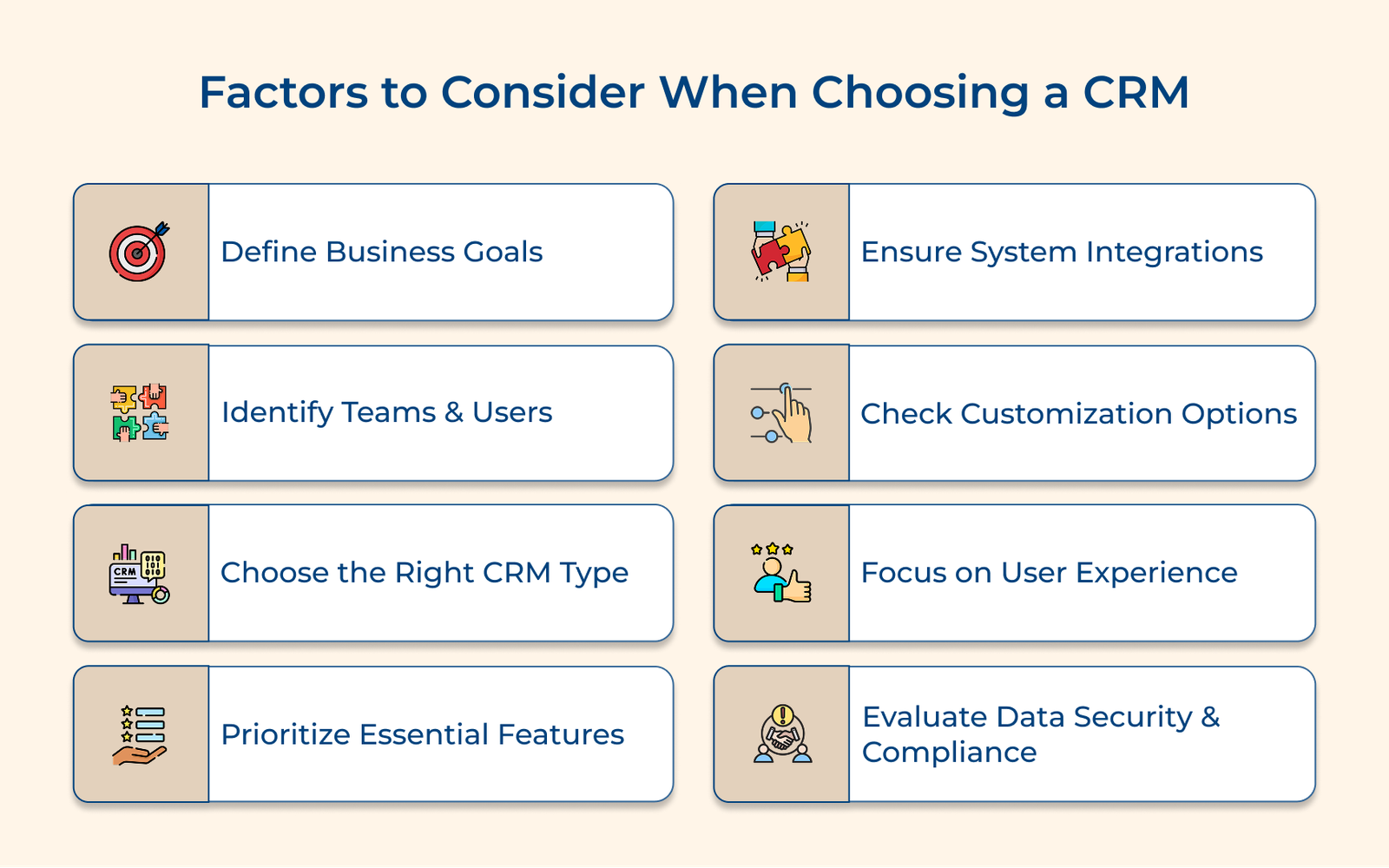
Identifying business requirements and goals is the first step when choosing a CRM system. It ensures that your choice supports the real needs of your team. Skipping the step often leads to buying a system packed with features you don’t use—or worse, one that doesn’t solve your core problems.
Start by talking to people across your organization. Use their input to create a clear list of issues your CRM should address and the improvements you expect it to deliver. Here are some key business goals a CRM should help with:
Pro tips:
Understanding which teams need access to your CRM system helps you select the right solution with appropriate features for each department. The step is essential if you want your CRM to support real work, not just check a box. When you know who’s using it and why, you avoid overpaying for licenses.
Review how customer information moves through your company. Map it out before you pick a CRM. It’ll help you choose features and access levels that match your workflows—no more, no less.
Choosing between cloud-based and on-premise CRM systems is a crucial decision that impacts your long-term operations. It influences your costs, security setup, system performance and how easily your team can access customer data day to day.
Cloud-Based CRM
A cloud CRM runs on the vendor’s infrastructure and is accessed via the internet. Your team can log in from anywhere, which makes it great for distributed workforces or teams that travel often. The vendor handles system updates, backups and security patches. You typically pay a monthly or annual subscription fee based on usage and features.
On-Premise CRM
The software is installed on your company’s servers and maintained by your internal IT team with an on-premise CRM. You buy the license upfront and manage all updates, backups and security yourself. The setup offers more control and data ownership, but it also requires more internal resources to maintain.
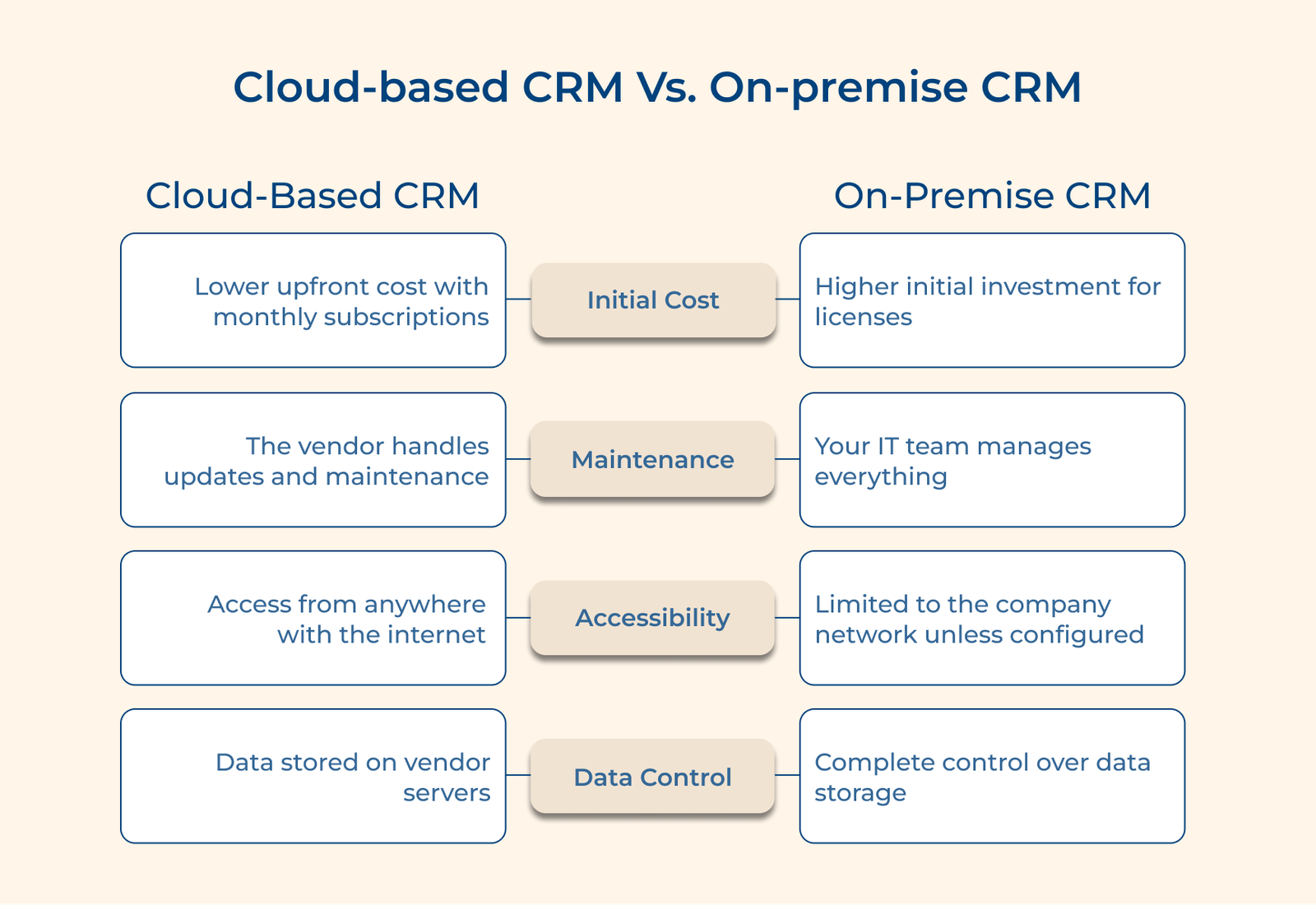
Cloud-based CRMs work best for small to medium businesses wanting flexibility and lower upfront costs. On-premise solutions suit large enterprises with strict data control requirements and companies in heavily regulated industries that need complete control over their systems.
Actionable tips:
Identifying essential CRM features helps you pick a system that fits your business, not just one that looks good on paper. Focus on the features that make your work easier, not the bells and whistles you’ll rarely use.
Key features:
Think about your daily operations and customer interactions. Some businesses might need robust analytics, while others, particularly those seeking enterprise crm solutions, focus more on pipeline management. The key is understanding which features directly impact your efficiency and customer relationships. Start with core features that solve your biggest pain points.
Integration capabilities determine how well your CRM fits your day-to-day work. Think of it like adding a new player to your team—if they don’t play well with others, things fall apart fast. Your CRM should make workflows smoother, not more complicated.
Review current software tech stack
Start by listing all the tools your team uses, from email clients and calendars to marketing platforms. It gives you a clear picture of what the CRM needs to connect with. The goal is to avoid breaking anything that’s already working well. You don’t want to replace manual tasks with more manual work just to bridge systems that don’t talk to each other.
Check API and integration capabilities
APIs are what allow your CRM to “speak” to other software. A solid enterprise crm offers reliable and flexible APIs so it can share information with the rest of your systems. Let’s consider that new sales data should automatically update in your invoicing tool or your email marketing platform should sync contact activity without needing manual uploads. If integrations are weak or limited, expect more headaches down the line.
Evaluate data migration requirements
Transferring old data into a new CRM isn’t just about copying and pasting. Think about how much data you need to bring over, how it’s formatted and if it’s clean. The CRM should help preserve the structure and relationships between records, like which notes belong to which customer, so nothing important gets lost in the move. Planning it early helps you avoid nasty surprises later.
Customization options let you shape the CRM around how your business works, not the other way around. Like a well-fitted tool, the right adjustments make everything easier, more intuitive and more effective for the people using it every day.
Assess field and layout modifications
Start by checking if the CRM lets you rename fields, add new ones and change how information is organized on the screen. You want it to reflect your team’s language and workflow, not force them to learn a new one. If your team uses specific categories, stages or terminology, the CRM should support that out of the box or be easily adapted.
Review workflow automation customization
Your CRM should do more than just store data, it should help move things forward automatically. Be it the assigning of leads based on geography, sending reminders for follow-ups or creating multi-step approval flows, automation should match your real-life processes. Rigid systems that don’t let you tweak automation rules will slow you down and lead to more manual work.
Check report building flexibility
Custom reports let you track what matters to your team, not just what the CRM thinks is important. Look for the ability to create your dashboards, choose specific metrics and visualize data in a way that makes sense to your users. Bonus if you can schedule the reports to hit inboxes at regular intervals, so no one’s left guessing where things stand.
A CRM’s interface can determine if your team uses it or avoids it. A clean, simple design makes it easier to get work done. A clunky or confusing layout slows people down, causes frustration and often leads to the system being ignored altogether.
Evaluate interface navigation and usability
Your CRM should feel easy to use right from the start. Menus should be clearly labeled, features grouped logically and common tasks should take as few steps as possible. If your team needs to click through five screens just to log a call or update a lead, that’s a red flag. The design should guide users through tasks, not make them guess what to do next.
Check mobile responsiveness and accessibility
People aren’t just working from desks anymore. Your CRM needs to work just as well on a phone or tablet as it does on a laptop. It means responsive design that adjusts to smaller screens without hiding important tools or turning simple tasks into headaches.
Review system speed and performance
A slow CRM is an unused CRM. Loading delays, lagging searches or freezing dashboards kill productivity. Your team should be able to pull up customer data, jump between records and run reports without waiting. Especially as your database grows and more users come on board, the system needs to stay reliable.
Comprehensive support and training resources make the difference between a CRM your team uses and one that just collects dust. Even the best system won’t deliver results if users don’t know how to navigate it or can’t get help when they’re stuck.
When choosing the right CRM, security and compliance capabilities become crucial factors that protect your customer data. Just like a bank vault protects valuable assets, your CRM system must safeguard sensitive customer information while ensuring compliance with industry regulations.
Review security protocols and certifications
Start by examining the system’s security from the ground up. Your CRM should use strong encryption, both when data is being transferred and when it’s stored. Look for industry-recognized certifications like SOC 2, ISO 27001 or any others relevant to your sector.
Check data backup and recovery
Reliable backup and recovery features are non-negotiable. Your CRM should run frequent, automated backups and store them in multiple locations. You need a clear recovery process in case of a system failure or data breach that gets your system back online fast, without losing important data.
Verify compliance with industry standards
If your business operates in a regulated industry, the CRM must support those compliance obligations. Be it the GDPR, HIPAA or something industry-specific, the system needs built-in tools to help you manage data privacy and user consent. It should also allow you to enforce data retention policies and respond to data access or deletion requests with minimal friction.
Below are the common pitfalls that could derail your CRM implementation success. Understanding the mistakes helps you make a more informed choice.
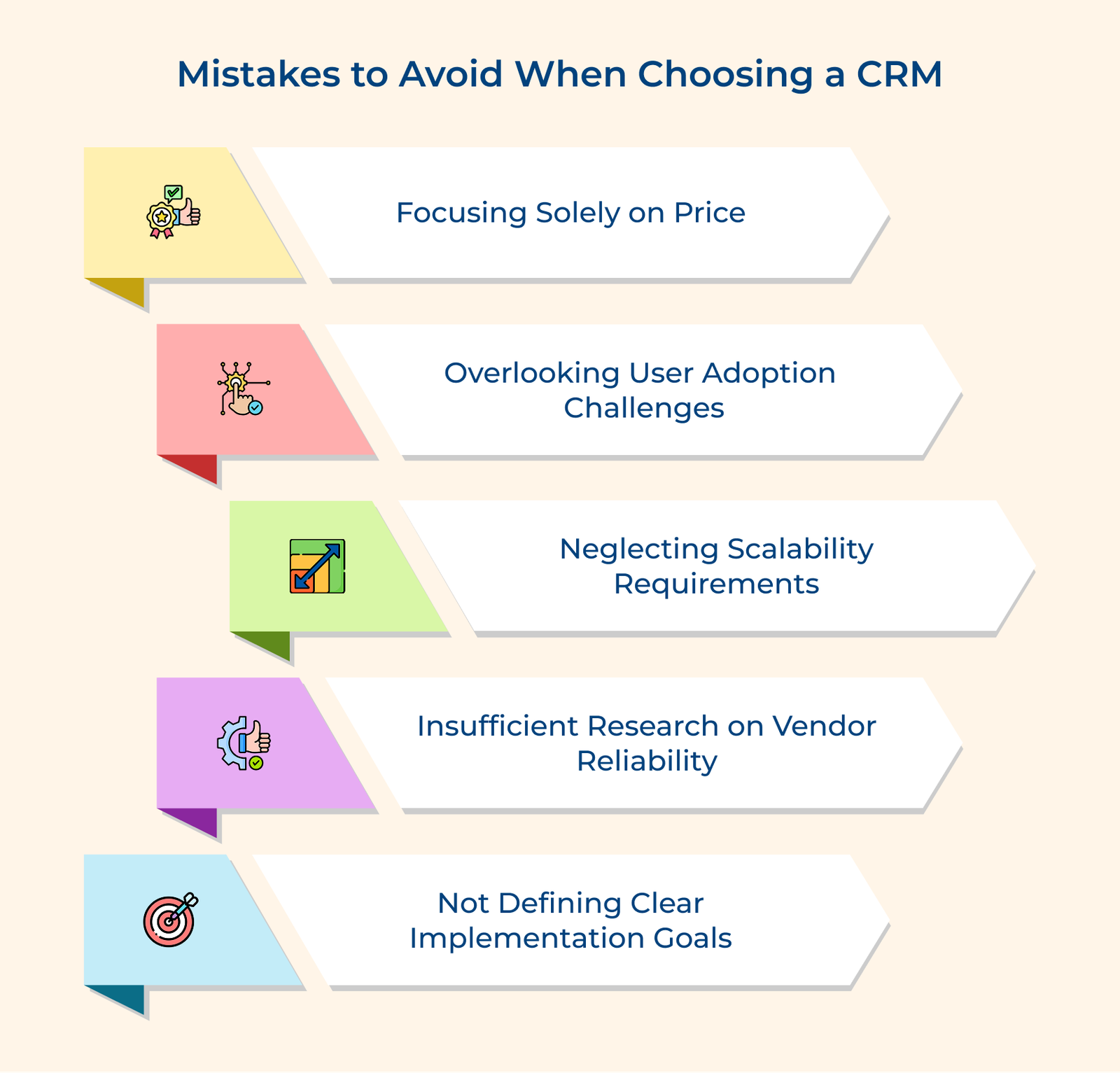
Many businesses fall into the trap of picking a CRM based only on the initial price tag. The cheapest option may seem appealing, but hidden costs like additional users, customization features or training staff quickly add up. Instead of focusing on price alone, focus on overall value. A slightly higher upfront cost may save you money and frustration in the long run.
Assuming your team will naturally adjust to a new CRM is a mistake. If the system is hard to navigate or doesn’t match how your people work, it won’t get used, no matter how advanced it is. Problems usually arise when decision-makers choose a CRM without talking to the people who’ll use it daily. Usability and proper onboarding matter as much as features.
Choosing a CRM that fits your current needs but can’t handle future growth can cost your business later. If your system can’t support more users, larger customer databases or expanded features, you’ll end up having to switch platforms again, which is costly and disruptive. Always think ahead and make sure your CRM can grow with you.
Rushing into a decision without checking the CRM vendor’s track record can backfire. Look into how long they’ve been around, if their customers are satisfied and how responsive their support team is. A flashy demo means little if the vendor disappears when you need help. Stability and support are just as important as software features.
Without clear goals, it’s tough to know if the CRM is helping. If you don’t set specific outcomes like faster response times or higher customer retention, you won’t know what success looks like. The lack of direction makes it harder to choose the right system and easier to miss out on features that could make a difference.
Choosing the right CRM system is a practical, long-term decision that shapes how your business manages relationships and daily operations. When you take time to evaluate your needs, understand how your team works and consider how your business might grow, you give yourself a much better chance of picking a system that works.
The CRM isn’t just another tool on your software list. Over time, it becomes the backbone of how you manage customer interactions, make decisions and keep things running smoothly. It organizes your data, simplifies your workflow and helps your team stay focused on what matters most.
But it’s not about choosing the CRM with the flashiest features or the biggest price tag. It’s about finding the one that fits the way your business operates. One that your team will use. One that grows with you instead of getting in your way.

A CRM helps you keep everything about your customers in one place—emails, calls, notes, purchases and more. It makes sure nothing falls through the cracks. It also saves time by automating repetitive tasks, helps you follow up at the right moment and gives you a better view of what your customers need. Simply put, it helps you stay organized and build better relationships.
Start by examining your business processes and asking: What problems are you trying to solve? How many users will need access? What’s your budget, including implementation and training? What systems does it need to integrate with? How much customization do you need? The questions help narrow down your options to systems that truly match your needs.
Focus on user-friendliness, integration capabilities, customization options and scalability. Consider the vendor’s reputation, support quality and training resources. Think about security features and compliance requirements. Evaluate the total cost of ownership, including hidden fees. The criteria ensure you choose a system that serves both current and future needs.
There’s no universal answer, it depends on your team size, budget and how you work. Smaller teams often do well with simpler, cloud-based tools. Larger organizations may need something more customizable and powerful. Think about how your teams operate day to day and choose a system that supports that.
If your setup is simple, you could be up and running in a few weeks. More complex setups, especially those with a lot of data or users, can take a few months. Add extra time for testing and training. Don’t rush this step. Doing it right the first time saves headaches later.
Most businesses see improvements in things like sales follow-ups, customer response times and team coordination within 6–12 months. Track specific numbers, like how many more leads you’re closing or how fast your support team is responding. Just remember, the return only shows up if your team uses the system.

Grow Customer Relationships and stronger team collaboration with our range of products across the Conversational Engagement Suite.
Omnichannel Customer Support & Help Desk Software
AI Enabled Business Messaging and Chatbot Software
Sales Engagement & CRM Software
Call Center Software & Virtual Phone System
Product Marketing & Experience Platform
Customer Experience & Feedback Management Software

 Feedback Form Templates Guide: What Is It & How to Design It?
Scroll to top
Feedback Form Templates Guide: What Is It & How to Design It?
Scroll to top


