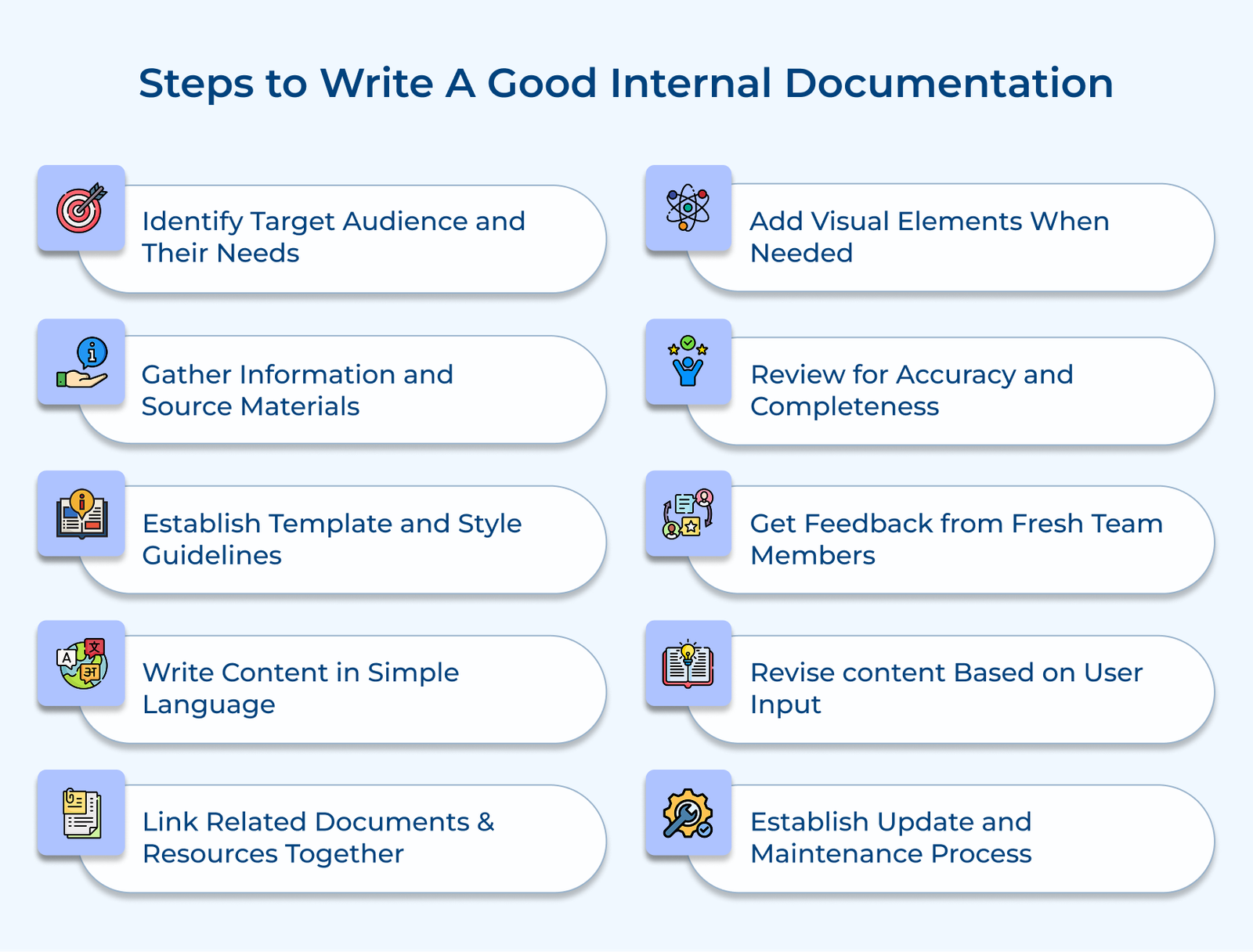
1. Identify Target Audience and Their Needs
Understanding your audience is key to creating effective documentation. Without knowing your reader’s needs, you risk producing content that’s either too complex or too simplistic, making it ineffective.
Start by defining clear documentation goals based on user needs. It involves assessing the audience’s technical expertise, role and knowledge gaps. Tailoring content in terms of depth, language and examples ensures maximum value.
Pro tips:
- Create user personas for each audience segment, outlining their role, technical expertise and key documentation needs.
- Conduct brief surveys or interviews with representative users from each audience group to understand their specific challenges and requirements.
2. Gather Information and Source Materials
Thorough information gathering ensures documentation is accurate, preventing critical details from being overlooked and identifying existing resources to streamline the process. The phase involves two key steps: collecting existing materials like old documents, emails or slides and interviewing subject matter experts to capture both documented as well as tacit knowledge.
Let’s take the example of documenting a customer service process. It will require gathering email templates, call scripts and troubleshooting guides while interviewing experienced reps to capture common scenarios.
Actionable tips:
- Create a centralized repository to organize all gathered materials by category, making them easy to reference during the writing process.
- Develop a structured interview questionnaire for stakeholders to ensure consistent information gathering.
3. Establish Template and Style Guidelines
Consistent templates and style guidelines are key to maintaining uniformity across documentation. Standardization helps readers navigate easily and ensures consistent formatting across different authors.
Start by creating templates with a logical flow, including sections like overview, prerequisites, step-by-step instructions and troubleshooting. Use clear headings, subheadings, and formatting rules to establish a well-defined structure.
Implementation tips:
- Develop a style guide that outlines formatting rules, terminology standards and examples of well-structured content.
- Create reusable templates for various document types, with placeholder text to illustrate how each section should be written.
4. Write Content in Simple Language
Clear, simple language makes documentation accessible to all readers, while complex terms or excessive jargon can hinder understanding and reduce its effectiveness.
Prioritizes clarity and directness by simplifying technical language unless essential. Use active voice, concise sentences and structure content with bullet points or numbered lists for easier readability. Instead of saying “The system utilizes advanced authentication protocols to validate user credentials,” write “The system checks your username and password to ensure access.”
Best practices:
- Before writing, compile a list of technical terms and their simpler alternatives for consistent use throughout the documentation.
- After completing each section, read it aloud to spot complex sentences and simplify them.
5. Link Related Documents and Resources Together
Linking related documentation creates a connected knowledge network, helping readers quickly find relevant information and preventing information silos.
Review existing documents to identify natural connections, then add cross-references and hyperlinks to related resources. Ensure each link is meaningful, with a brief description explaining its relevance.
Pro tips:
- Create a visual documentation map to highlight relationships between documents and identify potential connections.
- Regularly audit links to ensure they stay valid and relevant as your documentation evolves.
6. Add Visual Elements When Needed
Visual elements improve comprehension by clarifying complex concepts and processes, often information more effectively than text alone.
Include relevant diagrams and screenshots that enhance the content. Ensure visuals are clear, labeled and purposeful, with captions explaining their role. In software documentation, use annotated screenshots to highlight key buttons and flowcharts to illustrate decision-making or system workflows.
Actionable tips:
- Develop a visual style guide to set standards for screenshots, diagrams and other visuals, ensuring consistency.
- Use professional tools for diagram creation and screenshot editing to maintain high-quality, polished visuals.
7. Review for Accuracy and Completeness
A thorough review ensures documentation is accurate and reliable. Inaccurate or incomplete documentation can lead to mistakes, inefficiencies and frustration among users.
Validate technical details through testing, check content flow logical progression and review each procedure step-by-step for accuracy. Confirm all referenced specifications and standards. Have HR follow each step of the onboarding guide to verify accuracy and test system access, ensuring a seamless experience for new hires.
Best practices:
- Develop a review checklist that ensures technical accuracy, completeness, formatting consistency and valid links.
- Implement a peer review process where subject matter experts verify technical content and non-experts check for clarity.
8. Get Feedback from Fresh Team Members
New team members offer valuable insights into documentation clarity and effectiveness, spotting gaps that experienced staff may overlook. Have them review and use the documentation while completing tasks. Gather feedback on unclear sections, missing info and areas requiring extra help. Use the input to identify pain points and improve the content.
Imagine onboarding a new developer and tasking them with setting up their environment solely by following the documentation. As they navigate through the guide, take note of any points where they face confusion, encounter roadblocks, or seek clarification.
Pro tips:
- Create a feedback form that prompts specific comments on clarity, completeness and usability.
- Schedule regular sessions with new team members during their first month to gather insights on their documentation experience.
9. Establish Update and Maintenance Process
Regular updates ensure documentation stays relevant and reliable. Without a maintenance process, documentation becomes outdated and loses its value.
Establish a review schedule for all documentation, assigning ownership and responsibilities for different sections. Implement a change-tracking system and version control, with procedures for urgent updates when processes change. Set a quarterly review cycle where document owners assess their content, using version control to track updates and maintain a changelog.
Implementation tips:
- Create a maintenance calendar to schedule regular reviews based on the frequency of updates for each document type.
- Set up an easy system for users to report outdated information or request updates to specific documents.
Understanding the Difference Between Internal and External Documentation
Let’s explore the key differences between these two types of documentation and how each plays a vital role in organizational success.