Average Response Time: Formula, Steps and Examples
Discover how to calculate average response time and its importance. Learn ways to improve it with a simple formula, step-by-step guide and real-world examples for better efficiency.

Discover how to calculate average response time and its importance. Learn ways to improve it with a simple formula, step-by-step guide and real-world examples for better efficiency.
People reach out to support because they need help and they need it fast. If they’re left waiting, frustration builds, trust erodes, and sometimes, they just walk away. Responding within 5 minutes can increase the conversion rates by 21 times for a business. That’s why Average Response Time (ART) isn’t just another metric. It directly reflects how reliable and attentive your business feels to a customer in the moment they need you most.
The good news is that improving ART isn’t guesswork. When you have the right approach, you can track it, compare it to industry benchmarks and identify practical ways to respond faster without burning out your team. Here’s how to understand ART, why it matters and what you can do to get better at it.
Average response time (ART) refers to a crucial metric that measures how long it takes for a support agent to provide a meaningful reply after a customer submits a request. It’s a key indicator of how efficiently a support team addresses inquiries across different communication channels.
Tracking ART starts when a customer submits a ticket through email, chat or another platform. The clock runs until an agent delivers a real response, not just an automated acknowledgment, but one that directly addresses the issue. Helpdesk software continuously records response times, offering insights into team performance. Many platforms display ART in real time, helping managers spot delays and adjust staffing to keep wait times low.
Key principles:
Let’s go through the key reasons why maintaining a low average response time is vital for businesses and how it can transform the way they connect with their clients.
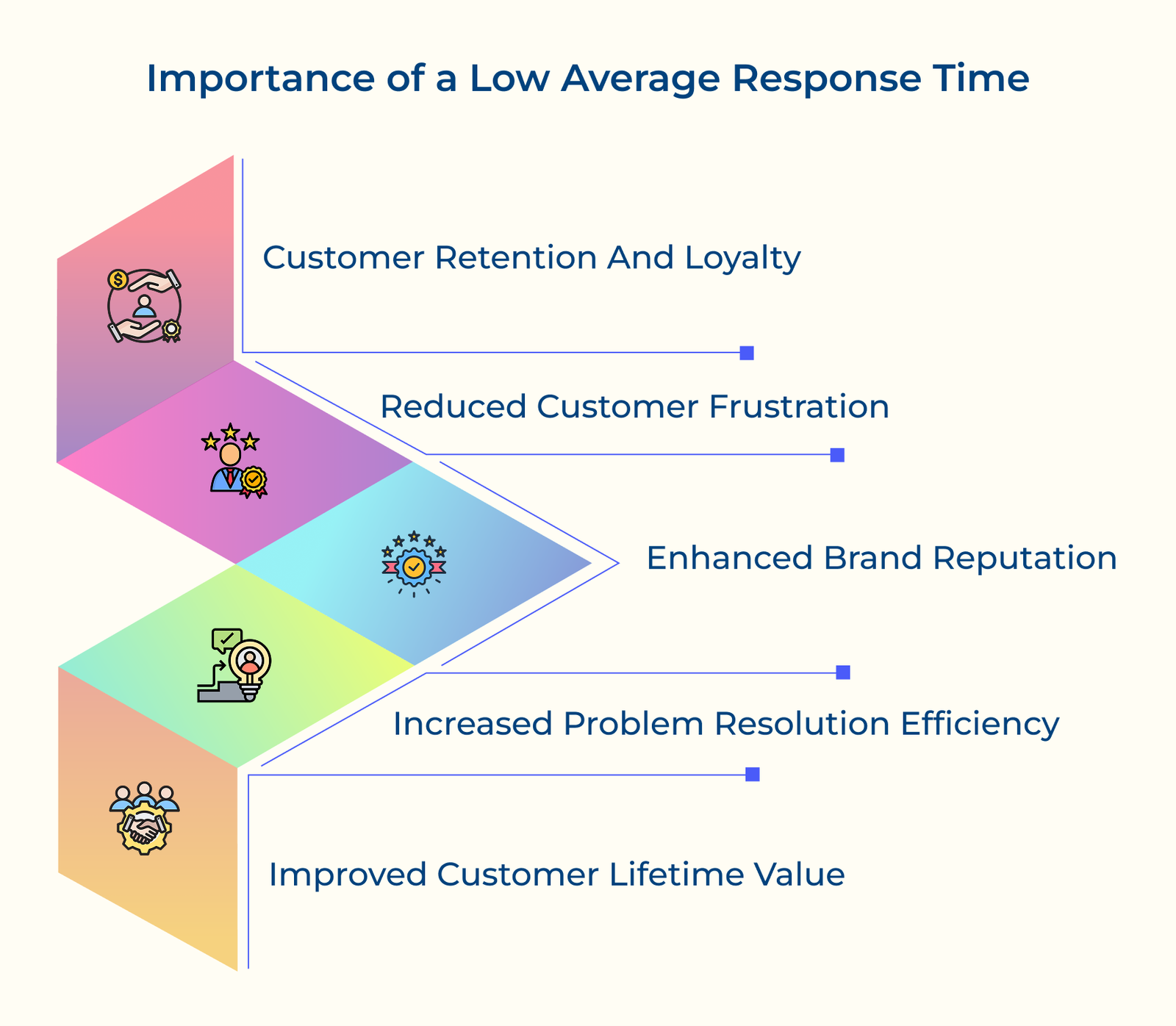
1. Customer Retention and Loyalty
When customers get timely responses, they feel heard and respected. It builds trust and reassures them that their concerns matter. A quick reply isn’t just about solving a problem; it’s about showing reliability. With 70% of businesses still losing customers to slow response times, the opportunity to gain a competitive edge has never been clearer.
2. Reduced Customer Frustration
Fast response times keep customers from getting frustrated while they wait. When they run into a problem, every passing minute adds to their anxiety. A low ART (Average Response Time) helps keep them calm and prevents them from linking your brand with stress.
3. Increased Problem Resolution Efficiency
Quick responses let customer service reps gather details fast and start troubleshooting right away. It keeps problems from getting worse and cuts down the time needed to fix them. The faster an issue is resolved, the happier the customer.
4. Enhanced Brand Reputation
Customers often talk about their support experiences online. Fast responses lead to positive reviews and recommendations, while slow service does the opposite. A good reputation for quick, helpful support makes people more likely to choose your business.
5. Improved Customer Lifetime Value
When customers get quick responses, they’re more likely to buy again and recommend your service. Over time, satisfied customers stick around longer and try more of what you offer.
Average response time (ART) is a key measure of customer support efficiency. It directly affects customer satisfaction and helps teams understand their performance.
First Response Time
The metric represents the time between a customer’s initial request and the first reply from a human agent. Automated messages don’t count since they don’t address the actual date.
Queue Time
Queue time measures how long a request sits in the system before an agent picks it up. It tends to rise during busy hours or when there aren’t enough agents available, which slows down overall response times.
Agent Processing Time
The component tracks the time agents spend reading, understanding and responding to customer requests. It includes researching solutions, reviewing documentation, and escalating complex issues when necessary.
1. Data Collection Phase
Start by collecting all support ticket data, including timestamps for ticket creation, first response and follow-ups. Make sure your help desk system logs the timestamps accurately and excludes automated replies.
2. Time Range Selection
Decide if you want to measure response times daily, weekly or monthly. Keep the time frame consistent for accurate trends. Consider excluding non-business hours if your support isn’t 24/7 to maintain realistic metrics.
3. Response Time Calculation
Subtract the creation time from the first response time for each ticket. It gives you the response time for that ticket, which you can use to calculate the average.
4. Data Cleaning Process
Filter out outliers like tickets with system errors or unusually long delays. Also, remove any that fall outside your service agreements or normal procedures to keep your data accurate.
5. Final Average Computation
Sum up all response times and divide by the total number of tickets. If some tickets have higher priority, you might want to weigh them differently based on their response time expectations.
Let’s calculate the ART for a support team handling 5 tickets:
– Ticket 1: 15 minutes
– Ticket 2: 25 minutes
– Ticket 3: 10 minutes
– Ticket 4: 30 minutes
– Ticket 5: 20 minutes
Total Response Time = 15 + 25 + 10 + 30 + 20 = 100 minutes
Total Tickets = 5
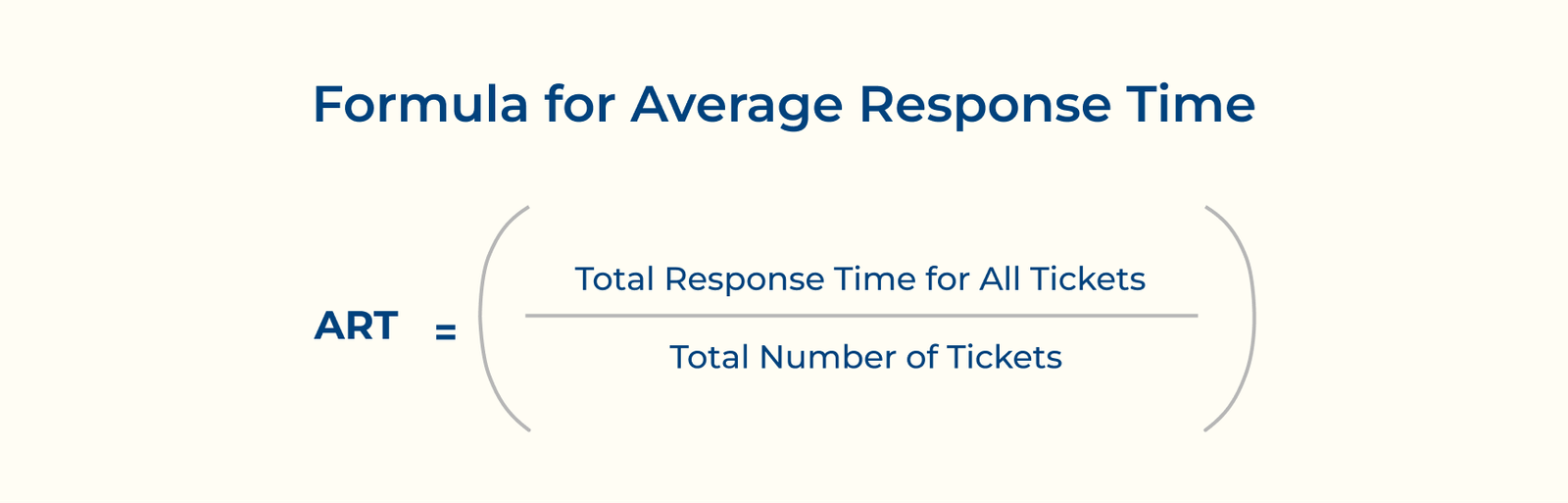
ART = 100 minutes / 5 tickets = 20 minutes
Hence, the average response time for the sample is 20 minutes, which indicates the typical waiting time customers experience before receiving their first response.
Check out the key differences between average response time and first response time. Understanding both metrics helps teams deliver more effective assistance.
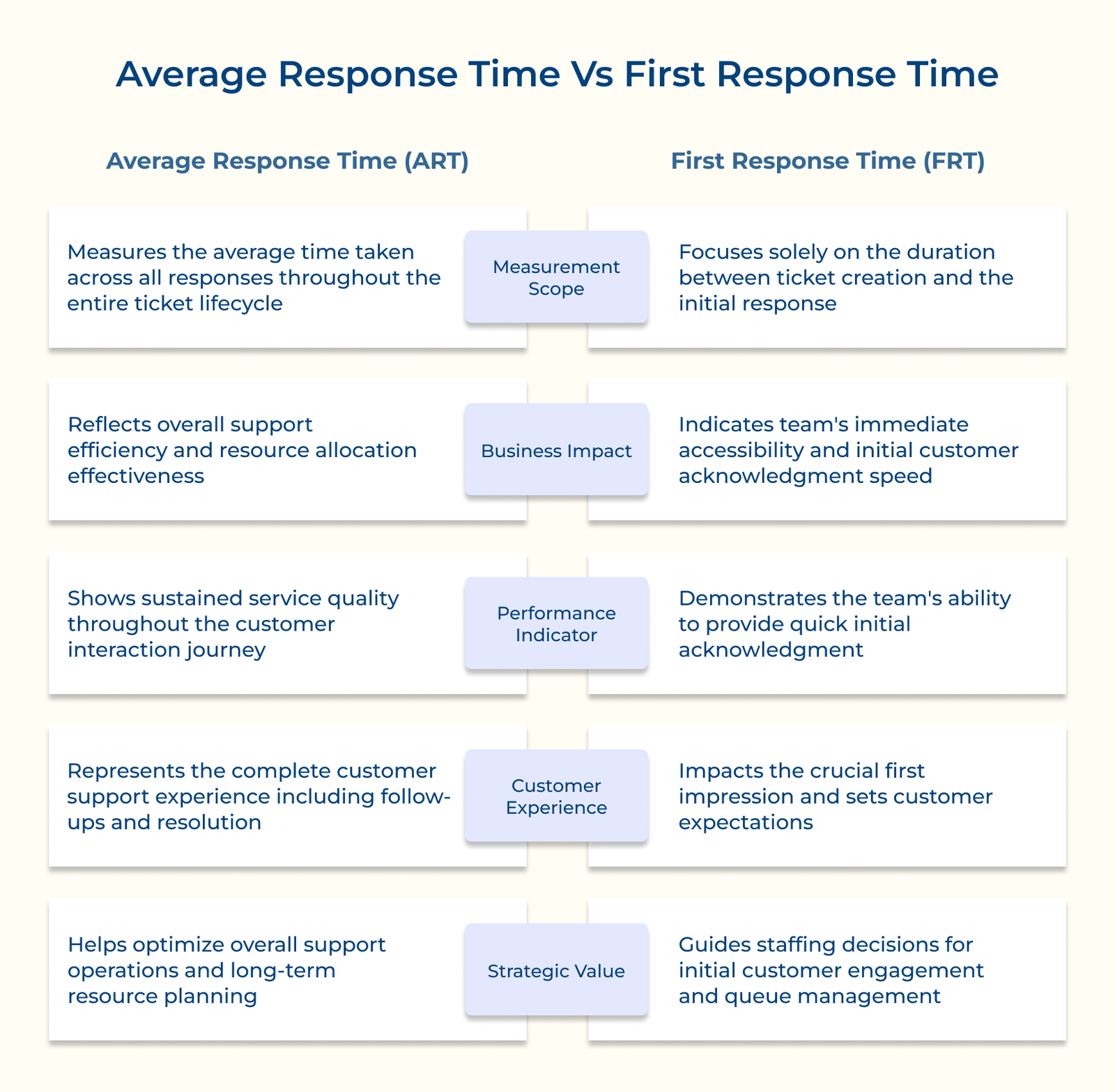
1. Measurement Scope
ART tracks the average time for all responses throughout a ticket’s life, from the first reply to follow-ups and resolution. It gives a full picture of support efficiency.
FRT measures only how fast the team responds to a new request. It shows how quickly customers get an initial reply but doesn’t account for the quality or speed of follow-ups.
2. Business Impact
ART reveals how efficiently a customer service team handles requests from start to finish. It helps identify delays, improve workflows and guide decisions on staffing.
FRT shapes a customer’s first impression. A fast initial response can ease frustration and set a positive tone, but it doesn’t guarantee a smooth resolution.
3. Performance Indicator
ART measures how well a support team maintains communication throughout a ticket’s lifecycle. It highlights response delays and areas needing more resources or process improvements.
FRT shows how quickly the team acknowledges new requests and handles ticket volume. While important for first impressions, it doesn’t reveal how well the team follows through or resolves issues.
4. Customer Experience
ART reflects the full support experience, making it a strong indicator of customer satisfaction. Steady response times build trust and show that support is reliable from start to finish.
FRT shapes first impressions. A quick initial response can reassure customers, but it doesn’t guarantee a smooth or satisfying resolution.
5. Strategic Value
ART helps shape long-term support strategies by revealing team capacity, resource needs and process efficiency. It guides leadership in making smart decisions about scaling and improving operations.
FRT helps managers fine-tune first responses and queue management. While useful for quick adjustments, it doesn’t offer the bigger picture needed for long-term planning.
Check out the impactful strategies you can implement right away to lower your average response time and take your productivity to the next level.
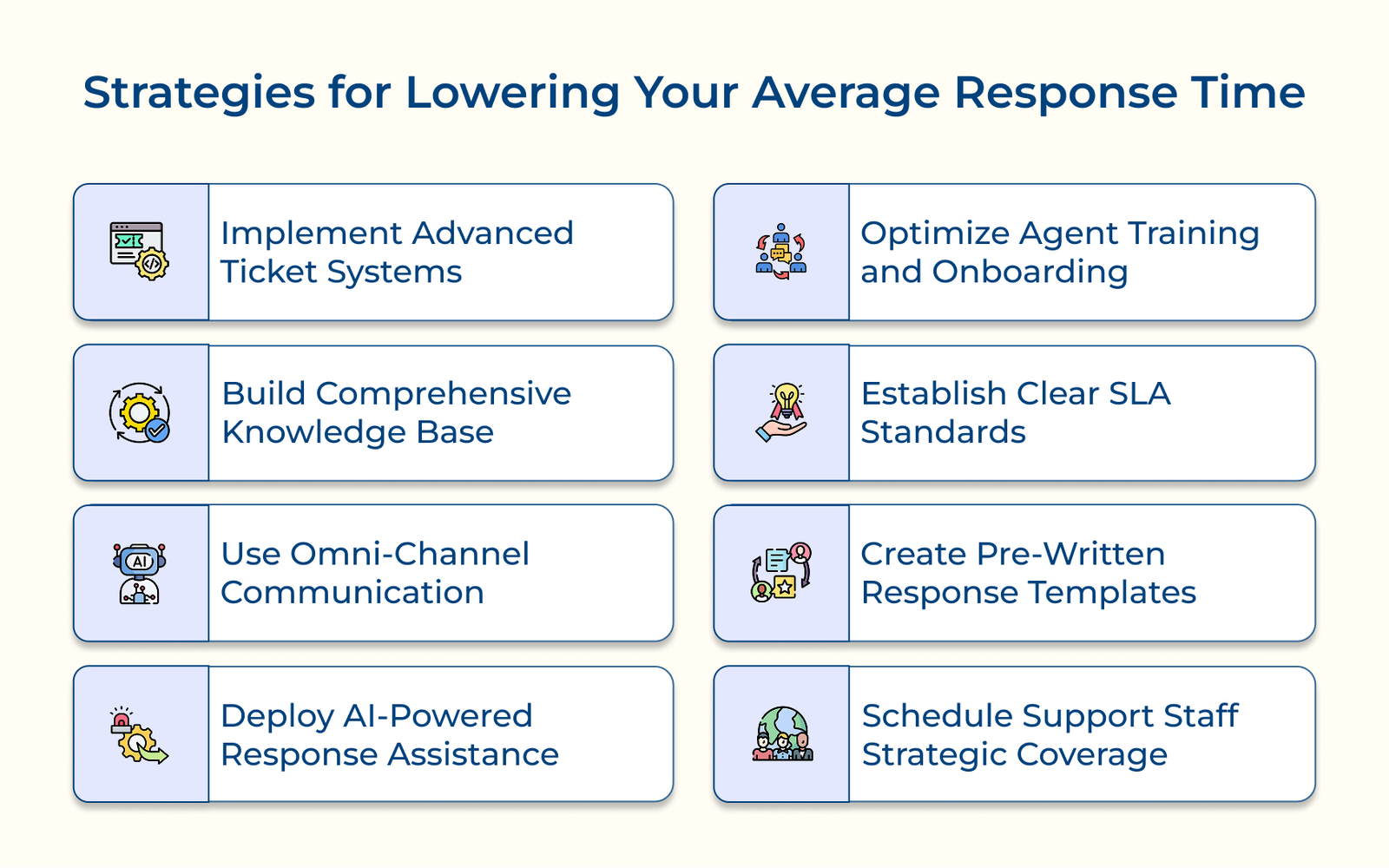
Advanced ticket routing systems are the backbone of an efficient support workflow. They eliminate the delays of sorting and help teams respond faster by automatically assigning incoming requests based on specific rules.
Skill-based routing means sending a query to someone who actually knows how to handle it. Say a customer asks about API integration, the system doesn’t just toss it to any available agent. It sends it straight to someone who understands the technical side, so the customer isn’t stuck waiting or explaining the issue twice.
Pro tips:
A well-structured knowledge base gives customers the tools to solve problems on their own. It reduces the number of support tickets by making answers to common questions easy to find. It’s also a valuable resource for support agents who need quick, reliable information while helping customers.
Writing useful articles takes more than just dumping information. Start by reviewing past support tickets to spot patterns. Use the data to create focused guides with clear steps, real examples and troubleshooting advice.
Actionable tips:
Omnichannel communication brings all your support channels like email, chat, social and more into one place. Instead of juggling multiple tools, agents work from a single dashboard. It cuts down response times and helps teams stay focused.
A unified view makes support more fluid. If a customer emails first and follows up via chat, the agent can see the full conversation history right away. There’s no longer any need to ask the customer to repeat themselves, as everything will already be there.
Best practices:
AI tools are changing how support teams work. They take care of simple, repetitive tasks and help agents respond faster. It shortens resolution times and frees up human agents to focus on complex issues.
Chatbots are often the first to respond when a customer reaches out. They can answer common questions, share product details and collect key information before passing the issue to a human if needed. It keeps customers from waiting and lightens the load on your team.
Key takeaways:
Solid training and onboarding give support agents the confidence and knowledge to handle issues without hesitation. When agents understand the product, the process and common customer problems, they’re faster, cutting down response times right from day one.
Scenario-based training is especially useful. It prepares agents to deal with real situations, like payment issues or login problems, before they ever go live. Instead of guessing, they follow steps they’ve already practiced. Ongoing coaching keeps skills sharp and helps spot areas for improvement.
Pro tips:
Service Level Agreement (SLA) set clear expectations for how quickly support teams should respond to different types of requests. They bring structure to response time management and help teams stay accountable under pressure.
Escalation rules are a safety net. When a ticket is close to breaching its SLA, it is automatically bumped to a senior agent or supervisor. It keeps urgent issues from being overlooked, especially when volume spikes.
Actionable tips:
A solid template library helps support teams respond faster and more consistently. Agents spend less time writing from scratch and more time solving problems, directly reducing average resolution time with ready-made replies for common issues.
Different situations call for different tones and detail levels. A technical customer might want step-by-step instructions, while someone less familiar with the product may need a simpler explanation. It is why it helps to keep multiple versions of each template, each with built-in spots for personalization like names, order details or account info.
Best practices:
Smart scheduling keeps your support team running smoothly. When shifts are planned based on actual demand, you avoid coverage gaps and make sure customers aren’t left waiting. It also helps spread the workload fairly, so agents stay focused and avoid burnout.
Cross-training adds flexibility. If agents can handle a range of issues, it’s easier to shift coverage across time zones without sacrificing quality. Let’s consider that a New York-based agent trained in technical support can cover UK customers during their busy hours—no need to stretch teams thin or overwork individuals.
Best practices:
Understanding average response time (ART) benchmarks across different communication channels helps support teams set realistic goals and meet customer expectations effectively.
| Channel | Response Time Benchmarks |
Reasoning |
| Live Chat |
|
Live chat creates an expectation of immediate assistance since customers actively wait for responses during the conversation |
|
Email allows for more detailed responses and customers typically expect less urgency compared to real-time channels | |
| Social Media |
|
Social media platforms are public-facing and quick responses prevent potential negative brand perception |
| Phone Support |
|
Phone interactions demand immediate attention since customers invest time waiting on the line |
| SMS/WhatsApp |
|
Mobile messaging creates expectations of faster responses than email but allows more flexibility than live chat |
Check out the examples below to see how different teams maintain an average response time across various support scenarios.
1. Amazon’s Prime Support Excellence
Amazon uses AI chatbots to handle common questions and routes more complex issues to the right team based on a customer’s history or the type of query. Their systems can even spot potential problems, like delivery delays, before the customer contacts support. Amazon reduces wait times and builds customer trust through consistently quick resolutions by getting ahead of issues or routing tickets efficiently.
2. Zappos’s 24/7 Customer-First Approach
Zappos dropped the scripts and time limits. Agents are trained to handle a wide range of issues and are trusted to make decisions without constantly escalating. The freedom allows for faster resolutions and more meaningful conversations. It also keeps customers from being passed around, which helps build long-term customer loyalty.
3. Netflix’s Predictive Support Model
Netflix uses machine learning to detect streaming issues as they happen. If there’s a service glitch, the system can contact users with suggested fixes, sometimes before they’ve even noticed the problem. It cuts down on support tickets and keeps the experience smooth, helping users stay engaged without interruptions.
4. Airbnb’s Host-Guest Support Integration
Airbnb connects hosts, guests and support agents through a single messaging system. It automatically translates messages and gives agents key details about the booking or property so they can respond quickly. The setup helps resolve issues faster, especially in high-stress situations like last-minute cancellations or check-in problems and makes cross-language support seamless.
Average Response Time (ART) isn’t just a number, it’s a reflection of how seriously a company takes its customers. People don’t like waiting, especially when they need help. If your team takes too long to reply, frustration builds. But when you respond quickly and handle the issue well, you earn trust.
Teams with low ART don’t just reply fast, they get things done right and quickly. They’ve nailed the right mix of tools, training and workflows to respond thoughtfully. The right mix of speed and accuracy is what makes support worth remembering. Miss either and people move on.

A good response time depends on the context. In email support, replies within 4 hours are generally acceptable. Live chat should aim for under 30 seconds, but these are just benchmarks. What really matters is how quickly your customers expect a reply, something that changes depending on the urgency of the issue and who you’re serving.
Average response time is the typical time a customer waits after submitting a question or issue before they hear back from a real person on your team. It doesn’t count automated replies or generic acknowledgments, just the first meaningful human response. In simple terms, it shows how quickly your support team starts solving a customer’s problem. The longer the wait, the more frustrated the customer.
Live chat is a real-time conversation, not a message you can get back to later. When customers use it, they’re usually waiting right there, expecting a quick reply. That’s why response times are measured in seconds, not minutes or hours. Industry benchmarks suggest replying within 60 seconds, because any longer starts to feel like being left on read in the middle of a conversation. Once that happens, you risk losing the customer’s attention and their trust.
If your response times are slower than what’s expected for each channel, that’s a red flag. When it comes to email, taking more than 24 hours is already too long. A three-minute delay on live chat can feel like no one’s coming. Most users will already have lost interest or moved on. These delays usually point to deeper problems like not enough staff, poor training, or clunky internal systems. Fixing the root cause matters more than just speeding up replies.
How fast you respond tells customers everything about how much you value their time. A quick reply signals that you’re on top of things. A slow one? It suggests disorganization or indifference. Even if your solution is solid, making people wait can leave them irritated and less likely to return.
Priority levels should influence response time targets based on issue urgency and business impact. Critical issues like system outages or security concerns demand immediate attention, while general inquiries can follow standard response times. The prioritization helps balance resource allocation while maintaining customer satisfaction across all inquiry types.

Grow Customer Relationships and stronger team collaboration with our range of products across the Conversational Engagement Suite.
Omnichannel Customer Support & Help Desk Software
AI Enabled Business Messaging and Chatbot Software
Sales Engagement & CRM Software
Call Center Software & Virtual Phone System
Product Marketing & Experience Platform
Customer Experience & Feedback Management Software

 Opportunity Management System: The Ultimate Guide
Scroll to top
Opportunity Management System: The Ultimate Guide
Scroll to top