CRM What Is CRM-Pillar Page

The Definitive Guide to CRM: Benefits, Features, Use Cases & Tools

Explore the definitive guide on CRM and how to use it for sales management. Learn about its benefits, features, best practices and tools to help streamline the sales strategies.

No credit card required. Easy setup

CRM What Is CRM-Pillar Page

Trusted by Leading Brands

CRM: Turning Customer Connections into Lasting Relationships

Discover how CRM transforms customer interactions into meaningful relationships, driving growth and loyalty through efficient management.

Automated Follow-ups

Automatically engage prospects throughout their buying journey, ensuring timely and relevant interactions without manual effort. Now eliminates the need for manual follow-ups.

Streamline Sales Processes

Optimize the sales workflows by standardizing procedures to enhance teamwork and unify sales data across all departments. Make sure that every team member adheres to consistent practices, leading to smoother operations.

Sales Forecasting with Data-driven Insights

Harness real-time data to create precise sales projections and compelling visualizations that drive informed decision-making. Get valuable insights into future sales opportunities and make strategic decisions with confidence.

Lower Marketing and Sales Acquisition Costs

Boost your targeting efficiency and optimize resource allocation to reduce the cost of acquiring new customers. Lowering Customer Acquisition Cost (CAC), not only saves on expenses but also enhances retention rates and increases Customer Lifetime Value (LTV).

Unified Customer Data Hub for Seamless Team Collaboration

Bring every piece of customer information together in one accessible platform to empower your teams with a 360° customer view. Say goodbye to data silos and ensure marketing, sales, and support work seamlessly together to deliver consistent, high-impact interactions.

Boost Retention with Tailored Customer Experiences

Turn customer data into meaningful, personalized touchpoints that keep customers coming back. Engage every customer with relevant, timely interactions that elevate satisfaction and maximize lifetime value—no more one-size-fits-all!

The challenge of managing leads and closing deals efficiently has become increasingly complex, leading to missed opportunities. Many businesses struggle to maintain a cohesive view of their sales pipeline, resulting in lost revenue and frustrated team efforts.

CRM offers a centralized platform to manage customer interactions, streamline processes and drive strategic decision-making. The definitive guide covers the ins and outs of customer relationship management. Explores its benefits, features, real-world use cases and some key strategies for effective implementation.

What is CRM?

CRM (Customer Relationship Management) refers to a software platform designed to help businesses manage and optimize customer interactions throughout sales. The software serves as a centralized platform to streamline sales processes and provide data-driven insights for strategic decision-making.

Client relationship management tools offer features like contact management, sales pipeline tracking, task automation and reporting to help businesses manage their relationships. It collects customer data from various touchpoints to provide insights into their behavior, conversations and deals progress.

Key objectives:

  • Centralize customer data for a unified view of each customer across the organization.
  • Automate sales and marketing processes to increase operational efficiency.
  • Enhance customer experience through personalized interactions and improved service.
  • Provide actionable insights to drive strategic decision-making and sales forecasting.
  • Improve customer loyalty by identifying and addressing customer needs proactively.

What is the Importance of CRM?

Understanding the importance of CRM will help businesses streamline interactions, improve customer satisfaction and drive growth.

Benefits of CRM

1. Automate Lead Qualification and Follow-up
A CRM system streamlines lead qualification by scoring and categorizing leads, allowing sales teams to focus on promising prospects. The system can trigger automated follow-up sequences, sending personalized emails or text messages at optimal times.

2. Schedule Appointments on Autopilot
Modern client relationship management systems often include an intelligent appointment booking for prospects to schedule meetings directly. It eliminates the back-and-forth communication typically required to find a suitable time.

3. Improved Sales Operations Efficiency
CRM dramatically enhances operational efficiency, eliminates manual data entry and frees up sales teams to focus on high-value activities. Businesses get real-time insights into sales performance and pipeline health which enables the managers to make data-driven decisions.

4. Get a 360-degree View
A robust customer relationship management system consolidates all customer interactions and data into a single, comprehensive profile. The holistic view enables sales teams to understand customer needs better, personalize their approach and identify cross-selling or upselling opportunities.

5. Clear Accountability on Deals Management
CRM systems provide transparency in deal management by clearly assigning ownership of leads and opportunities to promote accountability among team members. They track each stage of the sales process, making it easy to identify bottlenecks or areas for improvement.

6. Automate Sales Outreach
CRM systems can send personalized emails based on customer behavior, schedule social media posts and even make initial phone calls using AI-powered dialers. The automation ensures consistent messaging across all channels and allows sales teams to maintain regular contact with a large number of prospects simultaneously.

7. Manage Multichannel Real-Time Conversations
A modern CRM integrates communication across multiple channels to provide a sales inbox where sales reps can manage all conversations in real time. A unified approach ensures that no customer inquiry is missed and that the context of previous interactions is always available.

How to Implement CRM Strategies for Optimal Sales Processes?

The proper implementation of CRM strategies can make all the difference. Let’s explore some key insights on how to implement them successfully.

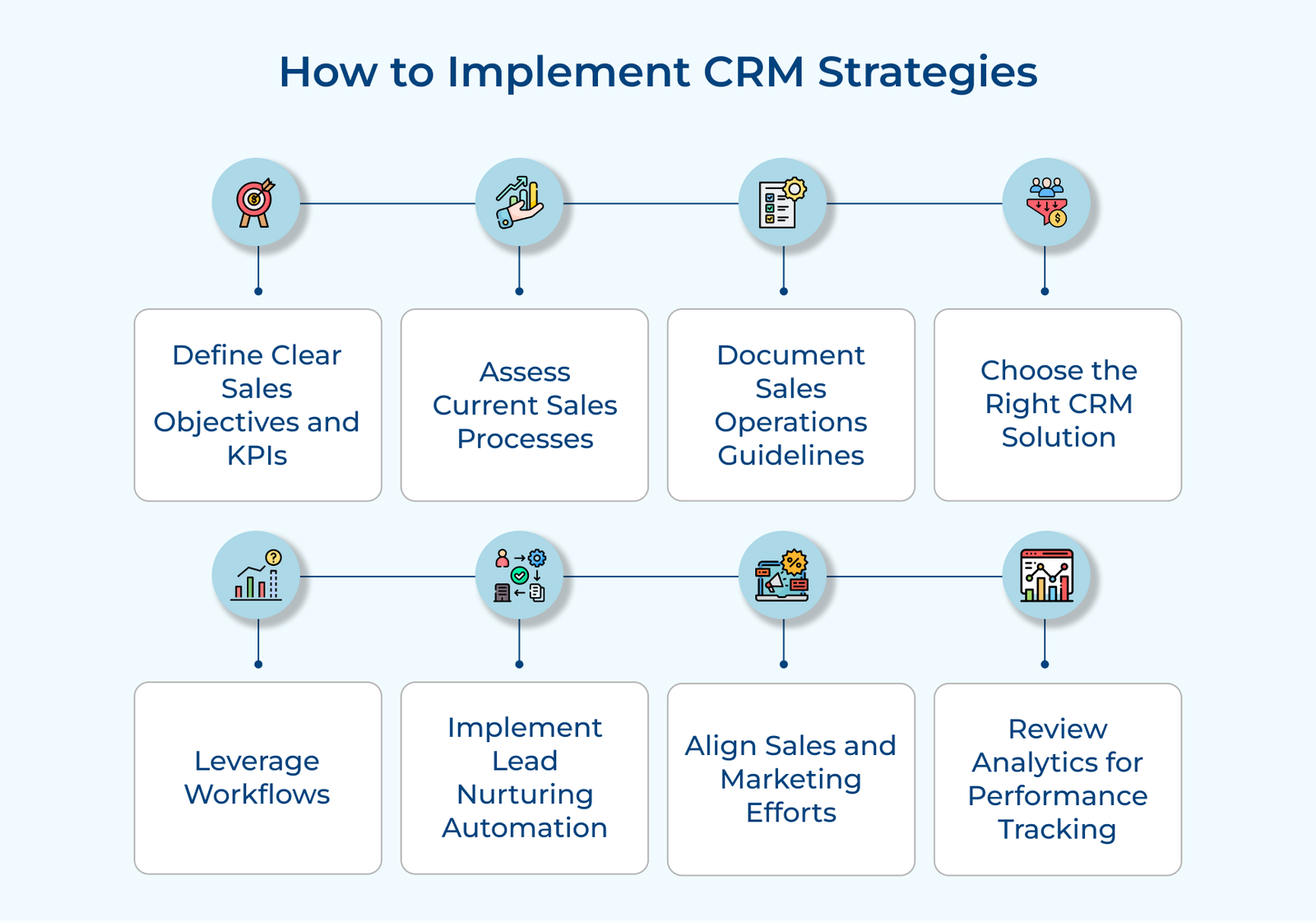
How to Implement CRM Strategies

1. Define Clear Sales Objectives and KPIs

Clear KPIs help sales teams focus on the most impactful activities and allow managers to make data-driven decisions. Organizations can create a more focused, data-driven sales approach that leverages their CRM system to its full potential.

Some common observations include setting revenue targets, defining conversion rate goals, establishing customer retention objectives and tracking sales activity metrics. The measurable goals can be used to motivate teams, identify areas for improvement and optimize sales processes.

Actionable tips:

  • Align CRM objectives with business goals to ensure coherence across the organization.
  • Involve sales team members in setting KPIs to increase buy-in and ensure realistic targets.
  • Regularly adjust objectives and KPIs based on performance data.

2. Assess Current Sales Processes and Bottlenecks

The next step is to evaluate where the sales strategy currently stands to assess existing workflows, lead leakage, or inefficient data management. The step is important because it prevents the replication of inefficient processes in the new system and ensures that client relationship management addresses specific pain points.

Consider analyzing lead conversion rates to determine the effectiveness of the sales funnel to conduct a comprehensive assessment. Evaluate the time spent on manual tasks to identify opportunities for automation and streamline operations.

Pro tips:

  • Conduct in-depth interviews with sales team members at all levels to gather diverse perspectives on current processes.
  • Use data analytics to identify quantifiable bottlenecks, such as stages where deals frequently stall or drop off.
  • Create a visual map of the current sales process to easily identify redundancies and areas for improvement.

3. Document the Sales Operations Guidelines

Having a clear set of guidelines and protocols establishes a standardized approach to sales processes, ensuring consistency across the team. The guidelines can cover everything from lead qualification criteria to deal closure protocols and CRM data entry standards.

Well-documented guidelines reduce confusion, streamline onboarding for new team members and provide a reference point for best practices. Some of the use cases here are training new sales reps, customer onboarding, or sales assessment criteria.

Actionable tips:

  • Involve key stakeholders in creating the guidelines to ensure comprehensive coverage and buy-in.
  • Use a mix of formats (text, flowcharts, videos) to cater to different learning styles and make the guidelines more accessible.
  • Regularly update the guidelines based on feedback and changing business needs to keep them relevant.

3. Choose the Right CRM Solution

Right CRM software aligns with the specific business needs and can be customized to fit into specific sales processes. A well-chosen CRM can streamline processes, improve data management and provide valuable insights that lead to increased sales performance.

Practical uses for choosing the right CRM include managing complex sales cycles, automating repetitive tasks and providing in-depth analytics for data-driven decision-making.

Pro tips:

  • Conduct a thorough needs assessment involving key stakeholders from sales, marketing and IT departments.
  • Evaluate multiple CRM options through demos and free trials to ensure the solution meets the specific requirements.
  • Consider factors like scalability, integration capabilities and total cost of ownership when making the final decision.

4. Leverage Workflows to Automate Sales Processes

Workflow automation can analyze vast amounts of data to provide actionable insights, personalize customer interactions and streamline repetitive tasks. The automation can significantly enhance efficiency, reduce human error and allow sales teams to focus on high-value tasks like closing deals.

Examples of workflow automation in action are automated lead scoring. It prioritizes prospects based on their likelihood to convert and predictive analytics that provides accurate sales forecasting by identifying potential opportunities.

Actionable tips:

  • Start small by automating one process at a time, measuring results and scaling gradually.
  • Ensure data quality and integration across systems to maximize AI effectiveness.
  • Provide thorough training to encourage the adoption and proper use of AI-powered tools.

5. Implement Lead Nurturing Automation

An effective lead nurturing strategy allows sales teams to maintain consistent, personalized communication with prospects at scale, increasing the likelihood of conversion. The automation ensures that leads receive relevant information at the right time, keeping them engaged throughout the sales cycle.

A few examples here can be sending targeted content based on prospect behavior, scheduling follow-up emails after initial contact and triggering personalized messages for specific milestones.

Pro tips:

  • Segment leads based on behavior and preferences to ensure targeted content delivery.
  • Create a diverse content library that addresses different stages of the buyer’s journey.
  • Regularly analyze and refine the automation workflows based on performance metrics.

6. Align Sales and Marketing Efforts

When sales and marketing teams work in harmony, they create a unified message that resonates with potential customers throughout the sales funnel. The alignment also ensures a cohesive customer journey by providing consistent messaging across all touchpoints.

The feature allows for better resource allocation, as both teams can focus on strategies that have proven to be effective. It results in higher ROI for marketing campaigns and sales initiatives.

Actionable tips:

  • Establish shared KPIs for both sales and marketing teams.
  • Implement regular cross-departmental meetings to share insights and feedback.
  • Utilize a unified CRM system that provides visibility into both marketing and sales activities.

7. Review Analytics for Performance Tracking

Performance review involves systematically analyzing customer feedback, sales data and team performance metrics to gain insights. Businesses can identify strengths, weaknesses and trends in their sales approach, enabling data-driven decision-making.

Actionable tips:

  • Define clear, measurable KPIs aligned with business objectives.
  • Implement a robust data collection system that integrates various sources of customer and sales information.
  • Regularly act on insights, involving the sales team in discussions and improvement strategies.

Key Features of Customer Relationship Management Solution

The best CRM software offers features to manage customer contacts, automate tasks and analyze data for improved sales. Let’s explore its key features in detail below.

Key Features of CRM

Contact Management
Robust contact management allows sales teams to organize detailed information about customers and prospects in a centralized database. Advanced CRMs can also integrate social media profiles and other external data sources to provide a comprehensive view of each contact.

Lead Management and Scoring
CRM systems often include lead scoring functionality, which automatically ranks leads based on criteria such as engagement level, demographics, or behavior. Sales teams use it to prioritize their efforts on the most convertible opportunities.

Automated Lead Nurturing
Once leads are captured, they need to be nurtured to move them through the sales funnel. This process is crucial for customer relationship optimization, ensuring consistent and personalized communication with prospects. Look for software that offers automated email sequences, personalized content delivery and triggered actions based on lead behavior. It ensures consistent communication with prospects without overwhelming the sales team.

Sales Pipeline Visualization
A visual representation of the pipeline allows sales managers to quickly identify bottlenecks, forecast revenue and make data-driven decisions to optimize the sales process. It typically includes customizable stages that reflect a company’s unique sales cycle.

Automated Sequence Management
Outreach sequences can include a mix of emails, calls and social touches, scheduled at optimal intervals. Sales teams can maintain consistent follow-ups without manual intervention, increasing efficiency and ensuring no leads fall through the cracks.

Task Management and Automation
Customer relationship management software often includes task management tools that help sales reps organize their daily activities and follow-ups. Automation features can trigger reminders, schedule tasks and even send personalized emails based on predefined rules or customer actions.

Reporting and Analytics
A good CRM provides customizable dashboards that offer real-time visibility into key metrics such as sales velocity, win rates and revenue forecasts. Advanced systems may include predictive analytics to identify trends and opportunities.

Role of AI and Automation in Effective CRM Management

Explore how integrating AI and automation into your CRM strategy can optimize your operations, leading to long-term success.

Role of AI and Automation Effective CRM Management

Lead Scoring and Prioritization

AI algorithms analyze vast amounts of data to score and prioritize leads based on their likelihood to convert so that teams focus their efforts on the most promising prospects. It improves sales process efficiency and conversion rates by ensuring that high-value leads receive timely attention.

Personalized Customer Interactions

AI-powered sales software, particularly advanced CRM systems, can tailor communications to individual customers based on their preferences, past behaviors, and current context. The personalization enhances customer experience, streamlines multi-channel conversations and improves sales rep productivity.

Predictive Analytics and Forecasting

Predictive analytics can flag accounts at risk of churn, allowing proactive measures to retain valuable customers. Sales managers can also make informed decisions about resource allocation, inventory management and strategic planning.

Automated Workflows

AI streamlines repetitive tasks such as data entry, appointment scheduling and follow-up reminders. It frees up sales representatives to focus on high-value activities like building relationships and closing deals. Intelligent workflow automation can also guide sales processes, ensuring consistent execution of best practices across the team.

Intelligent Chatbots

AI-powered chatbots and virtual assistants can seamlessly escalate complex issues to human agents when necessary. It ensures efficient use of human resources while maintaining high levels of customer satisfaction. AI assistants have become increasingly sophisticated in their ability to understand and respond to customer needs.

How does a CRM Improve Business Operations?

If a business is curious about how a CRM can benefit its business operations and drive growth, the following section will discover the transformative power of the essential tool.

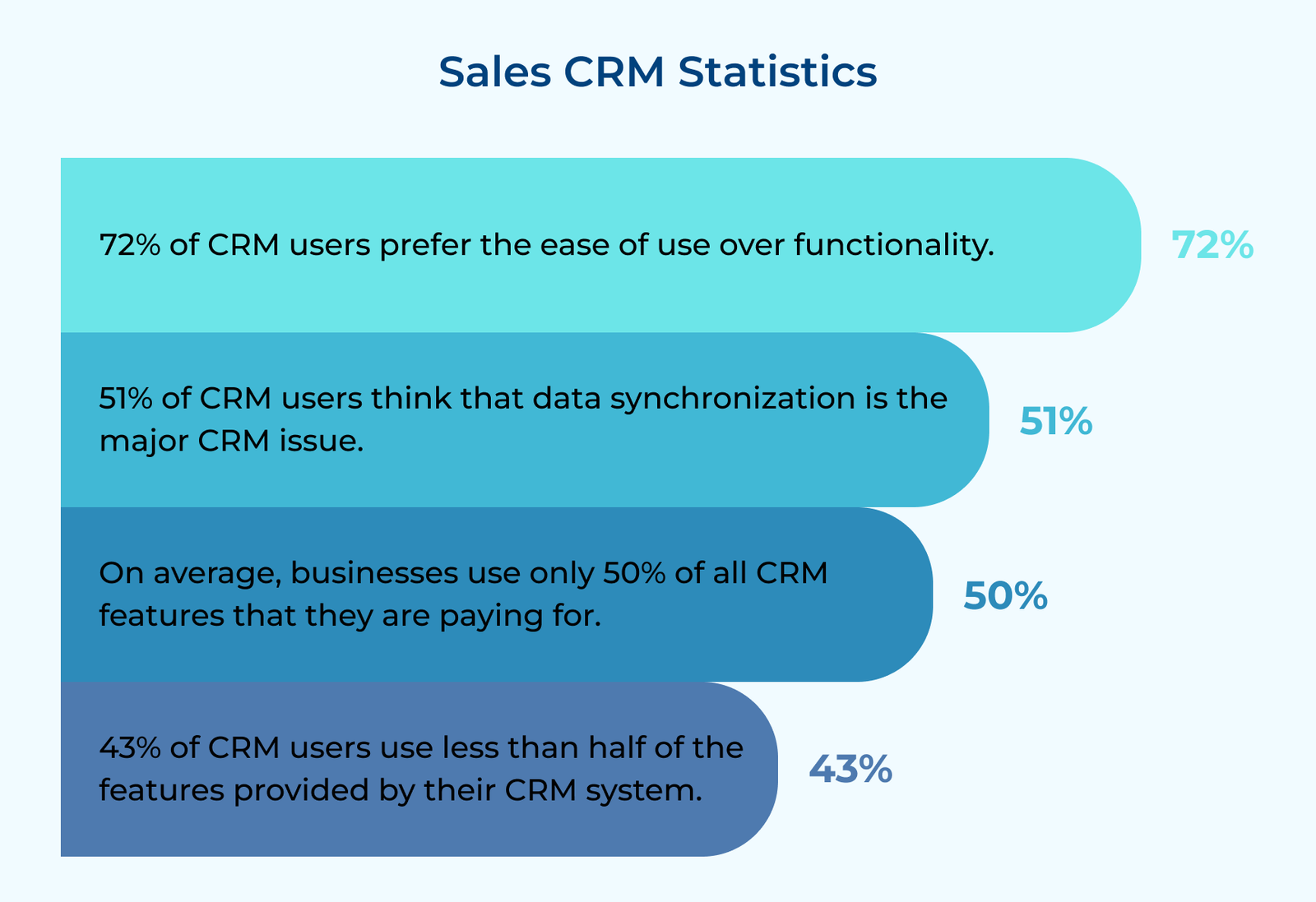
Sales CRM Statistics

1. Streamlined Sales Process
Sales CRM software automates and organizes various stages of the sales pipeline, from lead generation to closing deals. The streamlining reduces manual tasks, minimizes errors and allows sales teams to focus on high-value activities. The result is a more efficient sales process, shorter sales cycles and improved conversion rates.

2. Data-Driven Decision Making
CRMs provide valuable insights into market sales performance by collecting and analyzing vast amounts of customer data. It empowers management to make informed decisions about product development, marketing strategies and resource allocation.

3. Improved Cross-Functional Collaboration
Customer relationship management systems serve as a central hub for customer information, accessible to various departments such as sales, marketing and customer service. The shared access facilitates better communication and collaboration between teams, ensuring a cohesive approach to customer management.

4. Enhanced Forecasting and Planning
CRMs enable more precise sales forecasting with accurate data on sales pipelines, customer behavior and market trends. The improved predictability allows businesses to better manage inventory, allocate resources and set realistic goals.

5. Automation of Routine Tasks
CRMs automate many repetitive tasks such as data entry, follow-up reminders and report generation. The automation not only saves time but also reduces human error, allowing employees to focus on more value-adding activities. The result is increased productivity and better utilization of human resources.

6. Scalability and Adaptability
As businesses grow, client relationship management systems can easily scale to accommodate increased data volumes and user numbers. They also offer flexibility in terms of customization and integration with other business tools. The scalability and adaptability ensure that the CRM can continue to support business operations effectively as the organization evolves.

How to Effectively Measure The CRM’s Performance?

Measuring the performance of a CRM system is crucial to ensure it’s delivering value and helping achieve business objectives.

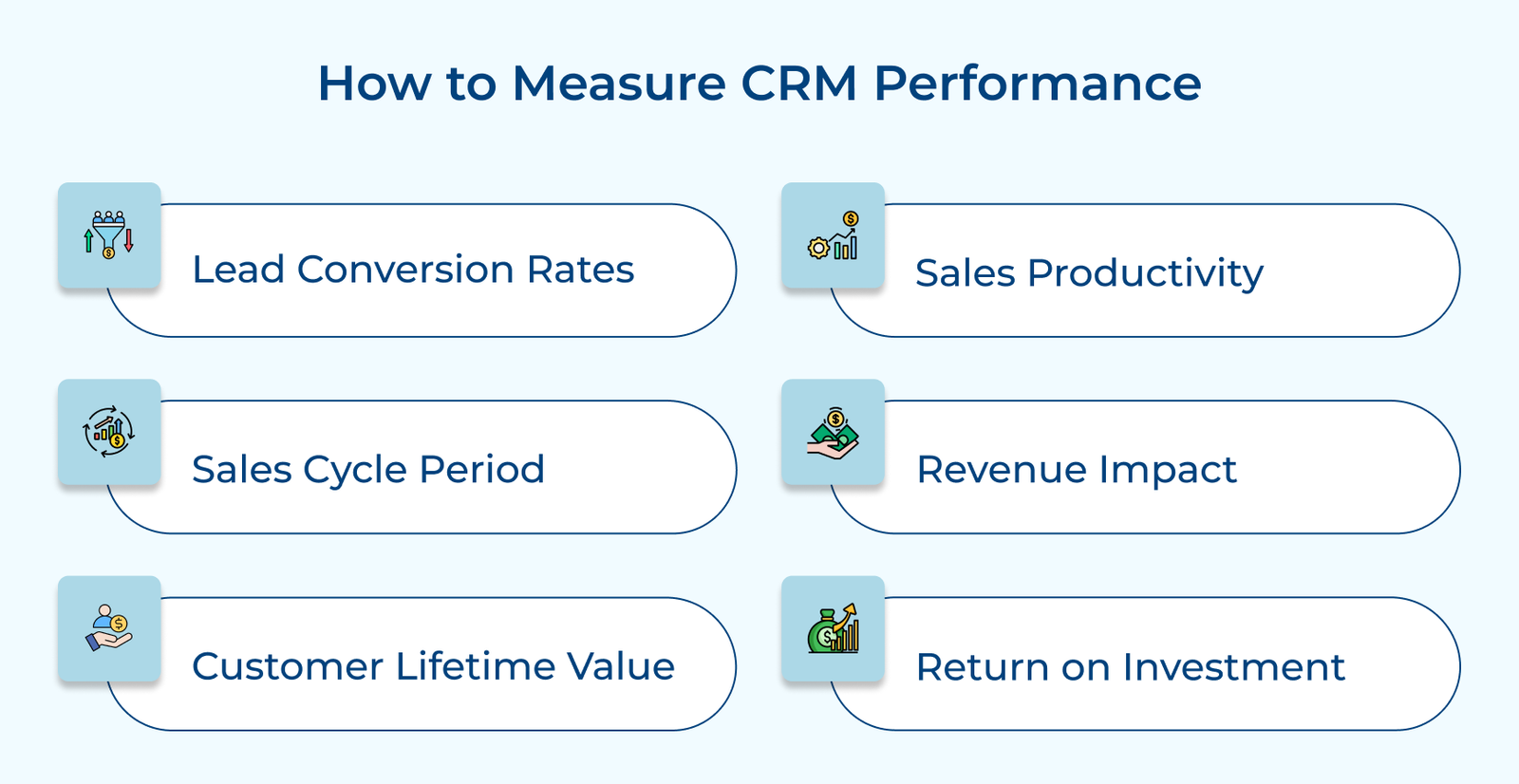
How to Measure CRM Performance

1. Lead Conversion Rates
Monitor how effectively the CRM is helping convert leads into customers. Compare conversion rates before and after customer relationship management implementation. Look at metrics such as lead-to-opportunity and opportunity-to-win ratios. Improvements in these areas can directly demonstrate the CRM’s impact on sales effectiveness.

2. Sales Cycle Period
A well-implemented CRM should help shorten the sales cycle. Measure the average time it takes to close a deal and track how it changes over time. A reduction in sales cycle length often indicates improved efficiency and better lead nurturing processes facilitated by the CRM.

3. Customer Lifetime Value
CRM systems should help improve customer relationships and, consequently, retention. Track customer churn rates and compare them to pre-CRM figures. An increase in customer lifetime value can be a strong indicator of client relationship management’s effectiveness in enhancing long-term relationships.

4. Sales Productivity
Evaluate how the CRM impacts individual and team productivity. Metrics to consider include the number of calls made, emails sent, meetings scheduled and deals closed per rep. Look for increases in the metrics that correlate with CRM usage.

5. Revenue Impact
The CRM should contribute to increased revenue. Track sales growth, average deal size and win rates. While many factors influence revenue, consistent improvements in the areas can often be partially attributed to effective client relationship management use.

6. Return on Investment (ROI)
Calculate the ROI of the CRM by comparing its costs (including software, implementation and ongoing maintenance) against the financial benefits it provides. The benefits might include increased revenue, cost savings from improved efficiency and reduced customer acquisition costs.

Best Practices of CRM Software

Let’s delve into the key best practices that will help businesses optimize their CRM management and take the business to the next level

CRM Management Best Practices

1. Ensure Data Quality and Consistency
Implement standardized data entry procedures. Regularly clean the database to remove duplicates, correct errors and update outdated information. Consider using data validation tools to ensure consistency in format and content. Encourage the team to update customer information after each interaction, making the CRM a reliable source of truth for the organization.

2. Customize the CRM to Fit the Sales Process
Customize the CRM, whether it’s an enterprise solution or CRM for small businesses, to align with the specific workflow, sales stages and key performance indicators (KPIs). Customize fields, pipelines and reports to reflect the business needs. Ensure that customer relationship management supports the process rather than forcing the team to adapt to a generic system.

3. Provide Comprehensive Training and Ongoing Support
Businesses can conduct initial training sessions for all users, covering both the technical aspects of the system and how it integrates with the sales process. Provide ongoing support through refresher courses, documentation and a dedicated team to address questions promptly.

4. Integrate with Other Business Tools
Integrating the CRM with other tools including social CRM platforms creates a seamless flow of data across departments, eliminating data silos and providing a comprehensive view of interactions. Regularly upgrade the integrations to ensure that they are set up correctly and maintained to prevent data discrepancies.

5. Encourage User Adoption Through Incentives and Accountability
Create a culture that values CRM usage by tying it to performance evaluations and incentive structures. At the same time, hold users accountable for keeping the system updated and following best practices. Consider appointing client relationship management champions within each team to promote best practices and provide peer support.

6. Regularly Review and Optimize CRM Usage
Solicit feedback from users at all levels to reviews of the CRM processes and usage patterns. Stay informed about new features from the CRM provider and evaluate how they can benefit the organization.

7. Ensure Data Security and Compliance
Implement robust security measures such as encryption, two-factor authentication and role-based access controls to comply with data protection regulations like GDPR. Regularly audit the data handling processes to ensure compliance with relevant regulations.

Choose the Right CRM for the Sales Team’s Needs

A well-suited CRM system acts as a powerful tool that aligns with the team’s workflow, enhances productivity and drives results. An ill-fitting CRM can hinder progress, create frustration and lead to poor adoption.

Selecting the appropriate CRM is necessary because it directly influences the team’s ability to manage leads, close deals and maintain customer relationships effectively. It impacts data accuracy, reporting capabilities and sales strategy execution. The right solution that aligns with the sales methodology and team culture, can set the foundation to work more efficiently.

FAQs about Customer Relationship Management

Select a CRM by assessing the specific needs, team size and budget. Consider factors like ease of use, customization options, integration capabilities with existing tools, mobile accessibility and scalability. Evaluate the vendor’s reputation, customer support and training resources. It’s also beneficial to try demos before making a final decision.

Successful adoption of a CRM requires strong leadership support, comprehensive training and clear communication about the benefits. Start with a pilot program, gather feedback and make necessary adjustments. Ensure the client relationship management aligns with the existing sales processes and incentivizes its use. Regular check-ins and ongoing support are crucial for long-term adoption.

CRM improves sales forecasting by providing real-time data on sales activities and customer interactions. It offers advanced analytics tools to enable more accurate forecasting, helps in identifying bottlenecks and supports strategic decision-making for sales leadership.

The Definitive Guide for Sales CRM is available for download online. Simply visit the website where the guide is hosted, enter the information and you will receive a download link to access the guide. It’s a free resource, so you can easily share it with the team or colleagues.

Yes, The Definitive Guide for Sales CRM is regularly updated to reflect the latest trends and developments in the customer relationship management industry. It ensures that the business has access to the most up-to-date information when making decisions about CRM systems.

Integrating CRM software with existing systems can present challenges, primarily due to data compatibility and system architecture. The difficulties can be mitigated with careful planning, a clear integration strategy and proper tools. It’s also important to involve technical experts and provide adequate training to ensure a smooth transition.