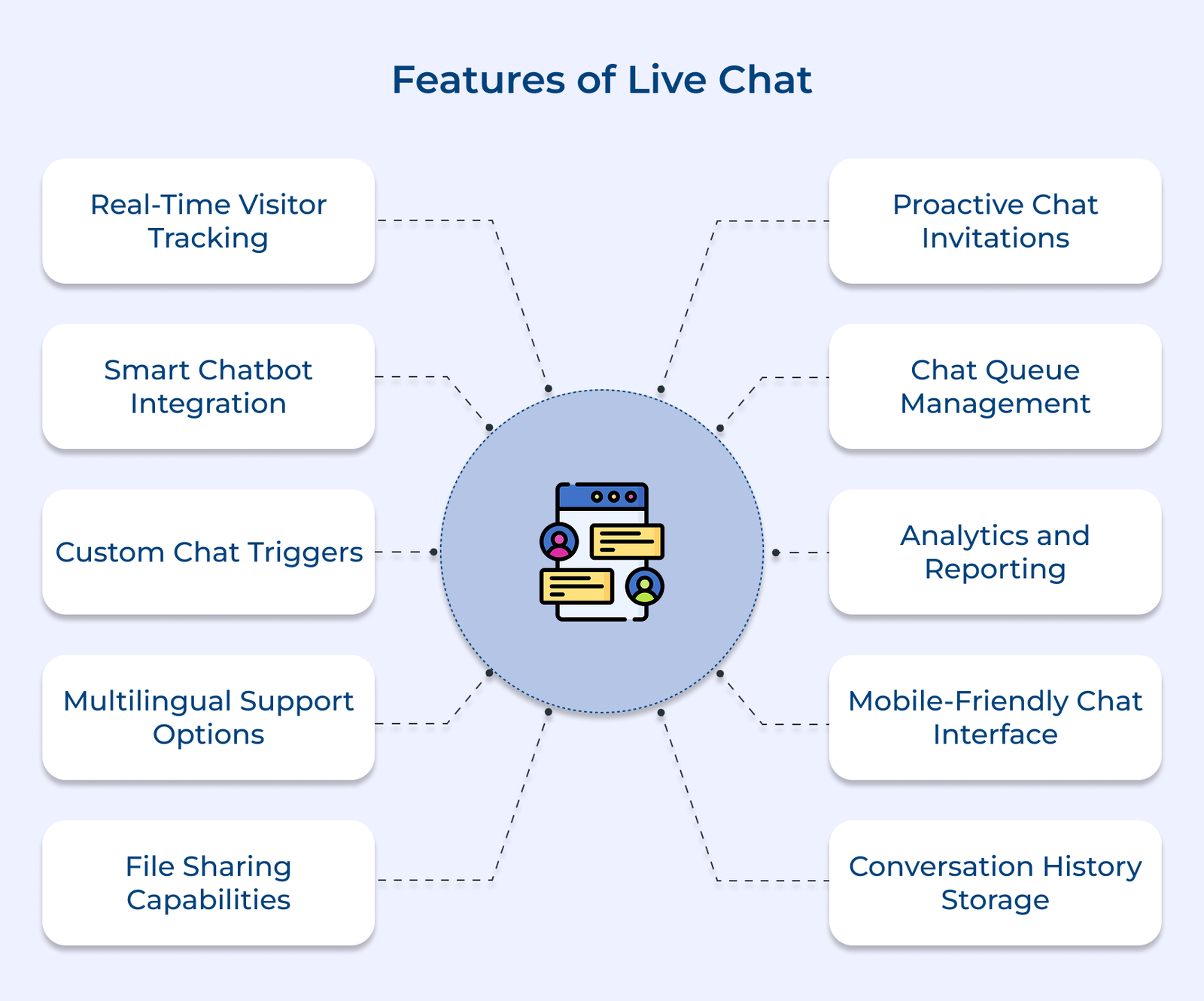
1. Real-time Visitor Tracking
Real-time visitor tracking is key to delivering personalized experiences on websites. Businesses can offer contextual support, anticipate needs and make data-driven decisions to boost engagement. Support teams can proactively address potential issues, ensuring a smoother customer journey. Advanced tracking systems can detect mouse movements and scroll depth to understand content engagement levels.
Tracking browsing patterns reveals vital insights into user touchpoints, pain points and high-traffic areas, helping to optimize page layouts. Monitoring page visit duration shows which content resonates most, identifying areas for improvement or additional resources.
Actionable tips:
- Implement event tracking for key actions like form fills and button clicks to map the entire customer journey.
- Set automated triggers based on time spent on pages to offer timely, relevant assistance.
2. Smart Chatbot Integration
Smart chatbot integration transforms customer support by providing instant responses and easing the workload on human agents. Using AI, modern chatbots understand customer intent and deliver relevant responses, enabling businesses to scale support without sacrificing response times.
When complex issues arise, chatbots smoothly transfer conversations to human agents along with key customer information, maintaining context and satisfaction. The integration provides 24/7 support for simple inquiries, while human agents manage more intricate issues during business hours.
Pro tips:
- Train chatbots on common FAQs and customer scenarios to enhance response accuracy.
- Set clear handover protocols to ensure seamless context sharing between bots and agents.
3. Custom Chat Triggers
Custom chat triggers boost proactive engagement by starting conversations at the right moments. The strategic prompts help businesses capture visitor attention and provide timely assistance, reducing the support team’s workload.
Behavior-based triggers monitor actions like cart abandonment or repeated page visits to initiate relevant conversations. Custom rules can be set for behaviors such as multiple product views or hesitation at checkout. Time-based notifications and exit-intent targeting further enhance engagement, with messages timed to visitor activity or aimed at preventing abandonment when users are about to leave.
Best practices:
- Set triggers for high-value pages, like pricing and checkout, to improve conversion rates.
- Experiment with trigger timing and messaging to find the most effective engagement points.
4. Multilingual Support Options
Multilingual support breaks down language barriers, expanding global reach and enhancing customer trust. Multilingual content has a 2x higher share rate, enhancing brand visibility and engagement. Businesses can improve satisfaction without needing separate support teams for each language by offering communication in customers’ preferred languages.
Automatic language detection uses browser settings and location to adjust chat interfaces, ensuring visitors receive relevant greetings without manual input. Real-time translation and language-specific routing work together to provide smooth, efficient support, translating messages while maintaining the conversation flow.
Actionable tips:
- Keep translation databases updated with common phrases and responses.
- Train agents in cultural sensitivity alongside language skills for effective communication.
5. File Sharing Capabilities
File-sharing enhances communication by enabling quick exchange of important documents and visuals, keeping all interactions in one place. It streamlines support, reduces resolution times and boosts customer satisfaction through clear, visual communication. Secure document exchange ensures sensitive information is protected with encryption and verification protocols.
Customers can easily share screenshots or verification documents with support for multiple formats and image uploads. The system automatically optimizes file sizes and formats for fast loading while preserving quality.
Actionable tips:
- Set clear file size and format guidelines to prevent upload issues.
- Implement preview features for common file types to enhance user experience.
6. Proactive Chat Invitations
Proactive chat invitations enhance meaningful engagement by reaching out to customers before issues arise. The feature shows attentiveness, offering assistance during their website journey and boosting conversion rates. Customizable welcome messages set the tone for positive interactions based on visitor context.
Smart timing algorithms work with targeted engagement rules to optimize invitation effectiveness. The system analyzes visitor behavior patterns to determine the ideal timing for chat invitations. Rules can be set based on factors like scroll depth or time spent on specific pages.
Pro tips:
- Craft tailored invitation messages for new vs returning visitors.
- Monitor invitation acceptance rates to fine-tune timing and messaging.
7. Chat Queue Management
Chat queue management streamlines the distribution of customer inquiries, ensuring smooth operation even during peak times and preventing agent overload. It reduces customer frustration and maintains service quality during high-traffic periods. Priority-based routing directs chats to the right agents based on urgency, complexity and other factors.
Wait time estimates provide transparency, setting clear expectations for customers. The system calculates approximate response times based on queue length and agent availability, with regular updates keeping customers informed.
Actionable tips:
- Set maximum chat limits for agents to maintain service quality.
- Use automated messages to keep customers engaged while waiting in queue.
8. Analytics and Reporting
Analytics and reporting are essential for continuous improvement in customer service. Businesses can identify trends, optimize resources and enhance service quality by regularly monitoring key metrics. Tracking conversation metrics, such as chat duration and resolution rates, offers insights into performance indicators like first response time.
The data helps uncover bottlenecks and opportunities for process improvement. Agent performance, combined with customer feedback, provides a complete view of service quality. Monitoring individual metrics and analyzing feedback helps identify areas for training.
Pro tips:
- Schedule weekly reviews of key metrics to pinpoint improvement areas.
- Set benchmarks for different inquiry types to establish realistic goals.
9. Mobile-friendly Chat Interface
Mobile-friendly chat interfaces cater to the growing number of customers seeking support via smartphones and tablets, ensuring consistent service quality across all devices without sacrificing functionality. Responsive design adapts to various screen sizes, providing a professional look and easy access to support on smaller screens.
Quick response templates streamline communication on mobile devices. Agents can access pre-written replies for common queries with minimal typing. The system optimizes template display for mobile screens while maintaining professional communication standards.
Actionable tips:
- Regularly test the chat interface on different mobile devices and screen sizes.
- Create mobile-specific templates with concise, clear messaging.
10. Conversation History Storage
Conversation history storage enhances customer service by providing personalized support and continuity. Agents can reference past interactions to offer tailored service, while stored conversations serve as valuable training resources and help identify recurring customer concerns.
Searchable chat archives enable quick access to past conversations, allowing agents to retrieve details without asking customers to repeat themselves. The system organizes records with easy filtering for efficient information retrieval. A customer interaction timeline offers context, allowing agents to track past issues and resolutions, ensuring smooth handling of follow-up questions or recurring problems.
Best practices:
- Regularly maintain archives to optimize storage efficiency.
- Implement standardized tagging for easy conversation categorization of conversations.
11. Co-browsing
Co-browsing transforms customer support by allowing agents to see and interact with customers’ screens in real-time. The feature lets support teams guide customers through complex tasks, troubleshoot issues and offer instant visual assistance without needing extra software. Agents can highlight screen elements, point out relevant details and walk customers through forms or procedures, reducing confusion that often occurs in text-only chats.
Security protocols ensure sensitive information is protected during co-browsing. Agents can only view specific webpage content, while personal data and payment details remain hidden, ensuring a secure support experience.
Actionable tips:
- Train agents to request co-browsing for complex navigation or form issues.
- Clear visual indicators show customers what elements agents can and can’t see during co-browsing.
Advanced Live Chat Features For Better CX
Following are the advanced live chat features that can significantly boost customer engagement, streamline support processes and enhance the user experience.