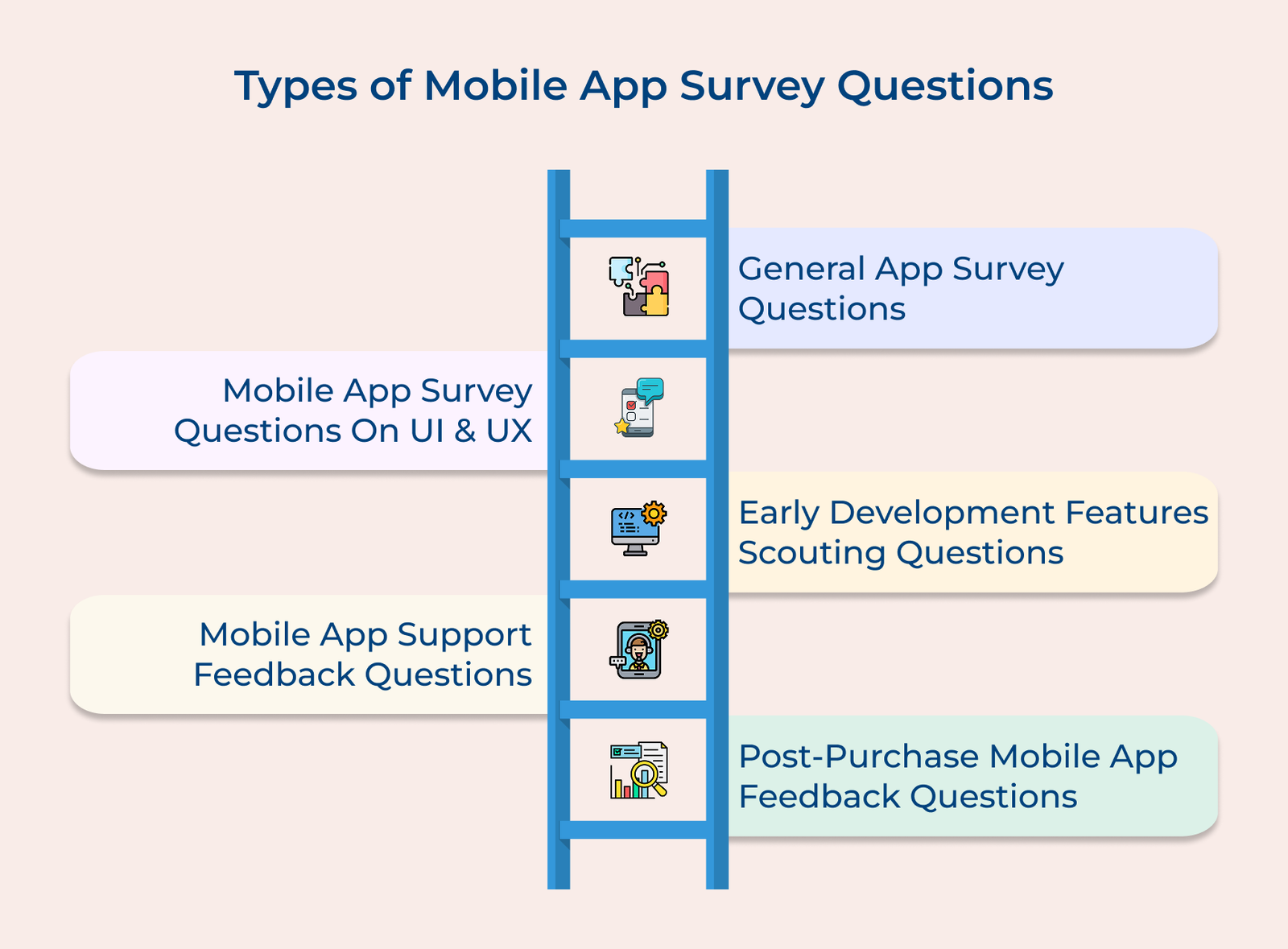
General Mobile App Survey Questions
The questions gather key insights into user preferences and behavior. It will give you a foundational understanding of how users interact with your app and what drives their usage patterns.
1. “What motivated you to download our app?”
The question offers valuable insights into user motivations and expectations. Understanding what draws users to your app helps align marketing strategies and feature development with user needs. Teams can use the data to improve app store descriptions and marketing materials.
2. “How often do you use our app? (Daily/Weekly/Monthly/Rarely)”
Frequency of use reveals user engagement and app stickiness. The metric helps teams identify patterns and segment users for targeted improvements. Regular users may have different needs than occasional ones, guiding feature prioritization.
3. “What features would make you use our app more frequently?”
You can learn about the opportunities to boost user engagement by revealing specific needs or desires that could drive more app usage. Product teams can use the insights to shape feature roadmaps and prioritize development.
4. “Would you recommend our app to others? (Yes/No/Maybe)”
The question quickly gauges user satisfaction and advocacy. High recommendation rates signal a strong product-market fit, while low rates highlight areas for improvement. Teams can follow up with detractors to address pain points.
Mobile App Survey Questions On Ui And Ux
The following questions for mobile application surveys focus on your app’s visual and interactive elements. It helps identify usability issues, design preferences and navigation challenges that users face.
5. “What aspects of our app’s design do you find most confusing?”
The feedback highlights UI/UX pain points, allowing design teams to address issues and improve overall user experience. It often encounters problems that internal testing may overlook.
6. “How would you rate the ease of navigation? (1-5 scale)”
Quantifiable feedback on navigation tracks UX improvements over time, allowing teams to benchmark against past versions and industry standards. Low scores signal the need for immediate adjustments to the navigation structure.
7. “Which features do you find difficult to locate in our app?”
The question highlights issues with information architecture and discoverability. Understanding what users struggle to find helps optimize menu structure, feature placement and informs decisions on interface organization.
8. “Is the text size comfortable for reading? (Yes/No)”
Businesses can learn about their accessibility concerns, ensuring text readability for better user comfort and engagement through this question. Teams can use the feedback to adjust default text sizes and offer customization options.
Early Development Features Scouting Mobile App Survey Questions
The questions assess user interest in potential new features, providing insights for product roadmap planning and feature prioritization before investing significant resources.
9. “What additional features would make our app more valuable to you?”
Businesses become familiar with the unmet user needs and desired features, allowing development teams to align their roadmap with user demands. It often reveals innovative ideas that internal teams may have overlooked.
10. “Would you be interested in [proposed feature]? (Yes/No/Maybe)”
The question provides clear metrics on interest in planned features, helping product managers prioritize development resources. High interest justifies immediate development, while low interest suggests reconsideration.
11. “How would [proposed feature] help you achieve your goals?”
The query reveals the practical value users place on potential features, helping refine specifications and implementation plans. It provides context for how users envision integrating new features into their workflow.
Mobile App Survey Questions To Rate The App
The questions gather overall satisfaction metrics and ratings for various app aspects, providing quantifiable data to track improvements.
12. “What do you like most about our app compared to alternatives?”
The question highlights key differentiators and competitive advantages from the user perspective, giving marketing teams valuable insights for positioning. It reveals the features that matter most to users.
13. “How would you rate your overall experience? (1-5 stars)”
The query offers a quick snapshot of user satisfaction, allowing teams to track improvements over time. It serves as a key performance indicator for app quality.
14. “Would you rate our app in the app store? (Yes/No)”
The question helps identify potential brand advocates and rating opportunities. High willingness signals strong user satisfaction, allowing teams to encourage more app store ratings.
Mobile App Survey Support Feedback Questions
The questions assess the effectiveness of support systems, highlighting areas where users may need more assistance or documentation.
15. “What challenges have you faced when seeking help in our app?”
The question highlights gaps in support documentation and features, enabling support teams to improve resources. It also helps identify common pain points in the support process.
16. “Was our help documentation useful? (Yes/No)”
Companies can measure the effectiveness of support materials through this question. It will help your content teams improve documentation quality. Low satisfaction rates signal the need for content revisions.
17. “How can we make our support resources more helpful?”
The query offers specific suggestions for improving support systems, allowing teams to enhance user assistance features and prioritize system improvements.
18. “How satisfied were you with our response time? (1-5 scale)”
The question measures support team performance, helping sales leaders optimize scheduling and resources while maintaining service level standards.
Post-Purchase Mobile App Survey Feedback Questions
The questions evaluate the entire purchasing journey, identifying friction points in the checkout process and capturing immediate post-transaction satisfaction.
19. “Please describe your experience with our checkout process today.”
The question invites users to share detailed feedback on their purchase journey, capturing specific challenges or positive aspects while the experience is fresh. Product teams can use the insights to streamline checkout and reduce abandonment rates.
20. “Was the payment process easy to complete? (Yes/No)”
The question directly measures payment system efficiency. A high rate of negative responses alerts teams to potential technical or UI issues in the payment flow, serving as an early warning for critical checkout processes.
21. “What could we have done to make your purchase experience better?”
The question invites constructive suggestions to improve the purchase flow. Users often share practical insights on desired features, helping development teams prioritize updates that enhance the buying experience and boost conversion rates.
22. “Did you find all the product information you needed before making your purchase? (Yes/No/Partially)”
Businesses can use this question to evaluate the completeness and clarity of product information in the app. Marketing and content teams can use the feedback to improve descriptions, reducing potential returns by ensuring customers have all the necessary details.
Customer Success Mobile App Survey Questions
The questions assess how effectively users are achieving their goals with your app, highlighting opportunities to enhance their overall success and experience.
23. “Have you achieved your primary goal using our app? (Yes/No)”
The question measures how well the app meets user objectives, helping success teams identify users who need extra support and track app effectiveness.
24. “What obstacles prevent you from achieving your goals?”
The question identifies barriers to user success, allowing product teams to prioritize updates or support that remove obstacles and directly enhance the user experience.
25. “How confident are you in using our app’s features? (1-5 scale)”
The query measures user comfort and proficiency with the app. Training teams can identify areas for additional guidance and optimize onboarding resources.
Best Practices for Mobile App Surveys
Check out seven best practices that will elevate your mobile application surveys and unlock the information you truly need.